# Introduction (Reference: https://docs.iqra.bot/intro)
What is Iqra AI? [#what-is-iqra-ai]
**Iqra AI** is an open-source orchestration platform designed to build, deploy, and manage intelligent Conversational Agents. Created by [Badal Technologies](https://www.badal.om) in the Sultanate of Oman, it serves as the operating system for the next generation of AI applications.
Unlike simple wrappers that treat AI as a chatbot, Iqra AI is a **Hybrid Computing Engine**. It allows you to harness the dynamic, human-like understanding of LLMs while enforcing the strict, deterministic reliability of code through our **Visual Script Builder** with **FlowApp** and **Action Flow** systems.
We enable you to build "Superhuman Employees"—agents that can think dynamically to understand a customer, but act systematically to update your database, process payments, or book appointments without error.
Iqra AI is open-source at heart! The complete technical stack (Frontend, Backend, Proxy, Workers) is available on [GitHub](https://github.com/abdofallah/IqraAI).
Core Philosophies [#core-philosophies]
We built Iqra AI to solve the "Enterprise AI Gap": balancing the need for creative intelligence with the requirement for data control and business logic.
} title="Hybrid Orchestration" href="/intro/philosophy">
**Probabilistic + Deterministic.** The AI handles the conversation flow, but **Action Flows** and **FlowApps** handle the business logic. This ensures your agent never "hallucinates" a bank transfer or a calendar booking.
} title="Multi-Channel Native" href="/build/campaigns">
**Build once, deploy everywhere.** Orchestrate conversations across **Telephony** (PSTN/SIP), **Web** (Real-time WebRTC), and **Chat** interfaces using a single logic graph.
} title="Latency & Region Control" href="/intro/concepts#multi-region">
**Master the Speed of Light.** We provide deep infrastructure control, allowing you to route calls and process inference in specific geographic regions (Edge Computing) to achieve \<1s voice latency.
} title="Native Polyglot" href="/intro/concepts#multi-language">
**Localization over Translation.** Define specific prompts, logic, and integrations for each language (e.g., English & Arabic) to ensure cultural nuance and grammatical accuracy.
Editions [#editions]
Iqra AI is available in two forms. We believe in transparency—you should own your infrastructure.
Iqra Cloud (SaaS) [#iqra-cloud-saas]
The fully managed, production-ready platform hosted at [app.iqra.bot](https://app.iqra.bot).
* **Agency Management:** Built-in Whitelabeling, Customer Management, and Custom Domains.
* **Billing Engine:** Automated credit management, subscription plans, and payment gateways.
* **Managed Infrastructure:** Zero DevOps. We handle the Servers, GPUs, scaling, and upgrades.
Get Started with Cloud
Open Source (Self-Hosted) [#open-source-self-hosted]
The complete technology stack available for developers and enterprises with data sovereignty requirements.
* **The Full Engine:** Includes the **Frontend** (Dashboard), **Backend** (Audio/Logic Processor), **Proxy** (Telephony Gateway), and **Background Workers**.
* **Exclusions:** Does *not* include the Multi-Tenant SaaS Billing system or Whitelabel management tools.
Want to run Iqra on your own servers? Check out the [Self-Hosting Guide](/developers/self-hosting) or learn how to contribute new plugins in the [FlowApp Ecosystem](/developers/flowapp).
Getting Started [#getting-started]
Ready to build the future?
} title="Architecture" href="/intro/architecture">
Understand the distributed cluster: Frontend, Backend, Proxy, and Background services.
} title="Quick Start" href="/intro/quick-start">
Jump straight into the Visual Builder and launch your first agent.
# Architecture (Reference: https://docs.iqra.bot/intro/architecture)
Iqra AI follows a hierarchical structure designed to support individual developers, agencies, and large enterprises simultaneously.
The platform is divided into two distinct layers:
1. **The Management Layer:** Handles Billing, Tenancy, and Whitelabeling (Cloud Only).
2. **The Operational Layer:** Handles the actual AI Agents, Logic, and Routing (Open Source Core).
Ecosystem Map [#ecosystem-map]
This diagram illustrates how the **Agency Owner** controls the platform and how **Customers** access their assigned workspaces.
1. The Master User [#1-the-master-user]
**The Administrator Level**
When you sign up for Iqra AI, you create a **User** account. This is the top-level entity responsible for the "financial" and "administrative" health of the account.
} title="Business Management" href="/platform/businesses">
Create, delete, and manage multiple **Workspaces**. Each business is an isolated container for your agents and data.
} title="Billing & Usage" href="/platform/billing">
**(Cloud Only)** Manage your credit balance, payment methods, and view aggregated usage costs across all your businesses.
} title="Whitelabeling" href="/platform/whitelabel">
**(Cloud Only)** The Agency Engine. Configure custom domains, branding, subscription plans, and manage your own customers.
2. The Business (Workspace) [#2-the-business-workspace]
**The Operational Level**
A **Business** is where the work happens. It is a strictly isolated container for your AI logic. An Agent in *Workspace A* cannot access a Phone Number or Knowledge Base in *Workspace B*.
} title="Agents" href="/build/agent">
**The Persona.** Define the voice, personality, interruption handling, and language settings.
} title="Scripts & Logic" href="/build/script">
**The Brain.** Use the Visual Builder to create conversation flows, **Action Flows**, and manage **Script Variables**.
} title="Routing & Campaigns" href="/build/campaigns">
**The Connection.** Connect Agents to the world via **Telephony** (Inbound/Outbound) or **Web** (Real-time Socket).
} title="Tools & FlowApps" href="/build/tools">
**The Capabilities.** Connect your agent to external systems (CRMs, Calendars) using our plugin system.
} title="Data & Knowledge" href="/build/knowledge">
**The Memory.** Manage RAG Knowledge Bases, Semantic Caching, and Business Context.
3. The Agency Model (Whitelabeling) (Cloud Only Feature) [#3-the-agency-model-whitelabeling-cloud-only-feature]
For Agencies, the hierarchy extends one step further. You act as the **Platform Owner**.
1. **You (The Agency):** Own the Iqra account, pay for usage, and set the pricing plans.
2. **Your Customer:** Logs into *your* domain (e.g., `app.agency.com`). They only see the **Business Workspace** you have assigned to them.
3. **Plan (Limits):** You can define a subscription plan for your customer to limit their use of features.
4. **Permissions:** You can restrict what the customer sees (e.g., allow them to view Conversations but not edit Scripts).
Deep dive into the Agency features in the [Whitelabeling Guide](/platform/whitelabel).
# Philosophy (Reference: https://docs.iqra.bot/intro/philosophy)
Software development has historically been **Static**. Developers wrote rigid `if/else` statements to define exactly how a user flows through a system. It was safe, but brittle.
The arrival of Generative AI introduced **Dynamic** computing. LLMs can handle infinite variations of user input. However, they are probabilistic—they can hallucinate, break rules, and leak data. They are powerful, but chaotic.
The Hybrid Approach [#the-hybrid-approach]
Iqra AI is built on a specific philosophy: **Probabilistic Intent driving Deterministic Action.**
We believe the future of software is not "Pure Code" nor "Pure AI", but a hybrid architecture that leverages the strengths of both.
The River and The Dam [#the-river-and-the-dam]
Think of user interaction as a river.
1. **The River (AI):** We let the AI flow naturally. It handles the nuances of language, dialect, and intent. We do not force the user into a rigid IVR menu.
2. **The Dam (Control Layer):** To generate value, that energy must be channeled. We place strict, deterministic gates—**Action Flows** and **FlowApps** through **Visual Script Builder**—that the AI must pass through to execute tasks.
This architecture ensures that while the *conversation* is dynamic, the *business outcome* (e.g., booking a database slot, processing a payment) is 100% reliable.
Core Pillars [#core-pillars]
} title="AI-First Routing">
The Agent is not just a script reader; it is a **Router**. It assesses the state of the conversation and decides which tool or flow to trigger next, breaking free from linear "Decision Trees."
} title="Deterministic Sub-routines">
Business logic cannot be "hallucinated." When the AI decides to "Calculate Loan Interest," it hands off control to a **FlowApp**—a strict code block that executes the math precisely and returns the result.
} title="The Clean Room">
We believe AI should never touch sensitive secrets. Our **Secure Session** architecture creates a wall between the LLM and your PII/PCI data, ensuring compliance without sacrificing intelligence.
Democratized Engineering [#democratized-engineering]
Finally, we believe that building this "Superhuman Employee" shouldn't require a team of backend engineers. By visualizing this complex architecture in a **Low-Code Builder**, we empower domain experts to build systems that previously required millions of dollars in R\&D.
# Core Concepts (Reference: https://docs.iqra.bot/intro/concepts)
To build on Iqra AI, you need to understand the relationship between the "Persona" (Agent) and the "Logic" (Script), as well as the building blocks available to you.
Agents vs. Scripts [#agents-vs-scripts]
**Separating Personality from Logic**
Iqra AI decouples the "Who" from the "What."
1. **The Agent (The Persona):** Defines the Voice, Tone, Language, and Interruption behavior.
2. **The Script (The Logic):** A visual graph that defines the capabilities, tools, and conversation flow.
*Benefit:* You can have one "Sales Script" used by 50 different Agents (with different voices/accents) simultaneously.
Script Components [#script-components]
The Script is more than just a conversation tree; it is a full orchestration map.
} title="Variables (State)" href="/build/script/variables">
**Memory.** Store data (e.g., `user_name`, `booking_count`) during the conversation.
* **Visible:** Data the AI can see and use.
* **Hidden:** Secure flags used for internal logic only.
} title="FlowApps (Plugins)" href="/build/script/flowapps">
**Integrations.** Pre-built connections to external apps (Cal.com, HubSpot). Unlike generic API nodes, these provide a rich UI with dynamic dropdowns and validation.
} title="Action Flows" href="/build/script/action-flows">
**Logic Engine.** A group of nodes that execute deterministic logic. When the AI enters an Action Flow, it follows a strict path (If/Else, Loops) until completion.
} title="Secure Sessions" href="/build/script/secure-sessions">
**Security.** A "Clean Room" mode where the AI is muted. The system takes control to collect PII/PCI data (Credit Cards, SSNs) via DTMF/Voice, ensuring the LLM never sees the secrets.
} title="System Capabilities" href="/build/script/nodes">
**Native Tools.** Built-in platform capabilities available in the graph:
* **Telephony:** Get DTMF Input, Transfer Call, End Call.
* **Messaging:** Send SMS.
* **Context:** Retrieve Business Data (Products/Services).
* **Control:** Change Language, Go To Node.
Native Multi-Language [#native-multi-language]
**Localization over Translation**
Iqra AI is built to be Polyglot. We do not rely on fragile real-time translation layers. You define specific prompts, responses, and logic for each language (e.g., English & Arabic) within the same agent.
Whenever you see the **Globe/Language Icon** next to an input field (like "Prompt" or "AI Response"), it means you must provide content for **every language** enabled in your Business Settings.
Latency & Regions [#latency--regions]
**Mastering the Speed of Light**
Voice AI requires sub-second responses. To achieve this, physical distance matters.
* **Multi-Region Strategy:** You can route a EU Phone Number to be processed by our EU Servers using AI Providers hosted in the EU.
* **Edge Computing:** By processing the "Brain" close to the "User," we eliminate trans-continental lag.
Templating (Scriban) [#templating-scriban]
**Dynamic Data Injection**
We use the **Scriban** engine to inject variables into your prompts, SMS messages, and API payloads.
* **Syntax:** `{{ variable_name }}`
* **Example:** `Hello {{ contact.first_name }}, your code is {{ session.otp }}.`
Look for the **Braces Icon** in input labels. This indicates that the field supports dynamic templating. Typing `{{` in these fields will trigger an autocomplete menu.
[Read the Templating Guide](/build/script/templating)
# The Foundation (Reference: https://docs.iqra.bot/intro/quick-start)
Before you can make a phone call or deploy a web agent, you need to build the **Core Intelligence**. This guide covers setting up the "Brain" (AI Models), the "Persona" (Agent), and the "Logic" (Script).
Prerequisites [#prerequisites]
To complete this tutorial, ensure you have API keys for your preferred AI providers:
* **LLM (Brain):** GroqCloud, Anthropic Claude, OpenAI, Google Gemini.
* **TTS (Voice):** ElevenLabs, Deepgram, Azure Speech.
* **STT (Ears):** Deepgram, Azure Speech.
If you are **Self-Hosting**, ensure you have registered these providers in the [Admin Dashboard](/developers/admin/services) first. If you are using **Iqra Cloud**, they are pre-configured; you just need your API keys.
***
Create a Business Workspace [#create-a-business-workspace]
Everything in Iqra AI happens inside a **Business** container.
1. Navigate to the **Businesses Tab** in your User Dashboard.
2. Click **Add Business**.
3. Give it a name (e.g., "My First Agency") and upload a logo if desired.
4. Click on the newly created business card to enter the **Business Dashboard**.
Learn more about managing workspaces and team isolation in the **[Business Management](/platform/businesses)** guide.
Connect AI Integrations [#connect-ai-integrations]
Give your business the resources it needs to think, hear, and speak.
1. Go to the **Integrations Tab** in the Business Dashboard.
2. **Add LLM:** Click *Add Integration* → Select **GroqCloud** → Paste your API Key.
3. **Add STT:** Click *Add Integration* → Select **Azure Speech** → Paste your API Key.
4. **Add TTS:** Click *Add Integration* → Select **ElevenLabs** → Paste your API Key.
Need help finding your keys? Check our specific guides for **[Azure](/integrations/providers/azure)**, **[OpenAI](/integrations/providers/openai)**, and **[ElevenLabs](/integrations/providers/elevenlabs)**.
Create the Agent (The Persona) [#create-the-agent-the-persona]
Define *who* is speaking.
1. Go to the **Agents Tab**.
2. Click **Add Agent**.
3. **General:** Name it "Iqra".
4. **Personality:** Enter a instruction prompt: *"You are a helpful receptionist for a dental clinic. Be polite and concise."*
5. **Intelligence:** Select the integrations you added in Step 2.
6. **Utterances:** Set **Agent Speaks First** to `ON` with greeting: *"Hello! Thanks for calling Medina Dental. How can I help you?"*
7. Save the Agent.
The **[Agent engine](/build/agent)** is powerful. Learn how to configure **[Interruption Logic](/build/agent/interruption)** (VAD/Barge-in) and **[Caching](/build/agent/caching)** support.
Create the Script (The Logic) [#create-the-script-the-logic]
Define *what* happens.
1. Go to the **Scripts Tab**.
2. Click **Add Script**.
3. **The Visual Builder:** You will see a `Start Node`.
4. **Drag & Drop:**
* Drag a **User Query** node from the sidebar. Connect it to Start.
* Drag an **AI Response** node. Connect it to User Query.
5. **Save** the Script.
Master the **[visual builder](/build/script)**. Learn about **[Script Nodes](/build/script/nodes)**, injecting variables with **[Templating](/build/script/templating)**, and using **[FlowApps](/build/script/flowapps)** for external tools.
Deploy Your Agent [#deploy-your-agent]
Your "Iqra" agent is now alive, but she has no way to talk to the world. Choose a channel to deploy her.
} title="Make a Phone Call" href="/intro/quick-start/outbound">
**Outbound Telephony.** Connect a Twilio/Telnyx/SIP number and trigger a call to your own phone.
} title="Receive Phone Calls" href="/intro/quick-start/inbound">
**Inbound Telephony.** Connect a Twilio/Telnyx/SIP number and have the agent pick up incoming calls.
} title="Web Agent" href="/intro/quick-start/web">
**Real-time Web.** Create a high-fidelity web session and test it in your browser using our Client SDK.
# Make a Phone Call (Reference: https://docs.iqra.bot/intro/quick-start/outbound)
Now that you have an [Agent and Script](/intro/quick-start), let's give it a voice on the telephone network.
Iqra AI uses a **BYOC (Bring Your Own Carrier)** model. You connect your own Twilio, Telnyx, or SIP account. This gives you full control over your phone numbers and billing rates.
Prerequisites [#prerequisites]
* A **Twilio** or **Telnyx** account with a purchased phone number.
* **Account SID** and **Auth Token** (or API Key) from your carrier.
***
Connect Telephony Integration [#connect-telephony-integration]
1. Navigate to **Business Dashboard** → **Integrations**.
2. Click **Add Integration** → Select **Twilio** (or your preferred provider).
3. Enter your **Account SID** and **Auth Token**.
4. **Default Number:** (Optional) Select a number to use as default.
5. Click **Save**.
Using a different carrier? Check our specific guides for **[Twilio](/integrations/telephony/twilio)**, **[Telnyx](/integrations/telephony/telnyx)**, or generic **[SIP Trunking](/integrations/telephony/sip-trunking)**.
Add Phone Number & Region [#add-phone-number--region]
We need to register the number in Iqra AI to handle routing.
1. Go to the **Numbers Tab**.
2. Click **Add Number**.
3. **Provider:** Select the integration you just added.
4. **Number:** Enter the number in **E.164 format** (e.g., `+1234567890`).
5. **Route Server (Critical):** Select the region closest to where this number is based (e.g., `US-East` for a US number).
Understanding latency is crucial. Read about our **[Multi-Region Architecture](/intro/concepts#latency-and-regions)** to optimize your voice delay.
Create Outbound Campaign [#create-outbound-campaign]
A "Campaign" links your Agent to a phone number strategy.
1. Go to **Routing** → **Outbound Campaigns**.
2. Click **Add Campaign**.
3. **Agent:** Select the "Iqra" agent you created.
4. **Script:** Select your script.
5. **Number Strategy:** Select your Twilio integration.
6. **Voicemail Detection:** Leave as default (Enabled) for now.
7. Save the Campaign.
**[Outbound campaigns](/build/campaigns/outbound)** are powerful. Learn how to configure **[Voicemail Detection (AMD)](/build/campaigns/outbound#voicemail-detection)** and **[Retry Logic](/build/campaigns/outbound#retry-logic)** for busy signals.
Launch the Call [#launch-the-call]
The moment of truth.
1. Click the **Make Calls** button (Top Right or Sidebar).
2. Select **Single Call**.
3. **Campaign:** Select the campaign you just created.
4. **To Number:** Enter your personal mobile number.
5. Click **Launch Call**.
**What happens next?**
1. Your phone will ring.
2. When you pick up, the AI will detect your voice (or silence).
3. It will speak the greeting defined in your Agent: *"Hello! Thanks for calling Medina Dental..."*
The **[Make Calls](/build/operations/manual-calls)** tool also supports **[Bulk CSV Uploads](/build/operations/manual-calls#bulk-calls-csv-upload)**. You can upload a spreadsheet of 10,000 leads, map columns to script variables (e.g. `{{ Name }}`), and launch a mass campaign instantly.
Troubleshooting [#troubleshooting]
* **Call Failed immediately?** Check the **Logs** tab. If the error is `Provider Error`, check your Twilio/Telnyx Geo-Permissions or credit balance.
* **Latency is high?** Check if your **Phone Number Region**, **Iqra Route Server**, and **AI Integrations (LLM/TTS)** are all in the same geographic region (e.g., all in US East).
# Receive Phone Calls (Reference: https://docs.iqra.bot/intro/quick-start/inbound)
Now that you have an [Agent and Script](/intro/quick-start), let's set up a digital receptionist.
**Inbound Routing** allows you to connect a phone number to an Agent. It also handles the initial handshake, such as asking the user for their preferred language ("Press 1 for English") before the AI takes over.
Prerequisites [#prerequisites]
* A **Twilio**, **Telnyx**, or **SIP** account with a purchased phone number.
* **Account SID** and **Auth Token** (or API Key).
***
Connect Telephony & Add Number [#connect-telephony--add-number]
If you haven't already connected your carrier:
1. Navigate to **Business Dashboard** → **Integrations**.
2. Add your **Twilio** or **Telnyx** integration.
3. Go to the **Numbers Tab** and click **Add Number**.
4. Enter your number in **E.164 format** (e.g., `+1234567890`) and select the **Route Server Region**.
For Inbound calls to work, your carrier must send the call to Iqra AI.
* **Twilio/Telnyx:** We attempt to auto-configure the webhook when you save the number.
* **SIP/Others:** You must manually copy the **Webhook URL** displayed in the Numbers list and paste it into your carrier's portal.
Trouble connecting? Read our detailed guide on **[Managing Phone Numbers](/build/campaigns/numbers)** and manual webhook setup.
Create Inbound Route [#create-inbound-route]
The "Route" is the logic that decides who picks up the phone.
1. Go to **Routing** → **Inbound Routing**.
2. Click **Add Route**.
3. **Number:** Select the phone number you added in Step 1.
4. **Agent:** Select your "Iqra" agent.
5. **Script:** Select your script.
**[Inbound Routes](/build/campaigns/inbound)** are powerful. You can configure **[Webhooks & Actions](/build/campaigns/inbound#actions)** to trigger external tools (like a CRM update) immediately when the phone rings or when the call ends.
Configure Language (IVR) [#configure-language-ivr]
Iqra AI features a built-in **Programmatic IVR**.
* **Single Language:** If you only enable "English", the Agent picks up immediately.
* **Multi-Language:** If you add "English" and "Arabic", the system automatically plays: *"Press 1 for English. Press 2 for Arabic."*
For this test, stick to **Single Language** (English) for the fastest pickup time.
The Test [#the-test]
1. Pick up your personal phone.
2. Dial the business number you configured.
3. **Ring... Ring...**
4. The system should answer, and your Agent should speak the greeting: *"Hello! Thanks for calling..."*
Real-time Monitoring [#real-time-monitoring]
While on the call, you can watch the "Brain" work in real-time.
1. Open the **Conversations Tab** in your dashboard.
2. You will see a row with status **Active**.
3. Click on it to see the live transcript as you speak.
Want to analyze the conversation after it ends? Check out **[History & Logs](/build/operations/history)** to listen to recordings and view debug traces.
Troubleshooting [#troubleshooting]
* **Busy Signal?** This usually means the **Webhook** failed.
* Check your Twilio/Telnyx console. Ensure the "Voice URL" is pointing to `https://.../webhooks/twilio`.
* Ensure you have credits in your Iqra AI account (if using Cloud).
* **Silence after pickup?** This is often a **Region Mismatch**. Ensure your Number, Route Server, and TTS Provider are in the same region (e.g., US-East).
# Web Agent (Reference: https://docs.iqra.bot/intro/quick-start/web)
Now that you have an [Agent and Script](/intro/quick-start), let's talk to it directly from your browser.
**Web Campaigns** use WebRTC/WebSockets instead of phone lines. This results in **HD Voice** quality and **Zero Telephony Costs**.
You **can** connect a browser directly to the Iqra Platform, but it is a security risk. For this tutorial, we use our **.NET Middleware** to act as a secure bridge, ensuring your API keys are never exposed to the public internet.
***
Create Web Campaign [#create-web-campaign]
First, generate the campaign configuration.
1. Navigate to **Routing** → **Web Campaigns** in the Business Dashboard.
2. Click **Add Campaign**.
3. **Name:** "Website Demo".
4. **Agent:** Select your "Iqra" agent.
5. **Script:** Select your script.
6. **Save** the Campaign.
Learn more about **[Web Campaign Configuration](/build/campaigns/web)**, including session timeouts and silence detection settings.
Get Campaign ID [#get-campaign-id]
Once saved, look for the **Campaign ID** in the list.
* Format: `camp_web_12345...`
* **Copy this string.** You will need it for the middleware configuration.
Generate API Key [#generate-api-key]
The middleware needs permission to talk to the Iqra AI Platform on your behalf.
1. Switch to the **User Dashboard** (click "Back to Dashboard" in the sidebar).
2. Go to the **API Keys** tab.
3. Click **Add API Key**.
4. **Name:** "Middleware Key".
5. **Scope:** You can restrict this key to *specific businesses* for security.
6. **Copy the Key** (starts with `iqra_sk_...`). You won't see it again.
Security matters. Read our guide on **[API Key Scoping](/platform/api-keys)** to understand how to lock down access.
Launch Middleware [#launch-middleware]
The middleware handles rate-limiting and authentication. For this quick start, we will run it locally.
**Prerequisites:** [Docker](https://www.docker.com/) installed.
Run the official image, pasting your **API Key** (Step 3) and **Campaign ID** (Step 2):
```bash
docker run -d -p 7157:80 \
-e VoiceAiPlatform__ApiSecretToken="PASTE_YOUR_API_KEY_HERE" \
-e VoiceAiPlatform__WebCampaignId="PASTE_YOUR_CAMPAIGN_ID_HERE" \
-e AllowedOrigins__0="http://localhost:3000" \
ghcr.io/abdofallah/iqra-middleware:latest
```
Your middleware is now running at `http://localhost:7157`.
This is a simplified setup. For production, check the **[.NET Middleware Guide](/developers/sdks/middleware)** to configure Redis queues, IP blocking, and SSL.
The Test (HTML Client) [#the-test-html-client]
Now, create the client that talks to your local middleware.
Create a file named `test.html` locally and paste the code below.
```html
Iqra AI Test
Web Agent Test
```
Building a React/Next.js app? Check out the full **[Web Widget SDK Documentation](/developers/sdks/web-widget)** for hooks and custom UI styling.
Run & Talk [#run--talk]
1. Open `test.html` in your browser.
2. Click **Start Call**.
3. Allow **Microphone Permissions**.
4. Speak to your agent!
# Platform Overview (Reference: https://docs.iqra.bot/platform)
The **User Dashboard** is the top-level management layer of Iqra AI. It is designed for the **Account Owner** or **Agency Administrator**.
Unlike the **[Business Dashboard](/build)** (which is for building agents), this dashboard focuses on **Governance**:
* **Who** has access? (Tenancy & Whitelabeling)
* **How much** are we spending? (Finance)
* **How** is the system performing globally? (Analytics)
Core Modules [#core-modules]
} title="Businesses" href="/platform/organization">
**Workspaces.** Create isolated containers for your projects or clients. Each business has its own agents, numbers, and data.
} title="Billing & Plans" href="/platform/billing">
**The Wallet.** Manage your credit balance, subscription plans, payment methods, and auto-refill settings.
} title="Usage Analytics" href="/platform/usage">
**The Ledger.** View aggregated cost reports, filter usage by business or feature, and audit transaction history.
} title="API Keys" href="/platform/api-keys">
**Access Control.** Generate secure tokens to control the platform programmatically. Support for Business-scoped keys.
} title="Whitelabeling" href="/platform/whitelabel">
**Agency Engine.** (Cloud Only) Rebrand the platform with your domain/logo and manage sub-customers.
The Hierarchy Strategy [#the-hierarchy-strategy]
Iqra AI uses a strictly hierarchical model to ensure data safety, easy billing management, and agency scalability.
Key Concepts [#key-concepts]
* **Global Billing:** You pay for *all* usage across your businesses from a single wallet. You do not need separate credit cards for every workspace.
* **Data Isolation:** While billing is shared, *data* is not. An API Key scoped to "Business A" cannot read the conversation logs of "Business B".
* **Whitelabeling (Agency Mode):** As a Master User, you can create "Customers." A Customer is a sub-user who can log in to a specific Business Workspace via your custom domain (e.g., `app.youragency.com`), seeing only what you permit.
To start building agents, click on any card in the **Businesses** tab to enter the Workspace context.
# Business Management (Reference: https://docs.iqra.bot/platform/organization)
In Iqra AI, a **Business** acts as a "Workspace" or "Project Container."
It is the fundamental unit of isolation. An Agent, Script, or Phone Number belongs to exactly **one** Business. This ensures that data, logs, and API keys never leak between different projects or clients.
The Businesses Tab [#the-businesses-tab]
Upon logging in to the [User Dashboard](/platform), you land on the **Businesses Tab**. This is your portfolio view.
* **Card View:** Displays all workspaces you own or have access to.
* **Search:** Quickly filter businesses (optimized for agencies managing 100+ clients).
* **Metadata:** See at a glance the active plan or status of the workspace.
Creating a Business [#creating-a-business]
Click "Add Business" [#click-add-business]
Located in the top right corner of the Businesses tab.
Configure Identity [#configure-identity]
* **Name:** The display name (e.g., "Medina Dental Clinic").
* **Logo:** (Optional but Recommended) Upload a brand icon.
Confirmation [#confirmation]
Once created, the new business card will appear in your list immediately.
Accessing the Workspace [#accessing-the-workspace]
To start building, you must enter the **Business Context**.
Simply **click on the Business Card**.
* **URL Change:** You will move from `/businesses` to `/business/{id}/overview`.
* **Sidebar Change:** The sidebar will switch from "Platform Management" (Billing, API Keys) to "Builder Tools" (Agents, Scripts, Routing).
Once inside a Business, you are ready to build. Check out the **[Build & Deploy](/build)** section to start creating:
* **[Agents](/build/agent):** Define the persona.
* **[Scripts](/build/script):** Build the logic graph.
* **[Routing](/build/campaigns):** Connect phone numbers.
Deleting a Business [#deleting-a-business]
You can delete a business from the card menu (`...` icon).
Deleting a business is **destructive**. It will permanently remove:
* All Agents, Scripts, and Flow configurations.
* All Conversation History, Recordings, and Logs.
* **Phone Numbers:** Connected numbers may be released or disconnected depending on the carrier integration.
# Billing & Plans (Reference: https://docs.iqra.bot/platform/billing)
Iqra AI operates on a **Hybrid Pricing Model** designed for flexibility. It combines the stability of a monthly subscription (for access and base limits) with the scalability of a pre-paid credit balance (for usage).
The Credit System [#the-credit-system]
Think of your account as a digital wallet. You maintain a **Credit Balance** which is used to pay for consumption.
Deduction Logic (Post-Call) [#deduction-logic-post-call]
Unlike prepaid phones that cut you off mid-sentence, Iqra AI prioritizes the customer experience.
1. **Usage Occurs:** A call is made, Conversation Minutes/Voicemail Detection/Etc are consumed.
2. **Calculation:** Once the session ends, the total cost is calculated based on your plan's unit price.
3. **Deduction:** The cost is deducted from your balance.
Because deductions happen *after* the activity finishes, it is possible for your balance to go **negative** (e.g., if a long call exceeds your remaining $1.00).
Services will be paused immediately after a negative balance is detected until you top up to a positive balance.
Subscription Components [#subscription-components]
Your Plan consists of two distinct types of charges.
1. Recurring Features (Rentals) [#1-recurring-features-rentals]
These are fixed monthly costs for assets you "hold".
* **Examples:** Phone Numbers, Whitelabel License, User Seats.
* **Billing:** Charged automatically to your default card on your monthly renewal date.
2. Usage-Based Features (Consumables) [#2-usage-based-features-consumables]
These are variable costs for activity (Minutes, Tokens, Storage).
* **Included Quota:** Most plans come with a "Free Allowance" (e.g., 500 Minutes). Usage is drawn from here first.
* **Pay-As-You-Go:** Once your included quota is exhausted, further usage is deducted from your **Credit Balance** at the unit price defined in your plan.
***
Payment Methods [#payment-methods]
We support major Credit and Debit cards (Visa, Mastercard, Amex).
Add a New Card [#add-a-new-card]
1. Navigate to **Billing** -> **Payment Methods**.
2. Click **Add Payment Method**.
3. Enter your card details securely.
Verification Charge [#verification-charge]
To ensure the card is valid, our payment processor initiates a small **Temporary Hold** (approx $1.00).
* **Note:** This is **not** a charge. It is immediately voided/refunded.
Set as Default [#set-as-default]
If you have multiple cards, you must mark one as **Default**. This card will be used for:
* Monthly Subscription Renewals.
* Auto-Refill triggers.
***
Auto-Refill [#auto-refill]
**Preventing Service Interruption**
To ensure your agents never go offline due to a low balance, we highly recommend configuring **Auto-Refill**.
1. Navigate to the **Billing Overview**.
2. Scroll to the **Auto-Refill** card.
3. **Threshold:** Set the trigger amount (e.g., *"If balance falls below $20"*).
4. **Top Up Amount:** Set the refill amount (e.g., *"Add $100"*).
5. Toggle the switch to **ON**.
***
Billing History & Invoices [#billing-history--invoices]
The **Billing History** tab provides a comprehensive audit trail of all financial transactions.
* **Statuses:**
* `Paid`: Successful transaction.
* `Failed`: Card declined or error.
* `Checkout`: A payment session was started but not completed.
* **Invoices:** Click on any `Paid` transaction to view details and download an official **PDF Receipt** for your accounting.
***
Support & FAQs [#support--faqs]
Iqra AI is built by **Badal Technologies**, based in the Sultanate of Oman. Our banking infrastructure processes payments in the local currency.
* **Display:** All dashboard pricing is shown in **USD** for clarity.
* **Processing:** The final charge is converted to OMR at a fixed, stable rate of **1 USD = 0.385 OMR**.
* Your bank handles the conversion back to your local currency on your statement.
**Yes.** We accept Credit and Debit cards from almost all countries globally via our secure payment gateway.
If you experienced a `Failed` transaction that appears on your bank statement, it is likely a "Pending Authorization" that will drop off within 3-5 business days.
If a `Paid` transaction is not reflected in your balance, please contact us immediately.
For refunds, disputes, or tax inquiries, please reach out to our finance team:
* **Email:** `billing@iqra.bot`
* **Support:** Get in touch with our team members through one of our communication channel (Discord etc.)
# Usage Analytics (Reference: https://docs.iqra.bot/platform/usage)
While the [Billing](/platform/billing) tab handles the money coming *in*, the **Usage Tab** tracks where the resources are going *out*.
This dashboard is your "Receipt." It provides granular transparency into every second of audio processed and every token generated.
Usage Overview [#usage-overview]
The **Overview Tab** provides high-level metrics for business owners.
* **Cost Analysis:** View your total spend over time (Daily/Monthly).
* **Volume Metrics:** Track total Calls, Minutes, and Request counts.
* **Grouping:** Break down costs by:
* **Day/Month:** Spot usage spikes.
* **Business:** Identify which Workspace/Client is consuming the most resources.
Use the **Group by Business** feature to determine the profitability of your agency clients. If "Client A" is costing $500 but paying you $300, you need to adjust their plan.
Usage History [#usage-history]
The **History Tab** is the detailed ledger. It records every single billable event in the system.
Understanding Line Items [#understanding-line-items]
Each row represents a specific consumption event.
| Column | Description |
| :----------- | :-------------------------------------------------------------------------------------------- |
| **Date** | Timestamp of the event. |
| **Business** | Which workspace generated this cost. |
| **Feature** | The resource used (e.g., `Conversation Minutes`, `Voicemail Detection`, `TTS Cache Queries`). |
| **Quantity** | The amount consumed (e.g., `5.2 Minutes`, `1 Detection`, `5 Cache Queries`). |
| **Cost** | The final amount deducted from your balance (or quota). |
Filtering [#filtering]
You can drill down into specific data points using the filter bar:
* **Date Range:** "Last 7 Days", "This Month", or Custom Range.
* **Business:** Isolate logs for a specific client workspace.
# API Keys (Reference: https://docs.iqra.bot/platform/api-keys)
Iqra AI provides a full REST API, allowing you to manage your businesses, trigger calls, and retrieve conversation history programmatically. **API Keys** are the credentials used to authenticate these requests.
Permission Scopes [#permission-scopes]
To ensure security, Iqra AI allows granular control over what an API key can do. Access is defined by two dimensions: **Business Scope** (Where it can act) and **User Management** (What it can change).
1. Business Scope [#1-business-scope]
Determines which workspaces the key can access.
| Scope | Description | Best For |
| :--------------- | :-------------------------------------------------------------- | :---------------------------------------------------------- |
| **Unrestricted** | Grants access to **all** businesses owned by your user account. | Global reporting scripts. |
| **Restricted** | Limits access to specific Business Workspaces only. | Production apps, client-side integrations, or team members. |
2. User Management Scope [#2-user-management-scope]
Determines if the key can access sensitive account-level data (Billing, Whitelabeling, User Profile).
* **Allow User Management Requests:** (Default: `Disabled`)
* **Enabled:** The key can access `/api/v1/user` endpoints.
**Least Privilege Principle:** Always keep `User Management` **Disabled** unless you are specifically building a dashboard to manage billing or whitelabeling.
For running agents or making calls, use a **Restricted Business Key** with **No User Management** access.
Managing API Keys [#managing-api-keys]
You can generate and revoke keys in the **API Keys Tab** of the User Dashboard.
Create New Key [#create-new-key]
Click the **"Add API Key"** button.
Configure Permissions [#configure-permissions]
1. **Name:** Give it a descriptive name (e.g., "Zapier Integration - Dental Clinic").
2. **Business Scope:** Choose "Unrestricted" or select specific Businesses.
3. **User Management:** Toggle **User Management Access** only if necessary.
Copy Key [#copy-key]
**Important:** The key is only shown *once* upon creation. Copy it immediately and store it securely (e.g., in your `.env` file). If you lose it, you will have to generate a new one.
Using the API [#using-the-api]
All API requests must be authenticated via the HTTP Header.
Endpoint & Reference [#endpoint--reference]
The base URL for the API is:
```bash
https://app.iqra.bot/api/v1
```
Want to see all available endpoints? Visit the interactive **[Developer API Reference](/api-reference)** to test requests directly in your browser.
Authentication Header [#authentication-header]
Pass your key in the `Authorization` header using the `Token` prefix.
```bash title="Example: Get User Profile"
curl -X GET https://app.iqra.bot/api/v1/user \
-H "Authorization: Token iqra_sk_12345abcdef" \
-H "Content-Type: application/json"
```
Never expose your API Key in client-side code (browsers, mobile apps). Always make API requests from your backend server or use our [Middleware](/developers/sdks/middleware).
# Whitelabel Overview (Reference: https://docs.iqra.bot/platform/whitelabel)
The **Whitelabeling System** transforms Iqra AI from a tool into a product you can sell. It allows Agencies and Enterprises to present the platform's capabilities to their own clients under a completely custom brand identity, domain, and pricing structure.
The Agency Dashboard [#the-agency-dashboard]
When you enter the **Whitelabel Tab**, you are presented with an executive overview of your agency's health.
* **MRR (Monthly Recurring Revenue):** Real-time tracking of revenue based on the Plans and Add-ons you have assigned to your customers.
* **Customer Health:** Graphs showing Active, New, and Cancelled customers over time.
* **Growth:** Date-filtered analytics to track your business expansion.
The Reseller Hierarchy [#the-reseller-hierarchy]
It is important to understand how your customers interact with the platform compared to how you interact with it.
1. **You (The Owner):** You have full access to the **User Dashboard**. You pay Iqra AI for usage.
2. **Your Customer:** They only have access to the **Business Dashboard**. They pay *you* (offline/externally) based on the plans you define.
3. **The Barrier:** Your customers **never** see Iqra AI branding, your billing details, or your other clients.
Whitelabel Modules [#whitelabel-modules]
To set up your agency, you will need to configure these four pillars:
} title="Branding" href="/platform/whitelabel/branding">
Visual identity. Upload your logo, favicon, and inject custom CSS to completely overhaul the look and feel.
} title="Domains & SSL" href="/platform/whitelabel/domains">
Technical setup. Configure CNAME records to point your custom domain (e.g., `agent.yourcompany.com`) to our infrastructure.
} title="Plans & Pricing" href="/platform/whitelabel/plans">
Define your economy. Create subscription tiers (e.g., "Gold Plan") with specific limits on minutes and concurrency.
} title="Customers" href="/platform/whitelabel/customers">
Manage your tenants. Create user accounts, assign them permissions, and link them to specific Business Workspaces.
# Branding (Reference: https://docs.iqra.bot/platform/whitelabel/branding)
The **Branding** module allows you to erase the "Iqra AI" identity and replace it with your own. You can control the platform name, logos, and even the fundamental color scheme via CSS.
Branding Levels [#branding-levels]
Iqra AI uses a cascading branding system.
1. **Platform Settings (Global):** These are the default settings applied to *all* your custom domains.
2. **Domain Overrides (Specific):** You can set specific branding for a specific domain (e.g., `agent.client-a.com`), which overrides the global settings.
If you are a single agency, just use **Platform Settings**. If you manage multiple distinct brands, use **Domain Overrides**.
Basic Configuration [#basic-configuration]
Navigate to **Whitelabel** -> **Platform Settings** (or Edit a specific Domain).
Platform Name [#platform-name]
The text that appears in the browser tab title and email notifications (e.g., "Medina AI Agent").
Visual Assets [#visual-assets]
Upload your assets to replace the default imagery.
| Asset | Recommended Format | Usage |
| :---------------- | :----------------------- | :---------------------------------------------------- |
| **Platform Logo** | SVG or PNG (Transparent) | Displayed on the login screen and top navigation bar. |
| **Platform Icon** | PNG or ICO (Square) | The **Favicon** displayed in the browser tab. |
Custom CSS (Advanced) [#custom-css-advanced]
For deep customization, Iqra AI allows you to inject raw CSS into the client portal. This gives you control over colors, fonts, border radius, and component visibility.
How to use [#how-to-use]
In the **Custom CSS** field, you can paste standard CSS code. This is loaded after the platform's default styles, allowing you to override them.
```css title="Example: Changing the Primary Color"
/* Change the primary brand color to Purple */
:root {
--primary: 120 100% 50%; /* HSL Format usually */
--ring: 120 100% 50%;
}
/* Make buttons rounded */
.button {
border-radius: 9999px;
}
/* Hide specific elements if needed */
.footer-links {
display: none;
}
```
Injecting incorrect CSS can break the layout of the dashboard for your customers. We recommend testing your CSS changes on a test account/domain before rolling them out to production.
Testing Your Brand [#testing-your-brand]
To see your changes in action:
1. Ensure you have a **Domain** configured and Active.
2. Open an Incognito/Private window.
3. Visit your custom domain (e.g., `https://agent.yourcompany.com`).
4. You should see your Logo on the login screen and your Favicon in the tab.
# Domains & SSL (Reference: https://docs.iqra.bot/platform/whitelabel/domains)
The **Domains** module is the backbone of the whitelabeling experience. It allows your customers to access their dashboard via your own URL (e.g., `agent.yourcompany.com`) rather than `iqra.bot`.
How it Works [#how-it-works]
When you add a custom domain, Iqra AI maps incoming traffic from that URL to your specific whitelabel settings.
1. **You** add the domain in the dashboard.
2. **You** configure your DNS provider (GoDaddy, Cloudflare, Namecheap, etc.).
3. **We** verify the connection and provision SSL certificates.
4. **Your Clients** log in securely via your domain.
***
Adding a Domain [#adding-a-domain]
Register the Domain [#register-the-domain]
Navigate to **Whitelabel** -> **Domains** and click **Add Domain**.
Enter Domain Name [#enter-domain-name]
Enter the full domain or subdomain you wish to use.
* **Subdomain (Recommended):** `app.agency.com`, `portal.agency.com`
* **Root Domain:** `agency-portal.com`
Do not include protocols (`https://`) or paths (`/login`). Just the domain name.
DNS Configuration (CNAME) [#dns-configuration-cname]
You must prove ownership of the domain and route traffic to us. Log in to your DNS provider and add a **CNAME Record**.
| Type | Name (Host) | Value (Target) | TTL |
| :-------- | :----------------- | :-------------------- | :----------------- |
| **CNAME** | `@` or `subdomain` | `whitelabel.iqra.bot` | Automatic / 1 Hour |
> **Example:** If your domain is `agent.mybrand.com`, the Name/Host is `agent` and the Value is `whitelabel.iqra.bot`.
SSL Configuration [#ssl-configuration]
Choose how you want to secure the connection (HTTPS).
* **Automatic SSL (Recommended):** We use Let's Encrypt to automatically provision and renew certificates for you. Zero maintenance required.
* **Custom SSL:** If you have your own certificate (e.g., for enterprise compliance), you can upload your **Private Key** and **Certificate Chain** manually.
Verification [#verification]
Once saved, Iqra AI will check for the CNAME record.
* **Status: Pending** - DNS changes are propagating (can take up to 24 hours, usually minutes).
* **Status: Active** - The domain is ready to use.
Domain Branding Overrides [#domain-branding-overrides]
A unique feature of Iqra AI is **Per-Domain Branding**.
If you have multiple domains (e.g., `agent.brand-a.com` and `agent.brand-b.com`), you can override the branding settings for each specific domain.
1. Click the **Edit** icon next to an active domain.
2. Navigate to the **Branding Override** section.
3. Upload a logo or inject CSS specific to *this* domain only.
This allows a single Agency account to serve multiple distinct sub-brands.
***
Troubleshooting [#troubleshooting]
If your domain status is stuck in "Pending", please wait. DNS changes can take time to propagate across the internet. You can use tools like [whatsmydns.net](https://whatsmydns.net) to check if your CNAME is pointing to `whitelabel.iqra.bot`.
**Common Errors:**
* **Proxy Status (Cloudflare):** If you use Cloudflare, ensure the "Proxy Status" is set to **DNS Only** (Grey Cloud) initially for verification.
* **Conflicting Records:** Ensure there are no A Records or other CNAME records for the same subdomain.
# Plans & Pricing (Reference: https://docs.iqra.bot/platform/whitelabel/plans)
The **Plans** module allows you to define the economy of your whitelabeled platform. By creating Plans, you package Iqra AI's capabilities into subscription tiers (e.g., "Starter", "Professional", "Enterprise") that you can assign to your clients.
Plan Anatomy [#plan-anatomy]
A Plan consists of three main components:
1. **Base Subscription:** The fixed monthly fee for access (e.g., $49/month).
2. **Usage-Based Features:** Consumables like Call Minutes. You define how many are included in the base fee and the cost per unit if the user exceeds that limit.
3. **Recurring Features:** Fixed monthly add-ons, such as additional **Conversation Concurrency** slots.
Creating a Plan [#creating-a-plan]
Create New Plan [#create-new-plan]
Navigate to **Whitelabel** -> **Plans** and click **Add Plan**.
Basic Configuration [#basic-configuration]
* **Name:** The display name (e.g., "Gold Tier").
* **Description:** Internal note or display text for the plan.
* **Pricing Model:**
* **Fixed Monthly Price:** The customer pays a set amount every month regardless of usage (until limits are hit).
* **Pay As You Go:** No monthly fee; the customer only pays for exactly what they use.
Configure Call Minutes (Usage) [#configure-call-minutes-usage]
This is the most critical setting. You need to define the logic for voice usage.
* **Included Quantity:** How many minutes are "free" with the base subscription? (e.g., 100 minutes).
* **Unit Price:** (Optional) The cost calculation value for the included minutes (internal tracking).
* **Overage Unit Price:** The cost per minute **after** the included 100 minutes are used up.
**Example Logic:**
> If a plan includes 100 minutes and has an Overage Price of $0.20:
>
> * Usage: 80 mins > Cost: Base Fee only.
> * Usage: 150 mins > Cost: Base Fee + (50 mins \* $0.20).
Configure Recurring Features [#configure-recurring-features]
You can bill for capacity. Since you (the Agency) provide the infrastructure, you can charge for **Conversation Concurrency**.
* **Included Quantity:** How many simultaneous calls allow in the base plan?
* **Unit Price:** The monthly rental cost for every *additional* concurrency slot the user wants to purchase.
Hard Limits [#hard-limits]
You can restrict the maximum "horsepower" of the plan to prevent abuse.
* **Max Concurrency:** The absolute maximum number of simultaneous calls this plan allows, regardless of add-ons.
Payment Collection [#payment-collection]
Currently, Iqra AI handles the **Calculation** of the bill, but the **Collection** of funds is managed by you externally.
* **Manual Process:** You collect payment from your client (via Stripe Invoice, Bank Transfer, etc.) based on the usage report we provide.
* **Credit Adjustment:** Once paid, you manually update the customer's balance in the [Customer Billing](/platform/whitelabel/customers#billing-management) section.
We are actively integrating with **Whop** and **Stripe Connect**. Soon, you will be able to process credit card payments for Plans directly inside the whitelabeled dashboard.
Assigning Plans [#assigning-plans]
Creating a plan does not apply it to anyone automatically. You must assign it to a specific customer.
1. Navigate to the **Customers** tab.
2. Edit a specific Customer.
3. Go to their **Billing** section.
4. Select the **Plan** from the dropdown to apply it.
For a detailed guide on adjusting customer balances, handling subscriptions, and viewing their usage, refer to the **[Customer Management](/platform/whitelabel/customers)** guide.
# Customer Management (Reference: https://docs.iqra.bot/platform/whitelabel/customers)
As an Agency Owner, you control the keys to the kingdom. The **Customers** module allows you to create user accounts for your clients, granting them access to specific Business Workspaces under your brand.
Customer Hierarchy [#customer-hierarchy]
In the whitelabel ecosystem:
1. **You (The Owner):** Manage the infrastructure and pay Iqra AI.
2. **The Customer (The Tenant):** Logs in via your custom domain (e.g., `app.youragency.com`). They perceive the platform as *yours*.
3. **Isolation:** Customers cannot see each other, nor can they see your master billing or other businesses.
Onboarding a New Customer [#onboarding-a-new-customer]
Create Account [#create-account]
1. Navigate to **Whitelabel** -> **Customers**.
2. Click **Add Customer**.
3. **Credentials:** Enter their Email and a temporary Password.
Assign Workspaces [#assign-workspaces]
Select which **Business Workspaces** this customer can access.
* *Note:* A customer can be assigned multiple businesses (e.g., if they own a franchise with 3 branches).
Assign Plan [#assign-plan]
Select a [Subscription Plan](/platform/whitelabel/plans) to define their limits and rates.
***
Billing Management (The "Bank" Role) [#billing-management-the-bank-role]
Since Iqra AI does not yet process credit card payments from *your* customers directly, you act as the Billing Administrator. You are responsible for collecting payment externally (e.g., Wire Transfer, Stripe Invoice) and then manually updating the platform to reflect that payment.
You access these controls by clicking **Edit** on a customer row and navigating to the **Billing** tab.
1. Balance Management [#1-balance-management]
If a customer pays you $500 via bank transfer for usage credits:
* **Action:** Go to **Credit Balance** -> **Adjust**.
* **Operation:** Select "Add Credit".
* **Amount:** Enter `500`.
* **Result:** The customer now sees $500 in their dashboard and can make calls.
2. Plan & Subscription Status [#2-plan--subscription-status]
You control the lifecycle of the subscription.
* **Active:** Customer has full access.
* **Past Due / Locked:** If an external invoice isn't paid, you can change the status to **Locked** to pause their services immediately.
* **Change Plan:** You can upgrade/downgrade their plan at any time.
3. Usage Cycle Management [#3-usage-cycle-management]
Plans usually have "Included Minutes" (e.g., 500 mins/month).
* **Monitoring:** View exactly how many minutes/tokens they have consumed in the current cycle.
* **Manual Reset:** If you need to restart their billing cycle early (or fix an error), you can click **Reset Usage Cycle**. This clears their "Consumed" counter back to zero.
4. Managing Add-ons [#4-managing-add-ons]
If a customer needs more capacity than their plan allows (e.g., "I need 10 more concurrent calls for a campaign today"):
* **Action:** Go to **Recurring Features**.
* **Modify:** Manually increase the **Quantity** of "Conversation Concurrency".
* **Effect:** This increases the monthly recurring cost calculated by the system.
We are actively integrating with **Whop** and **Stripe Connect**. Soon, you will be able to connect your own payment gateway, allowing customers to pay via credit card inside the dashboard, automating all balance top-ups and plan renewals.
Analytics & Auditing [#analytics--auditing]
Even though payments are manual, tracking is automated.
* **Customer Usage Report:** View a detailed breakdown of every cost generated by the customer based on the **Unit Prices** you defined in their Plan.
* **Profitability:** Compare the *Customer's Usage Cost* (what they "spent" based on your markup) vs. the *Actual Infrastructure Cost* (what you pay Iqra AI) to track your margins.
# Business Dashboard (Reference: https://docs.iqra.bot/build)
The **Business Dashboard** is your engineering workshop. While the User Dashboard handles billing and tenancy, this is where you build the actual AI architecture.
Everything you create here—Agents, Scripts, Numbers—is strictly isolated to this specific **Workspace**.
The Builder Architecture [#the-builder-architecture]
Building a "Superhuman Employee" involves assembling four distinct layers:
Workspace Modules [#workspace-modules]
We have organized the sidebar into logical groups to streamline your workflow.
1. Intelligence & Logic [#1-intelligence--logic]
Define *who* speaks and *how* they think.
} title="Agent Studio" href="/build/agent">
**The Persona.** Configure the Voice, Personality, Interruption logic, and Language capabilities.
} title="Script Builder" href="/build/script">
**The Brain.** Use the Visual Editor to design conversation flows, implement **Action Flows**, and manage state via **Variables**.
2. Capabilities & Memory [#2-capabilities--memory]
Give your agent tools to interact with the world and data to answer questions.
} title="Tools & Integrations" href="/build/tools">
**Hands.** Connect **FlowApps** (Plugins like Cal.com) or build custom HTTP tools to perform actions.
} title="Knowledge, Cache & Context" href="/build/knowledge">
**Memory.** Manage **RAG** (Documents), **Context** (Business Hours/Locations), and **Semantic Caching**.
3. Connectivity [#3-connectivity]
Connect your logic to the outside world.
} title="Routing & Campaigns" href="/build/campaigns">
**The Bridge.** Configure Inbound Routes, Outbound Campaigns, and Web/Socket Channels.
} title="Phone Numbers" href="/build/campaigns/numbers">
**Infrastructure.** Manage BYOC (Twilio/Telnyx/SIP) numbers and assign them to specific **Latency Regions**.
4. Operations [#4-operations]
Execute campaigns and analyze results.
} title="Make Calls" href="/build/operations/manual-calls">
**Launchpad.** Trigger outbound calls immediately. Supports **Single Call** testing and **Bulk CSV** uploads for mass outreach.
} title="History & Logs" href="/build/operations/history">
**Observability.** Review recordings, read transcripts, and inspect deep-level debug traces for every conversation.
} title="Post Analysis" href="/build/operations/analysis">
**Intelligence.** Define schemas to extract structured JSON data, generate summaries, and tag conversations automatically.
# Multi-Language (Reference: https://docs.iqra.bot/build/multi-language)
Iqra AI is built to be **Native Polyglot**.
Most platforms use a "Translation Layer" (User speaks Arabic -> Translate to English -> AI processes -> Translate back to Arabic). This causes high latency and loss of nuance.
We use a **Parallel Context** architecture. You define the prompt, script, and responses *specifically* for Arabic, and *specifically* for English. The agent switches its entire "Brain" and "Voice" to the target language instantly.
Configuration [#configuration]
1. Business Languages [#1-business-languages]
First, ensure your languages are enabled at the Workspace level.
* Go to **Settings** -> **General**.
* Add languages (e.g., `en-US`, `ar-SA`, `es-ES`).
* Set a **Default Language**.
2. Agent Configuration [#2-agent-configuration]
An agent does not automatically speak all business languages. You must enable them.
1. Go to **Agent Studio** -> **Intelligence**.
2. You will see tabs for each Business Language.
3. **Map Providers:**
* *English:* STT (Deepgram Nova-2) / TTS (ElevenLabs Turbo).
* *Arabic:* STT (Azure Speech) / TTS (Azure Neural or ElevenLabs Multilingual).
This allows you to pick the *best* provider for each language. Azure might be better for Arabic dialects, while Deepgram is faster for English.
3. Script Content [#3-script-content]
In the **[Script Builder](/build/script)**, every text field (User Query, AI Response) is multi-lingual.
* **The Global Selector:** Use the dropdown in the top header to switch views.
* **Validation:** Look for the checkmark next to the language name. This confirms all nodes have content for that language.
***
Switching Languages (Runtime) [#switching-languages-runtime]
How does the agent know which language to speak?
A. Inbound (IVR) [#a-inbound-ivr]
For [Inbound Routes](/build/campaigns/inbound), we recommend an explicit selection.
* *System:* "Press 1 for English. Press 2 for Arabic."
* *Result:* The call starts in the selected context.
B. Outbound (CSV Override) [#b-outbound-csv-override]
For [Outbound Campaigns](/build/campaigns/outbound), you define the starting language in the CSV.
* `to_number`: `+968...` -> `override_agent_language_code`: `ar`
C. Mid-Call Switching (Dynamic) [#c-mid-call-switching-dynamic]
The agent can switch languages during the conversation.
* **Use Case:** User starts in English but struggles, asks "Do you speak Arabic?"
* **Implementation:** Use the **[Change Language](/build/script/nodes#change-language)** node.
* *User Query:* "Speak Arabic" / "حول عربي"
* *Action:* Change Language Node (`ar`).
* *Result:* The agent immediately swaps STT/TTS providers and loads the Arabic prompt context.
# Create Agent (Reference: https://docs.iqra.bot/build/agent)
The **Agent** represents the "Persona" of your Voice AI. While the Script handles the logic flow, the Agent defines *who* is speaking, what they know about your brand, and how they behave tonally.
Creating an Agent [#creating-an-agent]
Navigate to **Agent Studio** -> **Agents** and click **Add Agent**.
General Information [#general-information]
Give your agent an internal name (e.g., "Iqra - Sales") and a description. This helps you identify them when assigning them to campaigns later.
Context Injection [#context-injection]
Instead of manually typing your company address or pricing into every prompt, you can "Inject" structured data from your **[Business Context](/build/knowledge/context)**.
* **Branding:** Company name, website, support email.
* **Services/Products:** The list of items you sell (Name, Short Description).
* **Branches:** Locations and working hours.
Only inject what is necessary. If an agent is for "Technical Support", do not inject the entire "Sales Product Catalog". This saves tokens and reduces hallucinations.
Personality (The System Prompt) [#personality-the-system-prompt]
This is the most critical section. You are constructing the **System Prompt** that governs the LLM's behavior.
* **Role:** Who is the agent? (e.g., "You are an official AI agent for Badal Technologies.")
* **Capabilities:** What can it do? (e.g., "You have access to the knowledge base system.")
* **Ethics:** The boundaries. (e.g., "You are a Muslim agent with the ethics of the Prophet (SAW)." or "You never ask for passwords.")
* **Tone:** The vibe. (e.g., "Treat the user with care and respect. Start responses with a polite greeting like 'Salam'.")
You must define these fields for **every language** enabled in your business. This ensures your Arabic agent has the correct cultural nuance (e.g., using "Salam") compared to the English agent.
Utterances (Greetings) [#utterances-greetings]
Define how the call starts.
* **Agent Speaks First:**
* **Enabled:** Standard for Outbound. The agent speaks immediately.
* **Disabled:** Standard for Inbound. The agent waits for the user to say "Hello?".
* **Greeting Message:** The exact text spoken. Supports [Templating](/build/script/templating) (e.g., `Salam {{ name }}`).
Pro Tips: Prompt Engineering [#pro-tips-prompt-engineering]
How to write instructions that actually work.
**Bad:** `Tone: Polite`
**Good:** `Tone: Treat the user with care and respect. Start responses with a polite greeting when appropriate (e.g., "Welcome to Badal Technologies", "Salam").`
*Why:* LLMs follow instructions better than abstract keywords. Tell it *how* to be polite.
**Bad:** `Be helpful.`
**Good:** `Ethics: Do not engage in vague, idle, or spam conversations. If someone forces you to, end the call.`
*Why:* Defining what the agent *should not* do is as important as what it *should* do to prevent jailbreaks.
**Bad:** `You are a bot.`
**Good:** `Role: You are Iqra, an official AI agent for Badal Technologies Oman. Your role is to help the user while putting their needs first.`
*Why:* Giving the agent a name and a specific employer helps ground its responses in a specific context.
Environment (Background Audio) [#environment-background-audio]
To make calls feel more natural and less "robotic," you can inject a continuous background audio loop.
* **Use Cases:**
* **Call Center:** Subtle typing and murmuring sounds.
* **Office:** HVAC hum and distant phone rings.
* **Cafe:** Clinking cups (for casual agents).
* **Configuration:** Upload an MP3/WAV file. The platform handles the loop mixing automatically.
Adding a low-volume background track significantly reduces the "Uncanny Valley" effect and makes users more forgiving of small latencies.
Next Steps [#next-steps]
Once the Persona is defined, configure the "Senses" and "Brain".
} title="Interruption Engine" href="/build/agent/interruption">
Configure **VAD** and **Turn-Taking** logic to handle interruptions naturally.
} title="Intelligence & Integrations" href="/build/agent/intelligence">
Connect specific LLM models, TTS voices, and Fallback providers.
} title="Knowledge Base" href="/build/agent/intelligence#knowledge-base">
Connect RAG documents and define search triggers.
# Intelligence (Reference: https://docs.iqra.bot/build/agent/intelligence)
The **Intelligence** tab is the control center for your agent's cognitive functions. Here you wire up the "Brain" (LLM), "Ears" (STT), and "Mouth" (TTS), and define exactly how the agent accesses its memory (RAG).
Integration Configuration [#integration-configuration]
Iqra AI is model-agnostic. For each language enabled in your Business, you must assign specific providers. This allows you to mix-and-match (e.g., Deepgram for English STT, Azure for Arabic STT).
The Fallback System [#the-fallback-system]
We enforce reliability through redundancy. If your primary provider (e.g., OpenAI) goes down or times out, the system automatically fails over to the next provider in the list.
***
Knowledge Base (RAG) [#knowledge-base-rag]
Connecting a [Knowledge Base](/build/knowledge/rag) is only step one. Step two is defining **Search Triggers**—the logic that decides *when* to look up information.
We offer two distinct architectural approaches: **Pre-Processing** (System-driven) and **Runtime** (Agent-driven).
Strategy A: Pre-Processing (Faster) [#strategy-a-pre-processing-faster]
The system performs the search *before* the Agent LLM receives the user's message. The retrieved context is injected into the prompt immediately.
} title="Always Search">
**Brute Force.** Performs a vector search for *every single user query*.
* *Pros:* Maximum context.
* *Cons:* High latency and embedding costs.
} title="KB Keywords Match">
**Auto-Tagging.** Searches only if the user mentions keywords extracted automatically from your uploaded documents.
* *Pros:* Zero configuration.
* *Cons:* Can miss semantic intent.
} title="Custom Keywords">
**Deterministic.** Searches only if the user says specific words you define (e.g., "Refund", "Policy").
* *Pros:* Precise control.
* *Cons:* High maintenance.
} title="Smart Classifier">
**Intelligent.** Uses a small, fast LLM to analyze intent. "Does this query require external data?" -> If Yes, Search.
* *Pros:* Best balance of speed and accuracy.
* *Cons:* Slight latency overhead (\~200ms).
Strategy B: Runtime (Better UX) [#strategy-b-runtime-better-ux]
The Agent LLM receives the message first, then *decides* to use a tool to search.
} title="Script / Tool Only" href="/build/script">
**Agent-Driven.** The Agent has a "Retrieve Knowledge" tool.
* *Flow:* User asks question > Agent says "Let me check that..." > Agent calls Tool > System searches > Agent answers.
* *Pros:* **Best User Experience** (No dead air silence).
* *Cons:* Can increase the context window of the base prompt
AI Query Refinement [#ai-query-refinement]
Users rarely speak in perfect search queries.
* *User says:* "How much is it?"
* *Vector Search sees:* "How much is it?" (Ambiguous > Poor Results).
If you enable **AI Query Refinement**, an LLM rewrites the query based on conversation history before searching:
* *Refined Query:* "What is the pricing for the Dental Cleaning service mentioned previously?" (Specific > High Accuracy).
Query Refinement significantly improves retrieval accuracy but adds \~300-500ms to the response time. Use only when necessary.
# Interruption Engine (Reference: https://docs.iqra.bot/build/agent/interruption)
The **Interruption Engine** is the referee of the conversation. It manages the delicate balance between "Listening" and "Speaking."
Visualizing the Logic [#visualizing-the-logic]
Before configuring parameters, it helps to understand how the agent makes decisions in real-time when it hears a sound.
***
1. Turn-End Detection [#1-turn-end-detection]
**"Are you done talking?"**
How does the agent know the user has finished their sentence and is waiting for a response?
} title="VAD (Voice Activity)">
**Fastest.** Detects silence. If the user stops making sound for X milliseconds (e.g., 500ms), the turn ends.
} title="Transcription">
**Balanced.** Uses the STT provider to check for a grammatically complete sentence (Final Segment).
} title="LLM Decision">
**Context Aware.** Sends the transcript to an LLM. It understands that a user saying *"I want..."* is not done, even if they pause for 2 seconds.
} title="ML (Smart Turn)">
**Experimental / High Fidelity.** Uses a specialized ML model to predict turn-end based on tone and prosody.
Deep Dive: ML Smart Turn (Pipecat) [#deep-dive-ml-smart-turn-pipecat]
This strategy uses the open-source **[Smart Turn](https://github.com/pipecat-ai/smart-turn)** model by Pipecat AI. It analyzes the raw audio stream to detect when a user has finished speaking based on intonation, not just silence.
While this is the "Gold Standard" for natural conversation, it is currently **Experimental**.
* **Numbers & Emails:** It may struggle to detect turn-end correctly when a user is reciting long number sequences or spelling emails.
* **Language Support:** Check the [GitHub Repo](https://github.com/pipecat-ai/smart-turn) for the latest supported languages.
* **Recommendation:** Use standard VAD for IVR/Data Collection bots. Use Smart Turn for conversational/support bots.
***
2. Interruption Handling (Barge-In) [#2-interruption-handling-barge-in]
**"Did you just interrupt me?"**
When the agent is speaking, and the user makes a sound, the agent must decide whether to stop or ignore it.
Pause Triggers [#pause-triggers]
How much "noise" triggers the agent to pause?
* **Pause via VAD:** Triggered by continuous sound duration (e.g., user speaks for 400ms). Best for low latency.
* **Pause via Word Count:** Triggered only after X words are transcribed. Prevents pausing for coughs or door slams.
AI Verification (False Positive Protection) [#ai-verification-false-positive-protection]
This feature prevents the agent from stopping due to "Backchanneling" (the user saying "Uh-huh", "Yes", or "Right" to show they are listening).
**How it works:**
1. User speaks > Agent **Pauses**.
2. The audio is transcribed and sent to a fast LLM.
3. **The Check:** The LLM compares the user's input against the Agent's current speech.
* *Input:* "Wait, stop." > **Agent Stops** and handles the new query.
* *Input:* "I see..." > **Agent Resumes** speaking exactly where it left off.
If the interruption was valid (Agent Stops), you can enable **"Include Interrupted Speech in Next Turn"**. This ensures that whatever the agent *didn't* get to say is fed back into the LLM context, so the logic isn't lost.
***
3. Turn-by-Turn Mode [#3-turn-by-turn-mode]
**Disable Interruptions**
For specific use cases (like taking a dictation, a formal interview, or legacy radio-style comms), you might want to disable interruptions entirely.
* **Behavior:** The agent will ignore all user audio until it has finished playing its current TTS response.
* **Use Case:** Highly disciplined workflows or environments with extreme background noise (Construction sites, Busy streets).
***
Future Vision: Dynamic Context Adaptation [#future-vision-dynamic-context-adaptation]
Currently, Interruption and Turn-End settings are **Static**—they apply globally to the Agent for the entire duration of the call.
However, we understand that conversation flow changes based on context.
* **Scenario A (Yes/No):** *"Do you want to proceed?"* > Requires short silence threshold (e.g., 400ms) for a snappy feel.
* **Scenario B (Data Entry):** *"Please spell your email address."* > Requires long silence threshold (e.g., 1500ms) because users pause while spelling.
We are actively developing **Context-Aware Turn Taking**. This will allow the Agent (or specific Script Nodes) to programmatically adjust the VAD sensitivity, silence duration, and interruption strategy mid-call based on the specific question being asked.
# Caching Strategy (Reference: https://docs.iqra.bot/build/agent/caching)
The **Caching** tab allows you to connect your agent to shared memory banks. By reusing previously generated audio and text, you can achieve **0-latency responses** and significantly reduce API costs.
How it Works [#how-it-works]
When the agent decides to speak or search, it first checks if it has done this exact task before.
* **Scenario:** Agent needs to say *"Welcome to Medina Dental."*
* **Check:** Is this phrase in the assigned Audio Cache Group?
* **Hit:** Yes -> Play the file instantly (0ms latency, $0 cost).
* **Miss:** No -> Call ElevenLabs -> Stream Audio -> Save to Cache for next time.
***
Configuration [#configuration]
To use caching, you must assign a **Cache Group** from your [Data Layer](/build/knowledge/cache) to the specific function of the agent.
1. Audio Cache (TTS) [#1-audio-cache-tts]
**Priority: Critical.**
* **Function:** Stores generated MP3 files.
* **Strategy:** Assign a group here to skip TTS generation for common phrases (Greetings, Standard Questions).
* **Warning:** If you change the Agent's **Voice ID**, you must clear or change this group, otherwise the agent will speak with mixed voices (Old Cached Voice + New Live Voice).
2. Embedding Cache (RAG) [#2-embedding-cache-rag]
**Priority: High.**
* **Function:** Stores vector math for text chunks.
* **Strategy:** Assign a group here to save money on Embedding Models (e.g., OpenAI `text-embedding-3`). If users ask similar questions, we reuse the math.
3. Message Cache (LLM) [#3-message-cache-llm]
**Priority: Low / Experimental.**
* **Function:** Stores the LLM's text response.
* **Strategy:** Only use this for **Static FAQs** (e.g., "Business Hours").
* **Risk:** Using this for dynamic conversation can lead to "Context Blindness" (The agent repeating a generic answer when a specific one was needed).
Cache Groups are reusable. You can assign the *same* Audio Cache Group to 10 different agents if they all use the same Voice ID. This means Agent B benefits from what Agent A has already learned.
***
Auto-Caching (Learning Mode) [#auto-caching-learning-mode]
By default, cache is read-only. To make the agent "learn" over time, enable **Auto-Cache**.
* **Behavior:** Every time the agent generates *new* content (that wasn't in the cache), it saves it to the group automatically.
* **Result:** The first user gets standard latency. The second user gets instant responses.
Want to view the saved files, set expiry dates (TTL), or manually pre-warm the cache?
Go to the **[Data & Knowledge > Caching](/build/knowledge/cache)** page.
# Builder Overview (Reference: https://docs.iqra.bot/build/script)
The **Script Builder** is more than a flowchart tool; it is a visual programming environment (IDE).
While the **Agent** defines the *personality*, the **Script** defines the *execution*. It acts as a state machine that orchestrates the conversation, manages variables, executes logic, and securely handles data.
The Interface [#the-interface]
The builder is organized to give you maximum canvas space while keeping powerful tools accessible.
1. The Sidebar Palette (Left) [#1-the-sidebar-palette-left]
This contains your building blocks. Nodes are grouped by function:
* **Conversation:** User Query, AI Response, SMS.
* **Action Flow:** Logic groups, Conditions, Waits.
* **Logic:** Go To Node, Continue From Node, Set Variable.
* **Telephony:** End Call, Transfer, Keypad Input.
* **Integrations:** **FlowApps** (Cal.com, HubSpot) and Custom Tools.
2. The Floating Controls (Bottom Right) [#2-the-floating-controls-bottom-right]
A dock containing essential view and state tools:
* ** Minimap:** Toggle the eagle-eye view of your graph.
* ** Full Screen:** Enter distraction-free mode.
* ** Undo / Redo:** Revert changes safely.
* ** Zoom Controls:** Fit to screen or zoom in/out.
* ** Script Variables:** Open the variable manager to define global state.
***
Native Multi-Language [#native-multi-language]
Iqra AI does not use cluttered tabs for every text field. Instead, we use a **Global Context Selector**.
The Language Dropdown [#the-language-dropdown]
Located in the **Top Header** (or below the Minimap in Full Screen mode), this dropdown controls what you *see* on the canvas.
* **View Context:** When you select "Arabic", all text fields in all nodes switch to show their Arabic content.
* **Validation Indicators:**
* **Green Check:** All multi-language fields for this language are filled.
* **Red Cross:** Some nodes are missing content for this language.
Build your logic flow in your primary language first. Then, switch the dropdown to your secondary languages to fill in the missing translations without disrupting the graph structure.
***
Building Your First Flow [#building-your-first-flow]
Start Node [#start-node]
Every script begins here. This is the entry point when the call connects.
Drag "User Query" [#drag-user-query]
From the **Conversation** category, drag a **User Query** node.
* *Intent:* "I want to book".
* Connect the **Start Node** to this node.
Drag "AI Response" [#drag-ai-response]
Drag an **AI Response** node.
* *Text:* "Sure! What day works for you?"
* Connect the **User Query** to this node.
Add Branching Logic [#add-branching-logic]
You can handle different outcomes. For example, if the user says "Cancel" instead, you can branch to a different path.
Visualization [#visualization]
Here is how a simple booking flow looks with branching logic. The AI follows the path based on the user's intent.
***
Advanced Capabilities [#advanced-capabilities]
} title="Script Variables" href="/build/script/variables">
**Memory.** Define variables (Global/Local) to store data. Toggle **Visibility** to hide secrets from the AI agent.
} title="FlowApps" href="/build/script/flowapps">
**Plugins.** Use pre-built integrations like Cal.com. Features dynamic dropdowns and "Latency Masking".
} title="Action Flows" href="/build/script/action-flows">
**Logic Engine.** Group nodes into deterministic sub-routines. Force the AI to follow strict business rules.
} title="Secure Sessions" href="/build/script/secure-sessions">
**Clean Room.** A protected scope where the AI is muted to collect sensitive PCI/PII data securely.
# Node Reference (Reference: https://docs.iqra.bot/build/script/nodes)
The Script Builder provides a comprehensive suite of nodes to handle conversation flow, business logic, and integrations.
Nodes are organized by category in the **Sidebar Palette**.
***
Conversation [#conversation]
The core interaction loop between the human and the AI.
User Query [#user-query]
Defines an **Intent** or specific phrase the user might say.
* **Usage:** Connect this after a Start Node or AI Response.
* **Matching:** The LLM uses semantic matching. If you type "I want to buy," it will also match "I'm looking to purchase."
* **Multi-Language:** You must define the query text for every enabled language.
AI Response [#ai-response]
Defines what the Agent speaks.
* **Content:** The text to be synthesized by TTS. Supports **[Templating](/build/script/templating)** (e.g., `Hello {{ name }}`).
* **Interruption:** You can toggle whether the user is allowed to interrupt this specific phrase.
* **Multi-Language:** Requires translated text.
Keep Listening [#keep-listening]
Forces the agent to keep the microphone open without speaking.
* **Use Case:** When you expect the user to continue talking after a brief pause, or when you want to simulate "Active Listening" silence.
***
Action Flow [#action-flow]
Deterministic logic containers. These nodes allow you to build strict business rules.
Action Flows are powerful sub-routines. Read the full **[Action Flows Guide](/build/script/action-flows)** to learn how to group nodes and enforce strict logic.
* **Action Flow Group:** The container for the sub-routine.
* **Condition:** If/Else logic branching (e.g., `If Balance > 0`).
* **Wait:** Pauses execution for a set duration.
* **Run Code:** Execute a JavaScript sandbox to manipulate variables.
* **Go To Action:** Jump to another step within the Flow.
* **Return:** Exit the Flow and return control to the main graph.
***
Logic [#logic]
State management and flow control.
Set Variable [#set-variable-]
Updates the value of a **[Script Variable](/build/script/variables)**.
* **Operation:** Set, Increment, Decrement.
* **Value:** Can be static (e.g., `true`) or dynamic (e.g., `{{ tool.result }}`).
Get Numerical Input [#get-numerical-input]
Requests specific keypad input (DTMF) from the user.
* **Settings:** Max digits, Timeout, Terminator (`#`).
* **Encryption:** If enabled, the value is **Redacted** from logs and the AI context. Useful for collecting IDs securely.
Transfer To Agent / Human [#transfer-to-agent--human]
* **To Agent:** Handoff the call to another AI Persona (e.g., Transfer from "Sales Bot" to "Support Bot").
* **To Human:** SIP/PSTN forwarding to a live call center or phone number.
Change Language [#change-language]
Switches the entire agent configuration mid-call.
* **Effect:** Swaps STT/TTS providers and the prompt context to the selected language immediately.
Send Event [#send-event-]
Sends a JSON payload to the client via WebSocket.
* **Use Case:** Updating the UI on a website or app (e.g., `navigate_to_checkout`) during a **[Web Campaign](/build/campaigns/web)**.
Webhook [#webhook-]
Fires a "Fire-and-Forget" HTTP request to an external URL. Unlike Custom Tools, this does not wait for a response or return data to the AI.
Add Script [#add-script]
Injects the logic of *another* script into the current conversation context (e.g., injecting a global "FAQ Script" into a "Sales Script").
Schedule Call [#schedule-call-]
Triggers an outbound call to be placed at a future time.
End Conversation [#end-conversation]
Terminates the connection.
* **Mode:** Speak a final message (Goodbye) or hang up immediately.
***
Telephony [#telephony]
Network-level controls.
Press Keypad [#press-keypad]
Simulates the agent pressing keys (e.g., dialing an extension `123#`).
***
Integrations [#integrations]
Connecting to the outside world.
FlowApps (Plugins) [#flowapps-plugins]
Pre-built, rich integrations for services like **Cal.com** plugin.
* **Dynamic UI:** These nodes render dropdowns and forms specific to the app.
* **Latency Masking:** Configure `Speaking Before Execution` to fill dead air while the API loads.
See how to use plugins in the **[FlowApps Guide](/build/script/flowapps)**.
Custom Tool [#custom-tool-]
Executes a raw HTTP webhook defined in the **[Tools Module](/build/tools)**.
* **Use Case:** Connecting to your own internal API or a service that doesn't have a FlowApp yet.
Retrieve Knowledgebase [#retrieve-knowledgebase-]
Forces a manual **[RAG](/build/knowledge/rag)** lookup.
* **Result:** The retrieved document chunks are injected into the context for the next AI response.
Send SMS [#send-sms]
Triggers a text message to the caller via your connected telephony provider.
# Script Variables (Reference: https://docs.iqra.bot/build/script/variables)
**Script Variables** allow your agent to remember information. They act as the "Short-term Memory" of the conversation.
You can use variables to store:
* **User Input:** Name, Date of Birth, Appointment Time.
* **Logic Flags:** `is_eligible`, `has_paid`.
* **Counters:** `retry_attempts`.
* **API Results:** Booking IDs, Reference Numbers.
The Variable Manager [#the-variable-manager]
Variables are defined globally for the script. You manage them via the **Variables Panel**, accessible from the ** Braces Icon** in the bottom-right floating controls of the builder.
Creating a Variable [#creating-a-variable]
When creating a variable, you define its structure and its relationship with the AI.
| Property | Description |
| :---------------- | :---------------------------------------------------------------- |
| **Key** | The unique identifier used in templating (e.g., `customer_name`). |
| **Type** | `String`, `Number`, or `Boolean`. |
| **Default Value** | The starting value when the call begins. |
***
Security & AI Context [#security--ai-context]
This is a unique feature of Iqra AI. You control exactly what the AI Agent "knows" versus what the System "knows."
} title="Visible to Agent">
**Context Injection.**
* **True:** The variable and its value are injected into the System Prompt. The LLM knows this information and can speak about it.
* **False:** The variable is **Hidden**. The LLM is unaware it exists.
* *Use Case:* Hide internal logic flags (e.g., `risk_score`) or sensitive tokens from the AI to prevent leaks.
} title="Editable by Agent">
**Hallucination Control.**
* **True:** The LLM is allowed to update this variable based on the conversation (e.g., extracting a name).
* **False:** The variable is **Read-Only** to the AI. Only System Nodes (Set Variable, FlowApps) can change it.
* *Use Case:* Prevent the AI from accidentally changing a `price` or `booking_id`.
} title="Redacted">
**Log Privacy.**
* **True:** The value is masked (`****`) in the logs, transcripts, and debug traces.
* *Use Case:* Storing collected Credit Card numbers or Passwords before sending them to a secure API.
***
Modifying Variables [#modifying-variables]
There are three ways a variable changes value during a call.
1. The "Set Variable" Node [#1-the-set-variable-node]
A deterministic logic node used to update state manually.
* **Operation:** Set, Increment, Decrement.
* **Value:** Can be static (e.g., `true`) or dynamic (e.g., `{{ flowapp.result_id }}`).
2. AI Extraction [#2-ai-extraction]
If **Editable by Agent** is `True`, the LLM will attempt to fill the variable from the user's speech.
* *Example:* You have a variable `user_name`. If the user says "I am Ali," the AI updates the variable automatically.
3. Tool Outputs [#3-tool-outputs]
**FlowApps** and **Custom Tools** can write their results directly into variables if configured in the output mapping.
***
Example: Retry Logic [#example-retry-logic]
Here is how to use a hidden variable to limit how many times an agent asks for input.
1. **Create Variable:**
* Key: `retry_count`
* Type: `Number`
* Default: `0`
* **Visible to Agent:** `False` (The AI doesn't need to know it's counting).
2. **Logic Flow:**
* User says something unintelligible.
* **Set Variable Node:** Increment `retry_count` by `1`.
* **Condition Node:**
* If `retry_count` \< 3: Go to **AI Response** ("Can you repeat that?").
* If `retry_count` >= 3: Go to **Transfer Call**.
This creates a robust error-handling loop completely outside the AI's control.
# FlowApps (Plugins) (Reference: https://docs.iqra.bot/build/script/flowapps)
**FlowApps** are the plugin system of Iqra AI. They allow you to add complex capabilities—like booking a meeting, creating a CRM contact, or sending a Slack message—without writing a single line of API code.
Unlike generic [Custom Tools](/build/tools/custom-tools), FlowApps provide a **Native UI Experience**.
Why use FlowApps? [#why-use-flowapps]
} title="Dynamic Dropdowns">
**No more ID hunting.** Instead of asking for a "Calendar ID", the node connects to your account and shows a dropdown of your available calendars.
} title="Validated Inputs">
The node knows what is required (e.g., Email, Date). It validates your inputs before you save, preventing runtime errors.
} title="Latency Masking">
APIs take time. FlowApps allow the agent to speak a filler phrase ("Let me check that for you...") *while* the tool is executing, eliminating dead air.
***
Configuring a FlowApp Node [#configuring-a-flowapp-node]
Add the Node [#add-the-node]
Drag your desired app (e.g., **Cal.com**) from the **Integrations** category in the Sidebar Palette onto the canvas.
Select Action [#select-action]
Click the node. In the configuration panel, select the **Action** you want to perform (e.g., "Book a Meeting").
* *Note:* The form below will change dynamically based on the action you choose.
Configure Inputs [#configure-inputs]
You will see a list of fields required by the API. For each field, you have two choices:
**Option A: Static / Template (You define it)**
You provide the value. It can be a hardcoded string or a [Script Variable](/build/script/variables).
* *Example:* `Email` -> `{{ variables.user_email }}`
**Option B: AI Generated (Agent defines it)**
You verify the checkbox **"AI Generated"**.
* The system will instruct the LLM to extract this information from the conversation history.
* *Example:* `Reason` -> The agent listens to the user and fills this field automatically.
Select Credentials [#select-credentials]
If the app requires authentication (e.g., HubSpot), select the **Integration** account you connected in the [Integrations Tab](/build/tools/integrations).
* *Public Apps:* Some apps (like Weather) do not require an account.
***
Advanced Features [#advanced-features]
Smart Fetchers (Context Aware) [#smart-fetchers-context-aware]
Some dropdowns are "Smart." They depend on other fields.
* **Scenario:** You want to book a meeting.
* **Step 1:** Select **User** (Dropdown lists your team members).
* **Step 2:** Select **Event Type**.
* *Magic:* The Event Type dropdown automatically updates to show only events belonging to the *selected User*.
Latency Masking (Speaking Before Execution) [#latency-masking-speaking-before-execution]
External APIs can be slow. A 2-second delay feels like an eternity in a voice conversation.
Use the **Speaking Before Execution** field to mask this delay.
* **Text:** *"One moment, let me see what times are available..."*
* **Behavior:** The Agent starts speaking this text *immediately*. While speaking, the system executes the API call in the background. By the time the agent finishes speaking, the data is ready.
If you use Latency Masking, remember to provide the filler phrase for **every language** enabled in your business.
Output Mapping [#output-mapping]
When the FlowApp finishes, it returns data (e.g., `booking_id`, `status`).
You can map these results to **Script Variables** to use them later in the flow.
* *Output:* `booking_id` -> *Map to Variable:* `my_booking_ref`
* *Usage:* In a later SMS node, use `Your ref is {{ variables.my_booking_ref }}`.
# Action Flows (Reference: https://docs.iqra.bot/build/script/action-flows)
The Action Flow engine is currently in active development. This documentation reflects the architectural vision.
**Action Flows** allow you to embed "Mini-Programs" inside your conversation script.
In the main script, the AI acts as a **Router**—it decides where to go next based on user intent. Inside an Action Flow, the system acts as a **Controller**—it executes nodes sequentially and strictly, ignoring user intent until the flow is complete.
Why use Action Flows? [#why-use-action-flows]
| Mode | Main Graph | Action Flow |
| :---------- | :---------------------------------------------------- | :---------------------------------------------------------- |
| **Driver** | The AI (Probabilistic) | The System (Deterministic) |
| **Logic** | Conversation Flow | Business Logic |
| **Example** | "The user wants to book, so I will ask for the date." | "If Credit Score \< 600, Reject. Else, Calculate Interest." |
The Container [#the-container]
An Action Flow appears as a single **Group Node** on the main canvas.
* **Inputs:** You define variables the flow needs (e.g., `loan_amount`).
* **Outputs:** You define the results (e.g., `is_approved`, `interest_rate`).
To the AI Agent, this entire group looks like a **Single Tool**. It calls the tool, waits, and gets the result.
Internal Nodes [#internal-nodes]
Inside an Action Flow, you have access to specialized **Logic Nodes** that are not available (or work differently) in the main graph.
} title="Condition (If/Else)">
**Logic Gates.** Branch the flow based on variable values.
* *Example:* `If variables.balance > 0` > Path A. `Else` > Path B.
} title="Run Code">
**Sandboxed JS.** Write JavaScript to perform complex math, string manipulation, or data parsing that is too hard for scriban templates.
* *Example:* `return Math.pow(input.rate, 2);`
} title="Wait / Delay">
**Pause Execution.** Hold the flow for a set duration.
* **Speaking:** You can configure the agent to play "Hold Music" or filler phrases ("Please wait while I calculate...") during the delay.
} title="Go To Action">
**Loops.** Jump back to a previous step in the flow. Useful for retrying API calls or iterating through lists.
Execution Behavior [#execution-behavior]
When the AI triggers an Action Flow:
1. **AI Mutes:** The LLM stops generating text.
2. **System Takes Over:** The engine executes the nodes inside the group one by one.
3. **Latency Masking:** If the flow takes time (e.g., heavy API calls), the system plays the defined `SpeakingBeforeExecution` audio.
4. **Completion:** Once the flow hits a **Return** node, control is handed back to the LLM with the final output variables.
# Secure Sessions (Reference: https://docs.iqra.bot/build/script/secure-sessions)
The Secure Session architecture is currently in active development. This documentation reflects the security design standards we are implementing.
**Secure Sessions** allow you to collect sensitive information—such as Credit Card numbers, Social Security Numbers (SSN), or PIN codes—without exposing that data to the AI model or your conversation logs.
The Compliance Dilemma [#the-compliance-dilemma]
Standard AI Agents are "always listening." If a user speaks their credit card number:
1. It is sent to the STT provider (e.g., Deepgram).
2. It is sent to the LLM (e.g., OpenAI).
3. It is stored in the Conversation Transcript.
For highly regulated industries (Banking, Healthcare), this is a compliance violation (PCI-DSS, HIPAA).
The Solution: The Clean Room [#the-solution-the-clean-room]
A Secure Session creates a temporary **"Clean Room"** within the conversation.
1. **AI Muted:** The connection to the LLM is temporarily severed. The AI cannot "hear" or "remember" anything said inside this session.
2. **Redacted Logs:** Inputs are masked (`****`) in the database instantly.
3. **Direct Processing:** Data flows directly from the user to your secure API (via a specialized Tool) and is then discarded from memory.
***
Configuration [#configuration]
To build a secure flow, you use specific **Security Nodes** available in the sidebar.
1. Start Secure Session [#1-start-secure-session]
Defines the entry point.
* **Audio Mode:** You can choose to switch to **DTMF Only** (Keypad) to prevent the user from accidentally speaking sensitive info, or allow **Voice** with strict redaction.
2. Secure Input [#2-secure-input]
Collects the data.
* **Type:** Credit Card, SSN, Numerical, Alphanumeric.
* **Validation:** Built-in Luhn Algorithm check (for Credit Cards) to ensure the number is valid before even hitting your API.
* **Storage:** You must map the result to a **[Script Variable](/build/script/variables)** that has the `IsRedacted` flag set to **True**.
3. Secure Tool [#3-secure-tool]
A variant of the [Custom Tool](/build/tools).
* **Input:** Accepts the redacted variable.
* **Output:** Returns a non-sensitive token (e.g., `transaction_id`) or status (`success`). It does *not* return the raw sensitive data.
***
What the Agent Sees [#what-the-agent-sees]
It is important to understand the Agent's perspective during this process.
* **Before Session:** "The user wants to pay. I am starting the payment flow."
* **During Session:** *\[Silence / Waiting]*
* **After Session:** The System injects a system message: `Secure Session Completed. Result: Payment Successful. Transaction ID: tx_123.`
The Agent knows *that* payment happened, but it never saw *how* it happened.
Use Cases [#use-cases]
} title="Payments (PCI)">
Collecting 16-digit card numbers and CVV codes. The system validates the card format locally before sending it to your Payment Gateway.
} title="Identity (PII)">
Collecting National IDs or Social Security Numbers for identity verification.
} title="Authentication">
Collecting OTPs or PIN codes. The value is compared against your API validation endpoint, and only the `True/False` result is shared with the AI.
# Templating (Scriban) (Reference: https://docs.iqra.bot/build/script/templating)
Iqra AI uses the **[Scriban](https://github.com/scriban/scriban)** engine to make your agents dynamic. This allows you to inject variables, format dates, perform math, and execute logic directly within your text fields.
You can use templating anywhere you see the **Braces Icon** in the input label (e.g., AI Response text, SMS content, Tool configurations).
The Smart Editor [#the-smart-editor]
We have integrated a **Monaco-based Editor** for all template fields.
* **Intellisense:** As you type `{{`, a dropdown menu will appear listing all available variables in the current context.
* **Validation:** The editor provides real-time syntax highlighting to catch errors (like unclosed braces) before you save.
While the frontend editor catches syntax errors, the final execution and validation happen on the backend during the call.
***
Basic Syntax [#basic-syntax]
To inject a variable, wrap it in double curly braces:
```liquid
Hello {{ variables.user_name }}, how can I help you?
```
If `variables.user_name` is "Ahmed", the agent will say: *"Hello Ahmed, how can I help you?"*
Accessing Data [#accessing-data]
Data is organized into **Namespaces**. Here are the common sources available during a conversation:
| Namespace | Variable | Description |
| :------------ | :-------------------- | :---------------------------------------------------------------------------------- |
| **Variables** | `{{ variables.key }}` | State stored via [Script Variables](/build/script/variables) or Set Variable nodes. |
| **Metadata** | `{{ metadata.key }}` | Data passed when launching the call (via API or CSV). |
| **Call** | `{{ call.from }}` | The caller's phone number. |
| **Call** | `{{ call.to }}` | The number dialed. |
| **Agent** | `{{ agent.name }}` | The internal name of the agent. |
***
Formatting & Filters [#formatting--filters]
Raw data often sounds robotic. Use **Pipes** `|` to apply filters that format the output for natural speech.
Date & Time [#date--time]
*Raw ISO:* `2023-10-25T14:00:00` > *Spoken:* "Twenty twenty-three dash..." (Bad).
```liquid
// Format: Wednesday, October 25 at 2 PM
{{ variables.appt_date | date.to_string "%A, %B %d at %I:%M %p" }}
```
String Manipulation [#string-manipulation]
```liquid
// Capitalize the first letter
{{ variables.name | string.capitalize }}
// Safety: Default value if variable is empty
{{ variables.name | default "Valued Customer" }}
```
Scriban is powerful. Check the official documentation for a full list of built-in functions:
* [Scriban Language Primer](https://github.com/scriban/scriban/blob/master/doc/language.md)
* [Built-in Functions List](https://github.com/scriban/scriban/blob/master/doc/builtins.md)
***
Logic & Control Flow [#logic--control-flow]
You can add logic *inside* a text field. This is powerful for handling minor variations without creating complex branches in your graph.
Conditional Text (If/Else) [#conditional-text-ifelse]
Change the greeting based on a flag.
```liquid
{{ if metadata.is_vip }}
Welcome back to the Premium line, {{ metadata.name }}.
{{ else }}
Thanks for calling Customer Support.
{{ end }}
```
Loops (For) [#loops-for]
Iterate over lists returned by FlowApps (e.g., available calendar slots).
```liquid
I found the following times:
{{ for slot in variables.available_slots }}
- {{ slot.time }}
{{ end }}
```
***
Best Practices [#best-practices]
1. Always use Defaults [#1-always-use-defaults]
If a variable might be null (e.g., a CSV column that is sometimes empty), accessing it directly might cause an error or silence.
**Bad:** `Hello {{ metadata.name }}`
**Good:** `Hello {{ metadata.name | default "there" }}`
2. Math Calculations [#2-math-calculations]
You can perform math directly in the template.
```liquid
// Calculate remaining balance
Your remaining credit is {{ metadata.limit - variables.current_spend }} dollars.
```
# Data & Knowledge (Reference: https://docs.iqra.bot/build/knowledge)
An AI Agent is only as good as the information it has access to. In Iqra AI, we separate data into distinct categories to optimize for **Accuracy**, **Latency**, and **Token Usage**.
This section covers **Global Data** (Facts about your business that rarely change).
If you are looking to store data specific to a *single phone call* (like the user's name or booking ID), use **[Script Variables](/build/script/variables)** instead.
Data Layers [#data-layers]
1. Business Context (Structured) [#1-business-context-structured]
**The Hard Facts.** Highly structured entities defined in the dashboard.
* **Examples:** Branch Locations, Opening Hours, Product Catalog.
* **Strategy:** "Summary Injection." The agent gets a list of product names in its prompt (low cost), but uses a tool to fetch the full specs only when asked (high detail).
2. Knowledge Base (Unstructured) [#2-knowledge-base-unstructured]
**The Library.** Documents ingested via a **RAG (Retrieval Augmented Generation)** pipeline.
* **Examples:** PDF Manuals, Policy Docs, FAQs.
* **Strategy:** "Vector Search." The system chunks your documents and retrieves only the relevant paragraphs based on the user's query.
3. Cache (Performance) [#3-cache-performance]
**The Short-Term Memory.** Storing generated outputs to save time and money.
* **Examples:** TTS Audio files, LLM Responses, Vector Embeddings.
* **Strategy:** "Exact Match." If the system has seen this input before, it skips the AI generation entirely.
***
Workspace Modules [#workspace-modules]
} title="Context Manager" href="/build/knowledge/context">
**Structured Data.** Define your Branding, Branches, Services, and Products. Control the injection strategy (Prompt vs. Tool).
} title="Knowledge Base (RAG)" href="/build/knowledge/rag">
**Unstructured Data.** Configure vector stores, advanced chunking (Parent-Child), and search triggers.
} title="Caching" href="/build/knowledge/cache">
**Performance.** Manage cache groups to reduce latency and API costs.
Data Flow Architecture [#data-flow-architecture]
How data moves from storage to the agent's brain:
# Business Context (Reference: https://docs.iqra.bot/build/knowledge/context)
**Context** refers to the structured facts about your business. Unlike the Knowledge Base (which is for documents), Context is for specific entities that have defined properties like "Name", "Price", or "Opening Hours".
The Injection Strategy [#the-injection-strategy]
**How to handle large catalogs without breaking the context window.**
If you have 50 products, putting every full description into the Agent's System Prompt would be expensive and confuse the LLM. Iqra AI uses a **Summary + Tool** strategy.
1. **Injected:** The Agent *always* knows the **Name** and **Short Description** of your entities.
2. **Retrievable:** The Agent uses an internal tool to fetch **Full Description**, **Pricing**, and **Metadata** only when the user specifically asks.
***
Context Modules [#context-modules]
1. Branding [#1-branding]
Global variables for the business identity.
* **Fields:** Business Name, Website, Support Email, Support Phone.
* **Usage:** Automatically available to the agent to answer questions like "What is your website?".
2. Branches [#2-branches]
Physical locations of the business.
* **Fields:** Name, Address, Phone, Email, Google Maps Link.
* **Working Hours:** Structured opening/closing times per day.
* **Usage:** "Where is your nearest branch?" or "Are you open right now?"
3. Services & Products [#3-services--products]
The catalog of what the business offers.
* **Name:** The identifier (e.g., "Dental Cleaning").
* **Short Description:** One sentence summary (e.g., "Routine plaque removal"). *Injected into Prompt.*
* **Full Description:** Detailed specs, pricing, or procedures. *Retrieved via Tool.*
* **Branch Availability:** Link specific services to specific branches.
***
Managing Context [#managing-context]
Add Data [#add-data]
Navigate to **Business Dashboard** -> **Context**. Select the module (e.g., **Products**) and click **Add Product**.
Fill Details [#fill-details]
Enter the required information. Be concise with the **Short Description** as it consumes tokens in every call. Be verbose with the **Full Description**.
Enable in Agent [#enable-in-agent]
Data is not automatically added to every agent. You must enable it explicitly.
1. Go to **Agents**.
2. Edit your Agent.
3. Go to the **Context Tab**.
4. Toggle **Enable Products** (and others).
Advanced: Metadata [#advanced-metadata]
For Services and Products, you can add custom **Key/Value** pairs.
* *Example:* `sku: 12345`, `stock_status: in_stock`.
* The agent can read these fields when retrieving details, allowing for dynamic answers based on custom attributes.
# Knowledge Base (RAG) (Reference: https://docs.iqra.bot/build/knowledge/rag)
The **Knowledge Base** is your agent's long-term memory. It allows the AI to "read" your proprietary documents (PDFs, Manuals, Policies) and answer questions based *only* on that data.
Iqra AI uses a **RAG (Retrieval Augmented Generation)** pipeline. We do not retrain the model; we inject relevant information into the context window in real-time.
The Ingestion Pipeline [#the-ingestion-pipeline]
It is important to understand how we treat your data. **We do not store your raw files.** Once uploaded, a document is converted into text, chunked, and embedded.
***
1. Creating a Group [#1-creating-a-group]
Documents are organized into **Groups** (e.g., "HR Policies", "Technical Manuals"). Retrieval settings are defined at the Group level.
Chunking Strategies [#chunking-strategies]
How should we split your documents?
} title="General Chunking">
Splits text linearly based on character count.
* **Best for:** Simple text files, FAQs.
* **Settings:** Max Chunk Length (e.g., 500 chars), Overlap.
} title="Parent-Child Chunking">
**High Precision.** Splits documents into small "Child" chunks for precise searching, but retrieves the larger "Parent" chunk for context.
* **Best for:** Complex documents where a single sentence loses meaning without its surrounding paragraph.
Retrieval Configuration [#retrieval-configuration]
* **Vector Search:** Matches semantic meaning (concepts).
* **Full Text:** Matches exact keywords.
* **Hybrid Search (Recommended):** Combines both scores for best results.
* **Reranking:** Re-orders the top results using a high-precision model to ensure the most relevant chunk is first.
***
2. Managing Documents [#2-managing-documents]
Once a group is created, you can upload and manage the data.
Upload & Pre-processing [#upload--pre-processing]
Upload PDF, DOCX, TXT, or MD files. You can enable **Cleaning Rules** to automatically strip URLs, emails, or excessive whitespace during extraction.
Chunk Management (Crucial) [#chunk-management-crucial]
After processing, the file exists only as a **List of Text Chunks**.
* **Edit Chunks:** If the PDF parser messed up a table, you can click on the chunk and fix the text manually.
* **Add Chunks:** You can manually add a text block (e.g., a quick policy update) without uploading a file.
* **Delete Chunks:** Remove irrelevant footers or legal disclaimers that confuse the AI.
***
3. Connecting to Agent [#3-connecting-to-agent]
Creating a database is useless if the Agent can't access it.
You must link your Knowledge Base Group to an Agent in the **[Agent Studio](/build/agent/intelligence)**.
Simply linking the KB doesn't mean the agent searches it every time. You must define a **Search Strategy** (e.g., *Always Search*, *Smart Classifier*, or *Script Tool*).
Read the **[Agent Intelligence Guide](/build/agent/intelligence#knowledge-base)** to configure *when* the agent searches.
***
Roadmap: Future Capabilities [#roadmap-future-capabilities]
We are actively expanding our Knowledge Engine.
} title="Dynamic Data Sources">
**Live Sync.** Instead of manual uploads, connect to **Google Drive**, **Notion**, or a **Website URL**. The system will periodically re-crawl and re-index the data to keep the agent up to date automatically.
} title="GraphRAG">
**Knowledge Graph.** Moving beyond simple vectors. We plan to map relationships between entities (e.g., "Product A *is compatible with* Product B"). This allows the agent to answer complex reasoning questions that standard RAG fails at.
# Cache Management (Reference: https://docs.iqra.bot/build/knowledge/cache)
The **Cache Manager** allows you to inspect and manage the shared memory banks of your agents.
Unlike simple key-value stores, Iqra AI's cache is **Configuration Aware**. This means a single Cache Group can hold multiple variations of the same phrase (e.g., different speeds or embedding models) without collision.
The Cache Hierarchy [#the-cache-hierarchy]
Understanding the data structure is key to debugging cache hits/misses.
* **The Group:** The high-level bucket (e.g., "English Audio").
* **The Query:** The text to be spoken or embedded.
* **The Configuration:** The specific settings used (Provider, Voice ID, Speed, Temperature).
* **The Data:** The actual generated file or vector.
If you change **any** parameter in your Agent's integration (e.g., changing Speed from `1.0` to `1.1`), the system will treat it as a **New Configuration**. It will **not** use the old cache entry; it will generate a new one.
***
Managing Groups [#managing-groups]
Navigate to **Business Dashboard** -> **Cache**. You will see three sub-tabs for the different data types.
1. Message Cache (Text) [#1-message-cache-text]
**Stores:** Static LLM Responses.
* **Structure:** Simple Key-Value pair.
* **Management:** You can manually add entries here (e.g., Query: "Who are you?", Response: "I am Iqra.").
* **Usage:** Best for FAQs where the answer never changes.
2. Audio Cache (TTS) [#2-audio-cache-tts]
**Stores:** Generated Audio data/files.
* **Management:** You can view the list of queries. Clicking a query reveals the specific **Configurations** stored for it.
* **Preview:** Listen to the generated audio to ensure quality.
* **Pre-warming:** You can add a Query manually. The next time an Agent (with a specific config) requests this text, it will generate and save the audio.
3. Embedding Cache (Vectors) [#3-embedding-cache-vectors]
**Stores:** Mathematical representations of text.
* **Management:** View cached queries.
* **Benefit:** Allows multiple agents using the same Embedding Model (e.g., `text-embedding-3`) to share the cost of vectorizing the Knowledge Base queries.
***
Operations [#operations]
Deleting Entries [#deleting-entries]
You can delete cache at three levels:
1. **Delete Group:** Wipes everything.
2. **Delete Query:** Removes "Welcome" and all its variations (Speed 1.0, 1.5, etc.).
3. **Delete Configuration:** Removes only the specific version (e.g., just the "Speed 1.5" version).
Setting Expiry (TTL) [#setting-expiry-ttl]
To manage storage costs, you can define a **Time-To-Live**.
* **Settings:** Defined at the Group level.
* **Logic:** If a specific cache entry is not accessed for `X` days, it is automatically purged.
If you update your Agent's Voice ID, the old cache entries become "Dead Weight" (they will never be hit again). It is good practice to **Delete** the old Configuration entries or rely on TTL to clean them up.
***
Future Roadmap [#future-roadmap]
We are enhancing the cache engine to be more intelligent.
} title="Semantic Matching">
**Coming Soon.** Using vectors to match "Hi" with "Hello". This increases the "Hit Rate" of the cache significantly but requires careful threshold tuning.
} title="Context Awareness">
**Coming Soon.** The cache lookup will check the *previous turn/chunk* as well as the current one. This ensures that the emotion/tone of the cached audio matches the current flow of the conversation.
# Connections Overview (Reference: https://docs.iqra.bot/build/tools)
To be useful, an Agent must be connected to the world. This section manages the **"External Interface"** of your workspace—the pipes that let data and audio flow in and out.
The Connectivity Stack [#the-connectivity-stack]
It is important to understand the relationship between these three modules:
1. **Integrations:** The **Keys**. (e.g., Your Twilio Account credentials).
2. **Phone Numbers:** The **Assets**. (e.g., The specific +1 number purchased from Twilio).
3. **Custom Tools:** The **Actions**. (e.g., A webhook to update your CRM).
Architecture Flow [#architecture-flow]
***
Workspace Modules [#workspace-modules]
} title="Integrations" href="/build/tools/integrations">
**The Key Vault.** Connect third-party providers.
* **AI:** LLM, TTS, STT keys.
* **Telephony:** Twilio, Telnyx, SIP credentials.
} title="Phone Numbers" href="/build/tools/phone-numbers">
**The Lines.** Manage your **BYOC (Bring Your Own Carrier)** numbers.
* **Region Control:** Assign numbers to specific server regions for low latency.
* **Webhooks:** Configure carrier routing.
} title="Custom Tools" href="/build/tools/custom-tools">
**The Hands.** Build raw HTTP webhooks to connect your agent to internal APIs.
* Define **Input Schemas** (what variables to send).
* Write **JavaScript** to parse the response into natural language.
# Custom Tools (Reference: https://docs.iqra.bot/build/tools/custom-tools)
A **Custom Tool** is a raw API definition. Unlike **[FlowApps](/build/script/flowapps)** (which are pre-built plugins), Custom Tools allow you to connect to *any* HTTP endpoint, giving you total control over the request, response parsing, and latency handling.
The Execution Flow [#the-execution-flow]
Creating a Tool [#creating-a-tool]
Navigate to **Business Dashboard** -> **Tools** -> **Add Tool**.
General Information [#general-information]
* **Name:** A unique identifier (e.g., `check_inventory`).
* **Description:** **Crucial.** This tells the AI *when* to use this tool.
* *Bad:* "API V2 Endpoint."
* *Good:* "Use this tool when the user asks about the stock availability of a specific product item."
Input Schema [#input-schema]
Define the **Variables** the agent must collect from the user to run this tool.
* **Key:** The variable name used in request templating (e.g., `product_name`).
* **Type:** String, Number, Boolean, or Date.
* **Description:** Instructions for the AI. (e.g., "The item name. Infer from context.").
* **Required:** If checked, the Agent will ask follow-up questions to get this data if it's missing.
Request Configuration [#request-configuration]
Define the HTTP Request. Use **Scriban Templating** to inject the Schema variables.
* **Method:** GET, POST, PUT, DELETE, PATCH.
* **URL:** `https://api.mystore.com/products/{{ product_name }}`.
* **Headers:** Add Authentication (e.g., `Authorization: Bearer sk_...`).
* **Body:** Construct your JSON payload.
```json
{
"item": "{{ product_name }}",
"quantity": 1
}
```
Response Handling (Javascript Sandbox) [#response-handling-javascript-sandbox]
APIs return raw JSON. You must parse this into something human-readable.
**Available Variables:**
* `response.status`: HTTP Code (e.g., 200).
* `response.data`: The JSON body.
**Code Example:**
```javascript
// API returns: { "stock": 50, "status": "ok" }
if (response.status === 200) {
// Return a clean string/value
return response.data.stock;
} else {
return "Error";
}
```
***
Latency Optimization [#latency-optimization]
Static Response (Skip the Brain) [#static-response-skip-the-brain]
By default, the tool result is sent back to the LLM, which "thinks" about it and generates a natural response. This adds latency (Time-to-First-Token).
You can bypass the LLM and send the result directly to the Text-to-Speech (TTS) engine.
* **Enable Static Response:** Toggle `ON`.
* **Template:** Define exactly what should be spoken. Use `{{ result }}` to inject the output of your JS Sandbox.
* *Example:* `We currently have {{ result }} units in stock.`
* **Benefit:** Saves \~500ms-1s of latency. The agent speaks immediately after the API returns.
Audio Triggers [#audio-triggers]
Tools take time to run. To prevent "Dead Air" silence while the HTTP request is pending, you can play a sound.
* **Sound File:** Upload an MP3 (e.g., keyboard typing sounds, or a voice saying *"Let me check that for you..."*).
* **Behavior:** The audio loops until the HTTP request completes.
***
Variable Mapping (Logic) [#variable-mapping-logic]
In the **Script Builder**, when you click the Custom Tool node, you can map the result to a **[Script Variable](/build/script/variables)**.
* **Output Variable:** Select a variable (e.g., `inventory_count`).
* **Usage:** You can now use a **Condition Node** to check `if inventory_count < 5` -> **Transfer to Agent**.
This mapping allows you to use the AI for *Intent* (triggering the tool), but use strict *Logic* (Condition Nodes) to handle the **Result**.
***
Roadmap [#roadmap]
} title="Tool Debugger">
**Coming Soon.** A built-in testing interface (top-right of the dashboard) to mock tool executions, inspect JSON payloads, and verify JS parsing logic without placing a real phone call.
# Integration Management (Reference: https://docs.iqra.bot/build/tools/integrations)
Before you can build an Agent or connect a Phone Number, you must provide the infrastructure. The **Integrations Tab** acts as your workspace's **Key Vault**.
You store your credentials here once, and reuse them across multiple agents, scripts, and campaigns.
Integration Categories [#integration-categories]
Iqra AI is vendor-agnostic. We support a wide range of providers across the entire stack.
} title="LLM (Intelligence)" href="/integrations/llm">
**The Brain.** Providers like **OpenAI**, **Azure**, **Anthropic**, and **Groq**.
} title="Voice (TTS & STT)" href="/integrations/voice">
**The Senses.** Speech-to-Text and Text-to-Speech providers like **ElevenLabs**, **Deepgram**, and **Azure Speech**.
} title="Telephony" href="/integrations/telephony">
**The Network.** Carriers like **Twilio**, **Telnyx**, and **SIP Trunks**.
} title="Knowledge (RAG)" href="/integrations/knowledge">
**The Memory.** Embedding and Reranking models (e.g., **Cohere**, **OpenAI Embeddings**) for vector search.
} title="FlowApps (Plugins)" href="/integrations/plugins">
**The Capabilities.** Authentication for external apps like **Cal.com**, **HubSpot**, or **Slack**.
***
Concept: Connection vs. Configuration [#concept-connection-vs-configuration]
It is important to understand the difference between adding an integration and using it.
| Concept | Location | Description |
| :---------------------- | :----------------------------------------- | :-------------------------------------------------------------------------------------------------------- |
| **Integration Account** | **Here (Integrations Tab)** | **The Credential.** You add your OpenAI API Key here. You give it a name (e.g., "My Prod Key"). |
| **Configuration** | **Agent Studio/Knowledge Base Studio/Etc** | **The Usage.** You select *which* model to use (e.g., GPT-4 vs GPT-3.5) and set parameters (Temperature). |
**Benefit:** You can add one OpenAI account, and use it to power 5 different Agents, each using a different model and temperature setting.
***
Adding an Integration [#adding-an-integration]
Navigate to **Business Dashboard** -> **Integrations**.
Select Provider [#select-provider]
Click **Add Integration**. You will see the library of supported services.
* *Tip:* Use the tags (e.g., `LLM`, `Embedding`) to filter the list.
Enter Credentials [#enter-credentials]
Enter the required secrets (API Key, Region, etc.).
* **Encrypted Storage:** Keys are encrypted at rest. Once saved, the full key is never displayed again in the UI.
Not sure where to find your API Key? Check our detailed connection guides in the **[Integrations Hub](/integrations/providers)**.
Naming & Scope [#naming--scope]
Give the integration a recognizable name (e.g., "Azure East US").
* **Workspace Scope:** This integration is available *only* to this specific Business. If you manage multiple clients, Client A cannot see Client B's keys.
Updating Credentials [#updating-credentials]
If you rotate your API keys on the provider side (e.g., generating a new Twilio Token), you must update them here immediately.
1. Click the **Edit** icon on the integration row.
2. Paste the new key.
3. Click **Update**.
Updates take effect instantly. However, any active Agents conversation will keep using the old integration for the lifetime of the conversation so if the old key is invalidated/expired, the conversation may fail. However, modules like phone number may stop working immediately as it depends on active integration if the key is invalidated/expired.
# Phone Numbers (Reference: https://docs.iqra.bot/build/tools/phone-numbers)
Iqra AI operates on a **Bring Your Own Carrier (BYOC)** model. We do not sell phone numbers directly. Instead, you connect your existing accounts (Twilio, Telnyx, Vonage, or SIP Trunks) to our platform.
This gives you full ownership of your numbers and allows you to negotiate rates directly with carriers.
Adding a Number [#adding-a-number]
Navigate to **Business Dashboard** -> **Phone Numbers**.
Need specific instructions for your carrier? Check out the list of all providers at [Integrations Telephony](/integrations/telephony) which includes detailed guide for each available telephony provider.
Quick guide access to commonly used providers:
* **[Twilio Setup](/integrations/telephony/twilio)**
* **[Telnyx Setup](/integrations/telephony/telnyx)**
* **[SIP Trunking](/integrations/telephony/sip-trunking)**
Select Provider [#select-provider]
Choose the Integration account this number belongs to.
* *Note:* You must have added the [Integration](/build/tools/integrations) first.
Enter Number (DID) [#enter-number-did]
Enter the phone number in **E.164 Format** (e.g., `+1234567890`).
* **Format:** Must include the `+` and Country Code.
* **Match:** Must match exactly what is in your carrier account.
Select Route Server (Region) [#select-route-server-region]
**Critical for Latency.** You must define which Iqra AI server region handles calls for this specific number.
* **Scenario:** You have a UK Phone Number (+44).
* **Action:** Select the **London (EU)** Route Server.
* **Result:** Audio packets travel a short distance between the UK Carrier and our UK Server.
If you route a UK number to a US Server, you introduce trans-atlantic latency (\~150ms extra delay) for every turn of the conversation.
***
Webhook Configuration [#webhook-configuration]
When a call comes into your number, the Carrier (e.g., Twilio) needs to know where to send the audio. This is done via **Webhooks**.
Automatic Configuration [#automatic-configuration]
For API-first providers like **Twilio** and **Telnyx**, Iqra AI attempts to automatically update the Voice URL settings for that number via their API when you save.
Manual Configuration [#manual-configuration]
If the auto-update fails, or if you are using **SIP Trunking**, you must configure this manually.
1. In the Numbers list, locate your number.
2. Click the **Webhook / Config** button in the **Actions** column.
3. A popup will appear with provider-specific details:
* **Twilio/Telnyx:** Copy the `Voice Request URL`.
* **SIP Trunking:** Copy the `SIP URI` and `Header` requirements.
4. Log in to your Carrier's dashboard and paste these values into the appropriate routing configuration.
***
SIP Trunking [#sip-trunking]
For SIP trunks, the setup often involves more than just a URL. The **Config Popup** will provide:
* **SIP URI:** The termination address (e.g., `sip:your-number@sip.iqra.bot`).
* **Headers:** Required SIP headers (e.g., `X-Business-ID`) for authentication.
* **IP Whitelisting:** If your provider requires IP whitelisting, please refer to the [Integrations Guide](/integrations/telephony/sip-trunking) for our signaling and media subnets.
Removing a number from Iqra AI **does not** cancel it with your carrier. You will continue to be billed by Twilio/Telnyx/Vonage until you release the number in their console.
# Routing Overview (Reference: https://docs.iqra.bot/build/campaigns)
An **Agent** and a **Script** are just code sitting on a server. To make them useful, you need to connect them to a communication channel.
**Routing** is the "Bridge" layer of Iqra AI. It defines the rules for how a conversation starts, which Agent handles it, and what happens when it ends.
The Connection Logic [#the-connection-logic]
Campaign Types [#campaign-types]
Iqra AI supports three distinct types of conversation flows today.
} title="Inbound Routing" href="/build/campaigns/inbound">
**Reactive.** Handle calls coming *into* your business phone numbers.
* **Features:** Multi-language IVR ("Press 1 for English"), Queue management, Fallback routing.
} title="Outbound Campaigns" href="/build/campaigns/outbound">
**Proactive.** Trigger calls *out* to your customers (Single or Bulk CSV).
* **Features:** Retry logic (Busy/No Answer), Voicemail Detection (AMD), Local presence dialing.
} title="Web Campaigns" href="/build/campaigns/web">
**Digital.** Real-time voice sessions inside a browser or mobile app via WebRTC.
* **Features:** Low latency, secure socket connections, frontend widget integration.
Future Roadmap: Omni-Channel [#future-roadmap-omni-channel]
We are actively working to bring your agents to every platform your customers use.
} title="WhatsApp Audio">
**Coming Soon.** Native routing for WhatsApp Voice Calls, allowing you to bypass traditional PSTN costs entirely.
} title="Meeting Bots">
**Coming Soon.** Agents that can join **Google Meet**, **Microsoft Teams**, or **Zoom** calls to participate or take notes.
} title="App Integrations">
**Coming Soon.** Direct integrations for **Telegram Voice** and **Messenger**.
# Inbound Routing (Reference: https://docs.iqra.bot/build/campaigns/inbound)
**Inbound Routes** define the logic for calls made *by* customers *to* your business phone numbers. They act as the dispatcher, deciding which Agent should pick up, what language should be spoken, and what data should be synced to your CRM.
The Inbound Flow [#the-inbound-flow]
Creating a Route [#creating-a-route]
Navigate to **Business Dashboard** -> **Inbound Routing** -> **Add Route**.
Language & IVR [#language--ivr]
Iqra AI features a built-in **Programmatic IVR** for language selection.
* **Single Language:** If you only select one language (e.g., English), the agent picks up immediately.
* **Multi-Language:** If you select multiple (e.g., English & Arabic), the system automatically plays a pre-recorded message: *"Press 1 for English. Press 2 for Arabic."*
Link Numbers [#link-numbers]
Select which of your connected **Phone Numbers** will use this route.
Before creating a Inbound Route, you must have a phone number available in your workspace.
Manage your numbers in **[Phone Numbers Tab](/build/tools/phone-numbers)**.
Agent Assignment [#agent-assignment]
Select the [**Agent**](/build/agent) and the [**Opening Script**](/build/script).
* **Context:** Enable **"Inject Caller Number"** if you want the LLM to know the phone number of the person calling.
Configuration [#configuration]
Fine-tune the call behavior (Pickup Delay, Max Duration, Silence Detection).
***
Post-Analysis [#post-analysis]
Before the call ends, you can configure how the system analyzes the conversation. This data is available in the **Call Ended** webhook.
1. Navigate to the **Post Analysis** tab in your Route settings.
2. Select a **Template** defined in the [Post Analysis Module](/build/operations/analysis).
3. **Context Variables:** The LLM will receive the following data to generate the summary/tags:
| Variable | Type | Description |
| :----------------------------------- | :------- | :--------------------------------------------------------------------- |
| `call_queue_id` | String | Unique ID for this specific call attempt. |
| `call_queue_created_at` | Datetime | When the call entered the platform. |
| `call_queue_enqueued_at` | Datetime | When the call was placed in the processing queue. |
| `call_queue_processing_started_at` | Datetime | When the system started handling the logic. |
| `call_queue_completed_at` | Datetime | When the queue item finished (if applicable). |
| `call_queue_status` | String | Current status (e.g., `ringing`). |
| `call_queue_route_id` | String | The ID of this Inbound Route. |
| `call_queue_calling_number_id` | String | The database ID of the business number being dialed. |
| `call_queue_calling_number_provider` | String | The carrier (e.g., `Twilio`, `Telnyx`). |
| `call_queue_provider_call_id` | String | The Carrier's unique Call SID (Use for debugging with Twilio support). |
| `call_queue_caller_number` | String | The phone number of the person calling. |
| `conversation_id` | String | Unique UUID for the conversation. |
| `conversation_start_time` | Datetime | When the conversation began. |
| `conversation_end_time` | Datetime | When the conversation finished. |
| `conversation_end_type` | String | Reason for termination (e.g., `completed`, `failed`). |
| `conversation_turns` | Object | Raw JSON array of speaker turns. |
| `conversation_turns_simplified` | String | Readable transcript of the chat. |
***
Actions (Webhooks) [#actions-webhooks]
Actions allow you to trigger **[Custom Tools](/build/tools/custom-tools)** when specific call events occur.
1. Create a Custom Tool first (e.g., "Update CRM").
2. Select that tool in the Action dropdown.
3. Map the **Available Variables** (below) to the Tool's Input Schema.
1. Ringing Action [#1-ringing-action]
Triggered when the phone network indicates the call is ringing (before pickup).
| Variable | Type | Description |
| :----------------------------------- | :------- | :--------------------------------------------------------------------- |
| `call_queue_id` | String | Unique ID for this specific call attempt. |
| `call_queue_created_at` | Datetime | When the call entered the platform. |
| `call_queue_enqueued_at` | Datetime | When the call was placed in the processing queue. |
| `call_queue_processing_started_at` | Datetime | When the system started handling the logic. |
| `call_queue_completed_at` | Datetime | When the queue item finished (if applicable). |
| `call_queue_status` | String | Current status (e.g., `ringing`). |
| `call_queue_route_id` | String | The ID of this Inbound Route. |
| `call_queue_calling_number_id` | String | The database ID of the business number being dialed. |
| `call_queue_calling_number_provider` | String | The carrier (e.g., `Twilio`, `Telnyx`). |
| `call_queue_provider_call_id` | String | The Carrier's unique Call SID (Use for debugging with Twilio support). |
| `call_queue_caller_number` | String | The phone number of the person calling. |
2. Call Picked Action [#2-call-picked-action]
Triggered the moment the Agent connects to the call.
| Variable | Type | Description |
| :----------------------------------- | :------- | :----------------------------------------------- |
| `call_queue_id` | String | Unique ID for the call attempt. |
| `call_queue_created_at` | Datetime | When the call started ringing. |
| `call_queue_enqueued_at` | Datetime | When queued. |
| `call_queue_processing_started_at` | Datetime | When processing began. |
| `call_queue_status` | String | Status (e.g., `processing`). |
| `call_queue_campaign_id` | String | The Route ID. |
| `call_queue_calling_number_id` | String | Business number ID. |
| `call_queue_calling_number_provider` | String | Carrier Name. |
| `call_queue_provider_call_id` | String | Carrier Call SID. |
| `call_queue_caller_number` | String | Customer phone number. |
| `conversation_id` | String | Unique UUID for the active conversation session. |
3. Call Ended Action [#3-call-ended-action]
Triggered when the call disconnects. This contains the richest data payload.
| Variable | Type | Description |
| :----------------------------------- | :------- | :---------------------------------------------------- |
| `call_queue_id` | String | Unique ID for the call attempt. |
| `call_queue_created_at` | Datetime | When the call started ringing. |
| `call_queue_enqueued_at` | Datetime | When queued. |
| `call_queue_processing_started_at` | Datetime | When processing began. |
| `call_queue_completed_at` | Datetime | When the call fully finalized. |
| `call_queue_status` | String | Final status (e.g., `completed`). |
| `call_queue_campaign_id` | String | The Route ID. |
| `call_queue_calling_number_id` | String | Business number ID. |
| `call_queue_calling_number_provider` | String | Carrier Name. |
| `call_queue_provider_call_id` | String | Carrier Call SID. |
| `call_queue_caller_number` | String | Customer phone number. |
| `conversation_id` | String | Unique UUID for the conversation. |
| `conversation_start_time` | Datetime | Exact start time of audio. |
| `conversation_end_time` | Datetime | Exact end time of audio. |
| `conversation_end_type` | String | `agent_hangup`, `user_hangup`, `timeout`, or `error`. |
| `conversation_turns` | Object | Full structured JSON array of every turn. |
| `conversation_turns_simplified` | String | Human-readable transcript string. |
# Outbound Campaigns (Reference: https://docs.iqra.bot/build/campaigns/outbound)
**Outbound Campaigns** act as the "Configuration Template" for making calls. Whether you are launching a single call via API or a bulk blast via CSV, you must select a Campaign to define *how* the call behaves.
Campaign Configuration [#campaign-configuration]
Navigate to **Business Dashboard** -> **Telephony Campaigns** -> **Add Campaign**.
Agent & Script [#agent--script]
Select the [**Agent**](/build/agent) and the [**Opening Script**](/build/script).
* **Context:** Enable **"Inject To/From Numbers"** if your script logic depends on knowing who is being called.
Number Routing (Local Presence) [#number-routing-local-presence]
Instead of picking a single caller ID, you define a **Strategy**.
* **Default Number:** The fallback number used for most calls.
* **Regional Overrides:** You can define rules: *"If the destination number starts with `+968` (Oman), use my Omani phone number."*
* *Benefit:* Significantly increases answer rates by showing a familiar local code to the recipient or lower local calling charges.
Retry Logic [#retry-logic]
Define persistence for failed attempts.
* **Triggers:** Select whether to retry on **Busy Signals**, **Decline**, or **No Answer**.
* **Limits:** Max retries (e.g., 3 attempts) and the delay between them (e.g., 1 hour).
Voicemail Detection (AMD) [#voicemail-detection-amd]
Iqra AI features an enterprise-grade **Answering Machine Detection (AMD)** engine. This ensures your agent doesn't start talking to a beep.
The Detection Pipeline [#the-detection-pipeline]
Configuration [#configuration]
1. **Initial Check Delay:** How long to listen before making a decision (usually 2-3 seconds).
2. **Advanced Verification (LLM):** If enabled, sends the greeting audio to an LLM to confirm it is a voicemail. Reduces false positives.
3. **Triggers:**
* **Stop Speaking:** Pauses the agent immediately if a machine is detected.
* **Final Action:** Choose to **End Call** immediately or **Leave Message** (uses a specific path in your script).
***
Variables & Metadata [#variables--metadata]
To make calls dynamic (e.g., "Hello **Ahmed**"), you must define the expected variables here.
* **Variables:** Data used inside the Script logic (e.g., `customer_name`).
* **Metadata:** Data attached to the call session but not used in the script (e.g., `crm_id`).
**Requirement:** If you mark a variable as **Required**, the API or CSV upload *must* provide it, otherwise the call will fail to launch.
***
Post-Analysis [#post-analysis]
Configure how the system analyzes the conversation after it ends.
1. Navigate to the **Post Analysis** tab.
2. Select a **Template** defined in the [Post Analysis Module](/build/operations/analysis).
3. **Context Variables:** The LLM will receive the following data to generate the summary/tags:
| Variable | Type | Description |
| :----------------------------------- | :------- | :--------------------------------------------------------------------- |
| `call_queue_id` | String | Unique ID for this specific call attempt. |
| `call_queue_created_at` | Datetime | When the call entered the platform. |
| `call_queue_enqueued_at` | Datetime | When the call was placed in the processing queue. |
| `call_queue_processing_started_at` | Datetime | When the system started handling the logic. |
| `call_queue_completed_at` | Datetime | When the queue item finished (if applicable). |
| `call_queue_status` | String | Current status (e.g., `ringing`). |
| `call_queue_route_id` | String | The ID of this Inbound Route. |
| `call_queue_calling_number_id` | String | The database ID of the business number being dialed. |
| `call_queue_calling_number_provider` | String | The carrier (e.g., `Twilio`, `Telnyx`). |
| `call_queue_provider_call_id` | String | The Carrier's unique Call SID (Use for debugging with Twilio support). |
| `call_queue_recipient_number` | String | The number being called. |
| `conversation_id` | String | Unique UUID for the conversation. |
| `conversation_start_time` | Datetime | When the conversation began. |
| `conversation_end_time` | Datetime | When the conversation finished. |
| `conversation_end_type` | String | Reason for termination (e.g., `completed`, `failed`). |
| `conversation_turns` | Object | Raw JSON array of speaker turns. |
| `conversation_turns_simplified` | String | Readable transcript of the chat. |
***
Actions (Webhooks) [#actions-webhooks]
Outbound campaigns have specific lifecycle events that you can sync to your external systems.
1. Create a [Custom Tool](/build/tools/custom-tools) first.
2. Select that tool in the Action dropdown.
3. Map the **Available Variables** (below) to the Tool's Input Schema.
1. Call Initiation Failure [#1-call-initiation-failure]
Triggered when the systen fails to initalize a conversation.
| Variable | Type | Description |
| :----------------------------------- | :------- | :--------------------------------------------- |
| `call_queue_id` | String | Unique ID for this specific call attempt. |
| `call_queue_created_at` | Datetime | When the API request was received. |
| `call_queue_enqueued_at` | Datetime | When it was placed in the dispatch queue. |
| `call_queue_processing_started_at` | Datetime | When the dialer started processing. |
| `call_queue_completed_at` | Datetime | When the queue item finished (if applicable). |
| `call_queue_status` | String | Current status (e.g., `initiated`). |
| `call_queue_campaign_id` | String | The Campaign ID. |
| `call_queue_calling_number_id` | String | ID of the From Number used. |
| `call_queue_calling_number_provider` | String | Provider of the From Number (e.g. Twilio). |
| `call_queue_provider_call_id` | String | The Carrier's Call SID (if available). |
| `call_queue_recipient_number` | String | The number being called. |
| `call_queue_scheduled_for_date_time` | Datetime | When the call was scheduled for. |
| `call_queue_dynamic_variables` | Object | JSON object of variables passed to the script. |
| `call_queue_metadata` | Object | JSON object of metadata attached to the call. |
| `call_queue_initiation_error` | String | Error details (e.g. `provider_error`, `busy`). |
2. Call Initiated [#2-call-initiated]
Triggered when the system starts dialing.
| Variable | Type | Description |
| :----------------------------------- | :------- | :--------------------------------------------- |
| `call_queue_id` | String | Unique ID for this specific call attempt. |
| `call_queue_created_at` | Datetime | When the API request was received. |
| `call_queue_enqueued_at` | Datetime | When it was placed in the dispatch queue. |
| `call_queue_processing_started_at` | Datetime | When the dialer started processing. |
| `call_queue_completed_at` | Datetime | When the queue item finished (if applicable). |
| `call_queue_status` | String | Current status (e.g., `initiated`). |
| `call_queue_campaign_id` | String | The Campaign ID. |
| `call_queue_calling_number_id` | String | ID of the From Number used. |
| `call_queue_calling_number_provider` | String | Provider of the From Number (e.g. Twilio). |
| `call_queue_provider_call_id` | String | The Carrier's Call SID (if available). |
| `call_queue_recipient_number` | String | The number being called. |
| `call_queue_scheduled_for_date_time` | Datetime | When the call was scheduled for. |
| `call_queue_dynamic_variables` | Object | JSON object of variables passed to the script. |
| `call_queue_metadata` | Object | JSON object of metadata attached to the call. |
| `conversation_id` | String | (Nullable) ID of the conversation if created. |
3. Call Declined [#3-call-declined]
Triggered if the call is rejected.
| Variable | Type | Description |
| :----------------------------------- | :------- | :------------------------------------------------------------- |
| `call_queue_id` | String | Unique ID for this specific call attempt. |
| `call_queue_created_at` | Datetime | When the API request was received. |
| `call_queue_enqueued_at` | Datetime | When it was placed in the dispatch queue. |
| `call_queue_processing_started_at` | Datetime | When the dialer started processing. |
| `call_queue_completed_at` | Datetime | When the attempt failed. |
| `call_queue_status` | String | Status (e.g., `failed`, `declined`, `missed`). |
| `call_queue_campaign_id` | String | The Campaign ID. |
| `call_queue_calling_number_id` | String | ID of the From Number used. |
| `call_queue_calling_number_provider` | String | Provider of the From Number. |
| `call_queue_provider_call_id` | String | The Carrier's Call SID. |
| `call_queue_recipient_number` | String | The number called. |
| `call_queue_scheduled_for_date_time` | Datetime | When the call was scheduled for. |
| `call_queue_dynamic_variables` | Object | JSON object of variables passed to the script. |
| `call_queue_metadata` | Object | JSON object of metadata attached to the call. |
| `conversation_id` | String | (Nullable) ID of the conversation if partial connect occurred. |
3. Call Missed [#3-call-missed]
Triggered if the call does not connect, or times out.
| Variable | Type | Description |
| :----------------------------------- | :------- | :------------------------------------------------------------- |
| `call_queue_id` | String | Unique ID for this specific call attempt. |
| `call_queue_created_at` | Datetime | When the API request was received. |
| `call_queue_enqueued_at` | Datetime | When it was placed in the dispatch queue. |
| `call_queue_processing_started_at` | Datetime | When the dialer started processing. |
| `call_queue_completed_at` | Datetime | When the attempt failed. |
| `call_queue_status` | String | Status (e.g., `failed`, `declined`, `missed`). |
| `call_queue_campaign_id` | String | The Campaign ID. |
| `call_queue_calling_number_id` | String | ID of the From Number used. |
| `call_queue_calling_number_provider` | String | Provider of the From Number. |
| `call_queue_provider_call_id` | String | The Carrier's Call SID. |
| `call_queue_recipient_number` | String | The number called. |
| `call_queue_scheduled_for_date_time` | Datetime | When the call was scheduled for. |
| `call_queue_dynamic_variables` | Object | JSON object of variables passed to the script. |
| `call_queue_metadata` | Object | JSON object of metadata attached to the call. |
| `conversation_id` | String | (Nullable) ID of the conversation if partial connect occurred. |
4. Call Answered [#4-call-answered]
Triggered when the call is picked up (by human or machine) and audio starts flowing.
| Variable | Type | Description |
| :----------------------------------- | :------- | :----------------------------------------------- |
| `call_queue_id` | String | Unique ID for this specific call attempt. |
| `call_queue_created_at` | Datetime | When the API request was received. |
| `call_queue_enqueued_at` | Datetime | When it was placed in the dispatch queue. |
| `call_queue_processing_started_at` | Datetime | When the dialer started processing. |
| `call_queue_completed_at` | Datetime | When the answer event occurred. |
| `call_queue_status` | String | Status (e.g., `answered`). |
| `call_queue_campaign_id` | String | The Campaign ID. |
| `call_queue_calling_number_id` | String | ID of the From Number used. |
| `call_queue_calling_number_provider` | String | Provider of the From Number. |
| `call_queue_provider_call_id` | String | The Carrier's Call SID. |
| `call_queue_recipient_number` | String | The number called. |
| `call_queue_scheduled_for_date_time` | Datetime | When the call was scheduled for. |
| `call_queue_dynamic_variables` | Object | JSON object of variables passed to the script. |
| `call_queue_metadata` | Object | JSON object of metadata attached to the call. |
| `conversation_id` | String | Unique UUID for the active conversation session. |
| `conversation_start_time` | Datetime | Exact timestamp when conversation began. |
5. Call Ended [#5-call-ended]
Triggered when the conversation finishes.
| Variable | Type | Description |
| :----------------------------------- | :------- | :----------------------------------------------------------- |
| `call_queue_id` | String | Unique ID for this specific call attempt. |
| `call_queue_created_at` | Datetime | When the API request was received. |
| `call_queue_enqueued_at` | Datetime | When it was placed in the dispatch queue. |
| `call_queue_processing_started_at` | Datetime | When the dialer started processing. |
| `call_queue_completed_at` | Datetime | When the call fully finalized. |
| `call_queue_status` | String | Final status (e.g., `completed`). |
| `call_queue_campaign_id` | String | The Campaign ID. |
| `call_queue_calling_number_id` | String | ID of the From Number used. |
| `call_queue_calling_number_provider` | String | Provider of the From Number. |
| `call_queue_provider_call_id` | String | The Carrier's Call SID. |
| `call_queue_recipient_number` | String | The number called. |
| `call_queue_scheduled_for_date_time` | Datetime | When the call was scheduled for. |
| `call_queue_dynamic_variables` | Object | JSON object of variables passed to the script. |
| `call_queue_metadata` | Object | JSON object of metadata attached to the call. |
| `conversation_id` | String | Unique UUID for the conversation. |
| `conversation_start_time` | Datetime | Start time of audio. |
| `conversation_end_time` | Datetime | End time of audio. |
| `conversation_end_type` | String | `agent_hangup`, `user_hangup`, `voicemail_ended`, `timeout`. |
| `conversation_turns` | Object | Raw JSON array of every speaker turn. |
| `conversation_turns_simplified` | String | Human-readable transcript string. |
# Web Campaigns (Reference: https://docs.iqra.bot/build/campaigns/web)
**Web Campaigns** allow you to embed Voice AI directly into your websites, mobile applications, or custom hardware.
Unlike Telephony campaigns (which rely on old phone networks), Web Campaigns use **WebRTC** or **WebSockets**. This results in:
* **Higher Audio Quality:** HD Voice (44.1kHz) instead of phone quality (8kHz).
* **Lower Latency:** Direct internet connection without carrier routing.
* **Zero Telephony Costs:** No per-minute fees to Twilio/Telnyx.
Creating a Campaign [#creating-a-campaign]
Navigate to **Business Dashboard** -> **Routing & Campaigns** -> **Web Campaigns**.
Agent & Script [#agent--script]
Select the [**Agent**](/build/agent) and the [**Opening Script**](/build/script).
Configuration [#configuration]
* **Max Duration:** Limit the session length to control compute costs.
* **Silence Detection:** Configure how the agent handles user silence (usually more lenient in web sessions than phone calls).
Dynamic Variables [#dynamic-variables]
Define what data you expect the frontend to pass to the agent.
* **Example:** If your website has a logged-in user, you can pass their `name` and `account_id` as metadata when the session starts.
* **Usage:** The Agent can then greet them personally: *"Welcome back, \{\{ name }}."*
Client Integration [#client-integration]
Once saved, the campaign generates a **Web Campaign ID** (e.g., `camp_web_123...`).
Use this ID with our client libraries. Check the **[Web Widget SDK](/developers/sdks/web-widget)** and **[.NET Middleware](/developers/sdks/middleware)** guides for implementation details.
***
Post-Analysis [#post-analysis]
Configure how the system analyzes the conversation after the session closes.
1. Navigate to the **Post Analysis** tab.
2. Select a **Template** defined in the [Post Analysis Module](/build/operations/analysis).
3. **Context Variables:** The LLM will receive the following data:
| Variable | Type | Description |
| :------------------------------ | :------- | :------------------------------------------- |
| `web_session_id` | String | Unique ID for the web session. |
| `web_session_created_at` | Datetime | When the connection was established. |
| `web_session_status` | String | Status (e.g., `completed`). |
| `web_session_web_campaign_id` | String | The Campaign ID. |
| `web_session_client_identifier` | String | The unique user ID passed from the frontend. |
| `web_session_dynamic_variables` | Object | JSON of variables passed from frontend. |
| `web_session_metadata` | Object | JSON of metadata passed from frontend. |
| `conversation_id` | String | Unique UUID for the conversation logic. |
| `conversation_start_time` | Datetime | Start of audio stream. |
| `conversation_end_time` | Datetime | End of audio stream. |
| `conversation_end_type` | String | `agent_hangup`, `user_hangup`, `timeout`. |
| `conversation_turns` | Object | Raw JSON array of speaker turns. |
| `conversation_turns_simplified` | String | Human-readable transcript. |
***
Actions (Webhooks) [#actions-webhooks]
Sync digital conversation events to your backend.
1. Create a [Custom Tool](/build/tools/custom-tools) first.
2. Select that tool in the Action dropdown.
3. Map the **Available Variables** (below) to the Tool's Input Schema.
1. On Conversation Initiation Failure [#1-on-conversation-initiation-failure]
Triggered if the connection is rejected (e.g., Invalid Token, Geo-blocked, or Concurrency Limit reached).
| Variable | Type | Description |
| :------------------------------ | :------- | :----------------------------------------- |
| `web_session_id` | String | Unique ID for the attempted session. |
| `web_session_created_at` | Datetime | Time of attempt. |
| `web_session_status` | String | `failed`. |
| `web_session_web_campaign_id` | String | The Campaign ID. |
| `web_session_client_identifier` | String | The unique user ID passed. |
| `web_session_dynamic_variables` | Object | JSON variables. |
| `web_session_metadata` | Object | JSON metadata. |
| `web_session_initiation_error` | String | Error details (e.g., `concurrency_limit`). |
2. On Conversation Initiated [#2-on-conversation-initiated]
Triggered when the WebSocket/WebRTC connection is established and audio is ready.
| Variable | Type | Description |
| :------------------------------ | :------- | :-------------------------------------- |
| `web_session_id` | String | Unique ID for the active session. |
| `web_session_created_at` | Datetime | Connection time. |
| `web_session_status` | String | `active`. |
| `web_session_web_campaign_id` | String | The Campaign ID. |
| `web_session_client_identifier` | String | The unique user ID passed. |
| `web_session_dynamic_variables` | Object | JSON variables. |
| `web_session_metadata` | Object | JSON metadata. |
| `conversation_id` | String | Unique UUID for the conversation logic. |
| `conversation_start_time` | Datetime | Start of audio stream. |
3. On Conversation Ended [#3-on-conversation-ended]
Triggered when the user closes the tab or clicks "End Call".
| Variable | Type | Description |
| :------------------------------ | :------- | :-------------------------------------- |
| `web_session_id` | String | Unique ID for the session. |
| `web_session_created_at` | Datetime | Connection time. |
| `web_session_status` | String | `completed`. |
| `web_session_web_campaign_id` | String | The Campaign ID. |
| `web_session_client_identifier` | String | The unique user ID passed. |
| `web_session_dynamic_variables` | Object | JSON variables. |
| `web_session_metadata` | Object | JSON metadata. |
| `conversation_id` | String | Unique UUID for the conversation logic. |
| `conversation_start_time` | Datetime | Start of audio stream. |
| `conversation_end_type` | String | Reason for termination. |
| `conversation_end_time` | Datetime | End of audio stream. |
| `conversation_turns` | Object | Raw JSON array of speaker turns. |
| `conversation_turns_simplified` | String | Human-readable transcript. |
# Operations Details (Reference: https://docs.iqra.bot/build/operations)
Once your Agent, Script, and Routes are configured, you move into the **Operations** phase. This is the day-to-day management of your Voice AI infrastructure.
The Operational Cycle [#the-operational-cycle]
Running a Voice AI business involves three distinct steps:
Modules [#modules]
} title="Manual Calls" href="/build/operations/manual-calls">
**Launch.** Trigger instant outbound calls.
* **Single Call:** Perfect for testing.
* **Bulk (CSV):** Upload thousands of contacts for mass outreach.
} title="Post Analysis" href="/build/operations/analysis">
**Extract.** Turn unstructured audio into structured data.
* Define schemas to extract JSON data (e.g., `appointment_date`).
* Configure automatic tagging and summarization.
} title="History & Logs" href="/build/operations/history">
**Audit.** Review every conversation.
* Listen to recordings and read transcripts.
* View detailed debug logs (Latency traces, Tool executions).
Data Export [#data-export]
While the dashboard provides powerful views, you often need the data elsewhere. Operations is tightly coupled with **Webhooks**.
* **Real-time:** Use [Campaign Actions](/build/campaigns/outbound#actions) to sync call statuses as they happen.
* **Post-Call:** Use the `Call Ended` action to send the structured data generated by **Post Analysis** to your database or CRM.
# Make Calls (Reference: https://docs.iqra.bot/build/operations/manual-calls)
The **Make Calls** interface is your command center for outbound traffic. Located in the sidebar, it allows you to bypass the API and trigger calls directly from the UI.
1. Single Call (Testing) [#1-single-call-testing]
Designed for rapid QA. Use this to verify your Script logic before launching a campaign.
Select Campaign [#select-campaign]
Choose the [Outbound Campaign](/build/campaigns/outbound). This loads the default Agent, Script, and Caller ID strategy.
Enter Destination [#enter-destination]
Enter the phone number in **E.164** format (e.g., `+1234567890`).
Fill Variables [#fill-variables]
The system automatically detects variables in your script.
* **Base Values:** You can fill in default values (e.g., `customer_name` = "Test User") here.
Launch [#launch]
Click **Launch Call**. The system places the call immediately.
***
2. Bulk Calls (CSV Upload) [#2-bulk-calls-csv-upload]
The Bulk Call engine is designed for scale. You can upload thousands of contacts, and the system will process them according to your concurrency limits.
Base Configuration vs. Overrides [#base-configuration-vs-overrides]
* **Base Config:** You set default variables in the UI (e.g., `campaign_name` = "Winter Sale").
* **CSV Overrides:** Any value in the CSV row **overrides** the base configuration for that specific call.
The CSV Schema [#the-csv-schema]
Iqra AI supports a sophisticated CSV format that allows you to change the Agent, Language, or Retries *per row*.
**Required Column:**
* `to_number`: The destination phone number (International format).
**Advanced Columns (Optional):**
| Header | Description |
| :-------------------------------- | :------------------------------------------------------------------- |
| `from_number_id` | Override the Caller ID (Must be a valid UUID from your Numbers tab). |
| `dynamic_variables` | A JSON object string containing specific variable values. |
| `override_agent_id` | UUID of a different Agent to handle this specific call. |
| `override_agent_script_id` | UUID of a different Script to run. |
| `override_agent_language_code` | Force a language (e.g., `en`, `ar`) for this call. |
| `override_retry_on_call_declined` | JSON configuration for retry logic. |
Example CSV Data [#example-csv-data]
Notice how `dynamic_variables` accepts a JSON object for complex data injection.
```csv
to_number,dynamic_variables,override_agent_language_code
+96899999999,"{""first_name"": ""Ali"", ""balance"": 500}",en
+97150000000,"{""first_name"": ""Fatima"", ""balance"": 120}",ar
```
When putting JSON inside a CSV column, you must escape double quotes by doubling them (e.g., `""key"": ""value""`).
***
Scheduling & Expiry [#scheduling--expiry]
You don't have to call everyone right now. You can manage the **Time Window** of the blast.
1. Start Time [#1-start-time]
* **Immediate:** Begins processing the queue instantly.
* **Scheduled:** Holds the queue until a specific future date/time.
2. Max Schedule Try (Expiry) [#2-max-schedule-try-expiry-]
This is a critical "Safety Switch."
* **The Problem:** You upload 5,000 leads at 4:00 PM. Your concurrency limit is 10 calls. The queue is slow. By 9:00 PM, the system is still dialing, disturbing people at night.
* **The Solution:** Set **Max Schedule Try** to `08:00 PM`.
* **Behavior:** If a queued call attempts to launch *after* 8:00 PM, the system **cancels** it automatically.
***
Monitoring Progress [#monitoring-progress]
Once launched, the job creates a **Queue**.
1. Go to the **Conversations Tab**.
2. Filter by **Status: Queued**.
3. **Concurrency:** The system respects the limits defined in your [Billing Plan](/platform/billing). If you have 50 slots, it processes 50 rows at a time.
# Post Analysis (Reference: https://docs.iqra.bot/build/operations/analysis)
Voice conversations are unstructured. A 10-minute call is just a blob of text. **Post Analysis** uses an LLM to process the transcript immediately after the call ends, converting it into structured business data.
The Analysis Pipeline [#the-analysis-pipeline]
Creating a Template [#creating-a-template]
You define your analysis rules in a **Template**. This allows you to reuse the same extraction logic across multiple campaigns.
Navigate to **Business Dashboard** -> **Post Analysis** -> **Add Template**.
1. Summary [#1-summary]
The simplest form of analysis.
* **Prompt:** You can guide the AI.
* *Default:* "Summarize the conversation."
* *Custom:* "Summarize the user's complaints specifically focusing on technical issues."
2. Conversation Tags [#2-conversation-tags]
Classify calls into buckets for reporting. Iqra AI supports **Hierarchical Tags** (up to 5 levels deep).
* **Top Level:** e.g., "Sales", "Support".
* **Child Level:** e.g., "Sales" > "Interested", "Sales" > "Not Interested".
**Configuration:**
* **Description:** Tell the AI *when* to apply this tag. (e.g., "Apply this if the user asks for pricing").
* **Multi-Select:** Can a call have multiple tags from the same level?
3. Data Extraction (JSON) [#3-data-extraction-json]
This is the most powerful feature. You define a **Schema**, and the AI fills it out.
**Supported Data Types:**
* **String:** Text values (e.g., Names, Feedback).
* **Number:** Amounts, Quantities.
* **Boolean:** True/False flags (e.g., `is_urgent`).
* **Datetime:** Standardized timestamps (e.g., `2023-10-27T10:00:00Z`).
* **Enum (Options):** Restricts the AI to a specific list (e.g., `[Low, Medium, High]`).
Conditional Logic [#conditional-logic]
You can create dynamic extraction rules. Why extract a "Cancellation Reason" if the user didn't cancel?
* **Logic:** *If* `user_cancelled` (Boolean) is `True`, *Then* extract `cancellation_reason` (String).
* **Benefit:** Keeps your data clean and reduces hallucinations.
***
Using the Data [#using-the-data]
Once you have created a template, you must **Assign it**.
1. Go to your **Inbound** or **Outbound Campaign**.
2. Navigate to the **Post Analysis** tab.
3. Select your Template.
Viewing Results [#viewing-results]
* **Dashboard:** Open the **Conversations Tab** and click on a call details view. You will see the analysis card.
* **API/Webhook:** The analysis result is sent in the `Call Ended` webhook payload.
```json title="Example Webhook Payload"
{
"session_id": "...",
"summary": "User called about login issues. Reset password successfully.",
"tags": ["Support", "Resolved"],
"extracted_data": {
"issue_type": "Login",
"customer_mood": "Frustrated",
"ticket_id": 12345
}
}
```
# History & Logs (Reference: https://docs.iqra.bot/build/operations/history)
The **Conversations Tab** acts as the historical ledger for your business. Every Inbound, Outbound, and Web session is recorded here, providing a complete audit trail from the moment a connection is attempted to the moment it closes.
The Conversation List [#the-conversation-list]
This is your main view for monitoring traffic.
Status Indicators [#status-indicators]
Calls go through several states. Understanding them helps in troubleshooting.
| Status | Description |
| :------------ | :--------------------------------------------------------------------- |
| **Queued** | (Outbound Bulk) The call is waiting for an available concurrency slot. |
| **Ringing** | Connection attempt in progress. |
| **Active** | Live conversation happening right now. |
| **Completed** | Successfully finished. |
| **Failed** | System error or Provider error (e.g., Invalid Number). |
| **Declined** | User rejected the call. |
| **Missed** | User did not answer within the timeout. |
Filters [#filters]
You can drill down into the data using filters:
* **Date Range:** "Last 24 Hours", "This Month".
* **Type:** Inbound vs Outbound vs Web.
* **Campaign:** Filter by specific campaigns to analyze performance.
***
Conversation Detail View [#conversation-detail-view]
Clicking on any row opens the **Detail View**. This view is split into three specific tabs.
1. Overview (Metadata) [#1-overview-metadata]
The high-level summary of the session.
* **Session ID:** The unique UUID (crucial for API debugging).
* **Cost:** The calculated cost for this specific call.
* **Duration:** Exact length in seconds.
* **Post-Analysis:** Displays the generated **Summary**, **Tags**, and **Extracted JSON Data**.
2. Media & Transcript [#2-media--transcript]
The artifacts of the conversation.
* **Audio Player:** Listen to the full MP3 recording. You can download this for quality assurance.
* **Transcript:** A timestamped, speaker-diarized text log of who said what.
* *User:* "Hello?"
* *Agent:* "Hi, this is Sarah."
3. Debug Logs (Traces) [#3-debug-logs-traces]
**For Developers.** This is the X-Ray view of the agent's brain. It shows the millisecond-by-millisecond execution flow.
If an agent felt "slow" or gave a "wrong answer," look here.
**What you can see:**
* **Latency Traces:**
* `STT Final` (User finished speaking) > `LLM Request`
* `LLM First Token` (Time to think) > `TTS Audio Stream`
* **Tool Execution:**
* Inputs passed to the tool.
* Raw JSON response received from the API.
* Any errors generated by the JavaScript post-processor.
* **Interruption Events:** Logs when a user barged in and how the VAD/AI handled it.
If you see a high duration between `LLM Request` and `LLM First Token`, check if you are using a slow model (e.g., GPT-4) or a complex system prompt. Switching to a faster model (e.g., GPT-4o-mini or Groq) usually fixes this.
# Integrations Library (Reference: https://docs.iqra.bot/integrations)
Iqra AI follows a **Bring Your Own Key (BYOK)** philosophy. We provide the orchestration engine; you provide the infrastructure credentials. This ensures you maintain full control over your data privacy, billing rates, and model choices.
The Integration Workflow [#the-integration-workflow]
1. **Connect (Providers):** Add your API credentials (e.g., OpenAI API Key, Twilio Auth Token) to your workspace.
2. **Configure (Capabilities):** Map those credentials to specific functions (e.g., Use `GPT-4` for the Agent Brain, use `ElevenLabs` for the Voice).
Documentation Structure [#documentation-structure]
} title="Providers & Accounts" href="/integrations/providers">
**Start Here.** Guides on how to create accounts and retrieve API keys from third-party services like Azure, Google, and Twilio.
Capabilities [#capabilities]
} title="LLM (The Brain)" href="/integrations/llm">
Large Language Models for reasoning and conversation generation.
} title="TTS (The Voice)" href="/integrations/tts">
Text-to-Speech engines for human-like audio synthesis.
} title="STT (The Ears)" href="/integrations/stt">
Speech-to-Text engines for transcribing user audio.
} title="Telephony (The Network)" href="/integrations/telephony">
Carriers for Phone Numbers and SIP Trunking.
} title="Embeddings" href="/integrations/embedding">
Vector embedding models for RAG Knowledge Base retrieval.
} title="Rerank" href="/integrations/rerank">
Vector rerank models for RAG Knowledge Base retrieval.
} title="FlowApps" href="/integrations/flowapps">
Authentication for external plugins like Cal.com and HubSpot.
# List of Available Connections (Reference: https://docs.iqra.bot/integrations/providers)
This section contains step-by-step guides on how to set up your accounts with third-party providers.
| Provider | Capabilities |
| :--------------------------------------------------------------- | :----------------------------------------------------------------------------------------- |
| **[Azure Speech](/integrations/providers/azure-speech)** | [STT](/integrations/stt/azure-speech), [TTS](/integrations/tts/azure-speech) |
| **[Azure OpenAI](/integrations/providers/azure-openai)** | [LLM](/integrations/llm/azure-openai) |
| **[Google Gemini](/integrations/providers/google-gemini)** | [LLM](/integrations/llm/google-gemini), [Embedding](/integrations/embedding/google-gemini) |
| **[OpenAI](/integrations/providers/openai)** | [LLM](/integrations/llm/openai) |
| **[GroqCloud](/integrations/providers/groqcloud)** | [LLM](/integrations/llm/groqcloud) |
| **[Anthropic Claude](/integrations/providers/anthropic-claude)** | [LLM](/integrations/llm/anthropic-claude) |
| **[Twilio](/integrations/providers/twilio)** | [Telephony](/integrations/telephony/twilio) |
| **[Telnyx](/integrations/providers/telnyx)** | [Telephony](/integrations/telephony/telnyx) |
| **[SIP](/integrations/providers/sip)** | [Telephony](/integrations/telephony/sip-trunking) |
| **[ElevenLabs](/integrations/providers/elevenlabs)** | [STT](/integrations/stt/elevenlabs), [TTS](/integrations/tts/elevenlabs) |
| **[Deepgram](/integrations/providers/deepgram)** | [STT](/integrations/stt/deepgram) |
| **[Hamsa](/integrations/providers/hamsa)** | [TTS](/integrations/tts/hamsa) |
| **[Aseembly AI](/integrations/providers/assembly-ai)** | [STT](/integrations/stt/assembly-ai) |
| **[Cal.com](/integrations/providers/cal-com)** | [FlowApp](/integrations/flowapps/cal-com) |
# List of Telephony Carriers (Reference: https://docs.iqra.bot/integrations/telephony)
**Telephony** providers connect your agent to the Public Switched Telephone Network (PSTN).
Supported Carriers [#supported-carriers]
| Carrier |
| :------------------------------------------------------- |
| **[SIP Trunking](/integrations/telephony/sip-trunking)** |
| **[Telnyx](/integrations/telephony/telnyx)** |
| **[Twilio](/integrations/telephony/twilio)** |
# SIP Trunking (Reference: https://docs.iqra.bot/integrations/telephony/sip-trunking)
**SIP Trunking** is the universal language of VoIP. It allows you to connect any carrier that supports SIP—such as **ModemTel**, **Vonage**, **Bandwidth**, or legacy PBX systems—to Iqra AI, even if we do not have a specific API integration for them.
This is an **Advanced Feature** requiring knowledge of networking and SIP headers.
Configuration Overview [#configuration-overview]
To establish a connection, you need to configure two directions:
1. **Inbound (Termination):** Sending calls *from* your carrier *to* Iqra AI.
2. **Outbound (Origination):** Sending calls *from* Iqra AI *through* your carrier.
1. Inbound Configuration [#1-inbound-configuration]
**Getting calls into Iqra AI.**
You need to tell your carrier where to route incoming calls. Iqra AI uses a **SIP URI** format.
The URI Format [#the-uri-format]
Construct your URI using the region closest to your carrier:
```text
sip:{E.164_NUMBER}@{REGION}.sip.iqra.bot
```
* `{E.164_NUMBER}`: The phone number (DID) including the country code (e.g., `+1234567890`).
* `{REGION}`: The server region ID (e.g., `us-east`, `eu-central`).
**Example:**
`sip:+96812345678@me-south.sip.iqra.bot`
Carrier Setup [#carrier-setup]
1. Log in to your Carrier's portal (e.g., ModemTel).
2. Navigate to your DID/Number management.
3. Set the **Routing / Forwarding** method to **SIP URI**.
4. Paste the constructed URI.
***
2. Outbound Configuration [#2-outbound-configuration]
**Allowing Iqra AI to dial out.**
Navigate to **Business Dashboard** -> **Integrations** -> **Add Integration** -> **SIP Trunk**.
You must provide the credentials required by your carrier to accept calls from us.
| Field | Description | Example |
| :---------------------- | :------------------------------------------- | :----------------- |
| **SIP Proxy / Gateway** | The carrier's server address. | `sip.modemtel.com` |
| **Username** | SIP Auth Username. | `user_123` |
| **Password** | SIP Auth Password. | `secret_pass` |
| **Port** | Usually 5060 (UDP/TCP) or 5061 (TLS). | `5060` |
| **Tech Prefix** | (Optional) Prefix required by some carriers. | `999#` |
Caller ID Headers [#caller-id-headers]
When we send an outbound call, we pass the Caller ID information in the SIP Headers. Ensure your carrier supports:
* **From:** The E.164 number.
* **P-Asserted-Identity (PAI):** The verified E.164 number (Standard for trust).
***
3. Network & Security [#3-network--security]
**Firewall Rules (IP Whitelisting)**
Most SIP carriers (like Twilio or Telnyx) require you to **Whitelist** the IP addresses that will be sending them traffic. If you do not whitelist these IPs, your outbound calls will fail with `403 Forbidden` or `503 Service Unavailable`.
Please allow traffic **to and from** the following subnets:
Signaling (SIP - Port 5060) [#signaling-sip---port-5060]
* `x.x.x.x/32` (US East)
* `x.x.x.x/32` (EU Central)
* *(Note: Check your specific Region settings in the dashboard for the exact IPs)*
Media (RTP - Ports 10000-20000) [#media-rtp---ports-10000-20000]
Audio packets may come from our media fleet.
* `x.x.x.x/24` (Global Media Range)
Iqra AI supports **PCMU (G.711u)** and **PCMA (G.711a)**. Ensure your carrier supports these standard codecs. We generally do not support G.729 due to licensing and quality issues for AI transcription.
# Telnyx (Reference: https://docs.iqra.bot/integrations/telephony/telnyx)
Telnyx is a high-performance carrier often chosen for its cost-effectiveness and private global network. Iqra AI connects to Telnyx via **Call Control**.
Prerequisites [#prerequisites]
* A [Telnyx Portal](https://portal.telnyx.com/) account.
* A purchased **Phone Number** in your Telnyx account.
* A **V2 API Key**.
Getting Credentials [#getting-credentials]
Generate API Key [#generate-api-key]
1. Log in to the **Telnyx Mission Control Portal**.
2. Navigate to **Account Settings** -> **Keys & Credentials**.
3. Click **Create API Key**.
4. Copy the key immediately (it will not be shown again).
Connect to Iqra AI [#connect-to-iqra-ai]
1. Navigate to **Business Dashboard** -> **Integrations**.
2. Click **Add Integration** -> **Telnyx**.
3. Paste your **API Key**.
4. Give it a name (e.g., "Telnyx Production").
Webhook Configuration (Call Control) [#webhook-configuration-call-control]
Unlike Twilio (where you configure the number directly), Telnyx requires you to create an **Application** and assign numbers to it.
Get Iqra AI Webhook [#get-iqra-ai-webhook]
1. In the Iqra AI Dashboard, go to **Numbers**.
2. Add your Telnyx number.
3. Copy the **Webhook URL** provided next to the number (e.g., `https://us-east.iqra.bot/webhooks/telnyx`).
Create Telnyx Application [#create-telnyx-application]
1. In Telnyx Portal, go to **Call Control** -> **Applications**.
2. Click **Add New Application**.
3. **Name:** "Iqra AI Agent".
4. **Webhook URL:** Paste the URL you copied from Iqra AI.
5. **API Version:** Select `v2`.
6. **Anchors:** (Optional) Select the region closest to your Iqra AI Route Server (e.g., Ashburn, VA for US East).
7. Click **Save**.
Assign Number to App [#assign-number-to-app]
1. Go to **Numbers** -> **My Numbers**.
2. Edit the number you wish to use.
3. Under **Connection/Application**, select the "Iqra AI Agent" app you just created.
4. Click **Save**.
Troubleshooting [#troubleshooting]
Telnyx (and regulations) often require you to associate an Emergency Address with your phone number before it becomes fully active for outbound calling. Check the "My Numbers" tab in Telnyx for any warnings.
* **Call Fails Immediately:** Check if the **Connection/Application** is correctly assigned to the number.
* **Latency:** Ensure your Telnyx Application "Anchor" region matches your Iqra AI "Route Server" region.
# Twilio (Reference: https://docs.iqra.bot/integrations/telephony/twilio)
Twilio is a leading cloud communications platform. Iqra AI integrates seamlessly with Twilio to provision phone numbers and manage call routing.
Prerequisites [#prerequisites]
Before connecting, ensure you have:
* A Twilio Account.
* A **Twilio Phone Number** purchased and active in your Twilio console.
* Your **Twilio Account SID** and **Auth Token**.
Getting Credentials [#getting-credentials]
1. **Log in** to your [Twilio Console](https://www.twilio.com/console).
2. **Account SID & Auth Token:** These are prominently displayed on the main **Dashboard** page. Copy both values.
3. **Phone Numbers:** Navigate to **Phone Numbers** > **Manage** > **Active Numbers**. Find the number you want to use with Iqra AI.
Connecting to Iqra AI [#connecting-to-iqra-ai]
1. Navigate to **Business Dashboard** > **Integrations**.
2. Click **Add Integration** > **Twilio**.
3. **Name:** Give your integration a recognizable name (e.g., "My Twilio Account").
4. **Account SID:** Paste your Twilio Account SID.
5. **Auth Token:** Paste your Twilio Auth Token.
6. **Default Number:** Select the primary Twilio number that will be used for this business. (This can be overridden in campaign routing).
7. Click **Save Integration**.
***
Webhook Configuration [#webhook-configuration]
This is the most crucial step for Twilio to work with Iqra AI. It tells Twilio where to send call events.
Automatic Configuration [#automatic-configuration]
When you save your Twilio integration, Iqra AI attempts to automatically configure the **Voice Request URL** for your Twilio number. It also attempts to set up the **Status Callback URL**.
* **If Successful:** You should see a green checkmark next to your number in the Iqra AI "Numbers" tab.
* **If Failed:** You may see a warning, indicating manual setup is required.
Manual Configuration (If Auto-Fails) [#manual-configuration-if-auto-fails]
If the automatic setup doesn't work, or if you prefer manual control:
1. **Find the Iqra AI Webhook URL:**
* Go to **Business Dashboard** > **Numbers**.
* Find your Twilio number in the list.
* Copy the **Voice Request URL** provided. It will look like: `https://.iqra.bot/webhooks/twilio` (e.g., `https://eu-1.sip.iqra.bot/webhooks/twilio`).
2. **Configure Twilio:**
* In your Twilio Console, navigate to **Phone Numbers** > **Manage** > **Active Numbers**.
* Click on your specific phone number.
* Scroll down to the **Voice & Fax** section.
* For **"A CALL COMES IN"**, select **Webhook** and paste the Iqra AI Voice Request URL you copied.
* Ensure the HTTP Method is set to **HTTP POST**.
* **Status Callback URL:** It's good practice to also set the **"Status Callback URL"** to the same Iqra AI webhook URL.
* Click **Save**.
Ensure your Twilio account allows outbound calls to the countries you intend to dial. Check your Twilio Console under **Super Properties** > **Geo Permissions**.
# List of LLM Providers (Reference: https://docs.iqra.bot/integrations/llm)
The **LLM (Large Language Model)** is the brain of your agent. It handles reasoning, context management, and response generation.
Supported Providers [#supported-providers]
| Provider |
| :------------------------------------------------- |
| **[GroqCloud](/integrations/llm/groq)** |
| **[OpenAI](/integrations/llm/openai)** |
| **[Azure OpenAI](/integrations/llm/azure-openai)** |
| **[Anthropic](/integrations/llm/anthropic)** |
| **[Google Gemini](/integrations/llm/google)** |
# List of TTS Providers (Reference: https://docs.iqra.bot/integrations/tts)
**TTS (Text-to-Speech)** determines how your agent sounds. Latency is critical here—the time it takes to generate audio is the main bottleneck in Voice AI.
Supported Providers [#supported-providers]
| Provider |
| :------------------------------------------------- |
| **[ElevenLabs](/integrations/tts/elevenlabs)** |
| **[Deepgram Aura](/integrations/tts/deepgram)** |
| **[Azure Neural](/integrations/tts/azure-speech)** |
| **[OpenAI Audio](/integrations/tts/openai)** |
# List of STT Providers (Reference: https://docs.iqra.bot/integrations/stt)
**STT (Speech-to-Text)** is the "Ears" of the agent. It transcribes user audio into text for the LLM. Speed and accuracy (especially for interruptions) are vital.
Supported Providers [#supported-providers]
| Provider |
| :------------------------------------------------- |
| **[Deepgram](/integrations/stt/deepgram)** |
| **[Azure Speech](/integrations/stt/azure-speech)** |
| **[OpenAI Whisper](/integrations/stt/openai)** |
# List of Embedding Providers (Reference: https://docs.iqra.bot/integrations/embedding)
**Embedding Models** convert text into mathematical vectors. This allows the system to find relevant documents based on meaning, not just keywords.
Supported Providers [#supported-providers]
| Provider |
| :------------------------------------------------ |
| **[OpenAI](/integrations/embedding/openai)** |
| **[Azure OpenAI](/integrations/embedding/azure)** |
| **[Cohere](/integrations/embedding/cohere)** |
# List of Rerank Providers (Reference: https://docs.iqra.bot/integrations/rerank)
**Rerankers** take the top results from a vector search and re-analyze them with a high-precision model to ensure the most relevant answer is first.
Supported Providers [#supported-providers]
| Provider |
| :---------------------------------------- |
| **[Cohere](/integrations/rerank/cohere)** |
| **[Jina AI](/integrations/rerank/jina)** |
# List of FlowApp Plugins (Reference: https://docs.iqra.bot/integrations/flowapps)
**FlowApps** are pre-built integrations that provide rich functionality within the [Script Builder](/build/script/flowapps).
Available Apps [#available-apps]
| App |
| :-------------------------------------------- |
| **[Cal.com](/integrations/flowapps/cal-com)** |
# Developer Hub (Reference: https://docs.iqra.bot/developers)
Welcome to the Developer Hub. Whether you are building a client-side application using our SDKs or deploying the full Open Source platform on your own infrastructure, this is your starting point.
Iqra AI is built on **.NET (C#)**. It is designed as a distributed, multi-region system capable of horizontal scaling.
High-Level Architecture [#high-level-architecture]
The platform consists of four primary services communicating over HTTP and interacting with a shared data layer.
Core Services [#core-services]
| Service | Technology | Role |
| :----------------- | :------------- | :----------------------------------------------------------------------------------------------------------------------------------------- |
| **IqraFrontend** | ASP.NET MVC | Serves the User and Business Dashboards. Handles client-side API requests and UI rendering. |
| **IqraProxyApp** | ASP.NET Core | The **Gateway**. Handles inbound telephony webhooks, route lookups, billing checks, and forwards requests to the correct regional backend. |
| **IqraBackendApp** | ASP.NET Core | The **Brain**. Handles the real-time conversation logic, audio processing (ingress/egress), and orchestration of LLM/TTS/STT services. |
| **IqraBackground** | Worker Service | Handles queue cleanup, stale session termination, and asynchronous maintenance tasks. |
Data Layer [#data-layer]
The platform relies on a specific stack of persistence technologies:
* **MongoDB:** Primary storage for Users, Businesses, Agents, and Logs.
* **Redis:** Hot storage for active sessions, audio buffers, and real-time state.
* **Milvus:** Vector database for RAG (Retrieval Augmented Generation).
* **RustFS / S3:** Object storage for recordings, assets, and cache files.
Developer Resources [#developer-resources]
} title="FlowApp Development" href="/developers/flowapp">
**Build Plugins.** Learn how to create new integrations (like Cal.com or HubSpot) using our C# + JSON Schema architecture.
} title="API Reference" href="/api-reference">
Interactive OpenAPI documentation. Test endpoints for call initiation, history retrieval, and management.
} title="SDKs & Middleware" href="/developers/sdks/web-widget">
Client libraries for React/JS and the .NET Middleware for secure rate-limiting and queuing.
} title="Self-Hosting" href="/developers/self-hosting">
Deploy the Open Source version. Guides for Docker, Windows/Linux setup, and configuration.
} title="Architecture Deep Dive" href="/developers/architecture">
Understand the code structure (`IqraCore`, `IqraInfrastructure`) and data flow.
# System Design (Reference: https://docs.iqra.bot/developers/architecture/system-design)
Iqra AI is a **Modular Monolith** built on **.NET**. While it consists of multiple deployable services, they share a common codebase through shared libraries. This ensures consistency in data models and business logic across the entire cluster.
Solution Hierarchy [#solution-hierarchy]
The solution is divided into **Libraries** (The Foundation) and **Applications** (The Runtime).
Shared Libraries [#shared-libraries]
The logic of Iqra AI lives here. The Applications are simply hosts/controllers that invoke this logic.
1. IqraCore [#1-iqracore]
**"The What"**
Contains only POCOs (Plain Old CLR Objects), Interfaces, and DTOs.
* **Entities:** Database models (e.g., `BusinessEntity`, `AgentEntity`).
* **Models:** Request/Response objects for APIs.
* **Interfaces:** Contracts for services.
2. IqraInfrastructure [#2-iqrainfrastructure]
**"The How"**
Contains the heavy lifting. If you are looking for "where the code is," it is likely here.
* **Managers:** Business logic (e.g., `BusinessManager`, `ConversationManager`).
* **Audio Utils:** PCM conversion, resampling, and buffer management.
* **Providers:** Implementations for LLM, TTS, STT services.
3. IqraStatic [#3-iqrastatic]
**"The Assets"**
Contains static resources required by the runtime.
* **Seeding Data:** JSON files used to populate the database with default languages and integration definitions on startup.
* **Local AI Models:** Binary files for on-device logic (e.g., `.onnx` models for Silero VAD or Voicemail Detection) used by the Backend App.
***
Application Services [#application-services]
These are the executable ASP.NET projects that make up the cluster.
| Project | Role |
| :-------------------------- | :----------------------------------------------------------------------------------------------------------------------------------------------------------------------------------------------------------------- |
| **ProjectIqraFrontend** | **The UI.** Serves the HTML dashboards (`.cshtml`), handles User/Business management APIs, and acts as the entry point for WebRTC web sessions. |
| **ProjectIqraProxyApp** | **The Gateway.** A lightweight edge service. It receives telephony webhooks (Twilio/SIP), performs authentication, checks billing, and routes the call to the correct **Backend** server based on load and region. |
| **ProjectIqraBackendApp** | **The Brain.** The compute-heavy node. It maintains the WebSocket/RTP connection, processes audio streams, runs VAD, and talks to AI providers. |
| **IqraBackgroundProcessor** | **The Janitor.** The service that runs background jobs: cleaning up stale sessions, processing heavy post-analysis tasks, and syncing usage logs. |
# Data Flow (Reference: https://docs.iqra.bot/developers/architecture/data-flow)
Understanding how data moves through the Iqra AI cluster is essential for debugging latency, configuring firewalls, and understanding the role of the **Proxy** vs. the **Backend**.
Scenario A: Inbound Telephony [#scenario-a-inbound-telephony]
**"The Router"**
This flow triggers when a human calls a phone number connected to your platform. The Carrier asks the Proxy where to send the audio.
***
Scenario B: Outbound Telephony [#scenario-b-outbound-telephony]
**"The Dispatcher"**
This flow triggers when you launch a call via API or the Dashboard. It involves an asynchronous queue system.
* **Why the Proxy dials?** The Proxy manages the global rate limits (CPS) and concurrency for the Business before the heavy Backend server is involved.
***
Scenario C: Web Session (WebRTC) [#scenario-c-web-session-webrtc]
**"The Direct Line"**
This flow bypasses the Telephony Proxy entirely. The Frontend API acts as the gatekeeper, handing a "Ticket" (Signed URL) to the browser to connect directly to the brain.
Web Sessions are significantly faster than Telephony scenarios because there is no Carrier middleware (Twilio/Telnyx) processing the audio packets. The browser speaks directly to the Iqra Backend.
# Storage Layers (Reference: https://docs.iqra.bot/developers/architecture/storage)
Iqra AI is a **Polyglot Persistence** system. Instead of forcing all data into a single database, we use specific technologies optimized for different types of data (State vs. Documents vs. Vectors vs. Files).
Storage Architecture [#storage-architecture]
***
1. MongoDB (Primary Storage) [#1-mongodb-primary-storage]
**The Source of Truth.**
MongoDB holds the persistent data for the platform. It allows for the flexible schema required by our dynamic Tool definitions and Integration configurations.
* **Entities:** Users, Businesses, Agents, Scripts, Campaigns.
* **Logs:** Conversation history, usage records, billing transactions.
* **Configurations:** Serialized JSON settings for integrations (e.g., Azure keys, Twilio settings).
Iqra AI allows users to define custom **Input Schemas** for tools and dynamic **Extraction Schemas** for analysis. A document store like MongoDB handles these varying structures natively without complex migrations.
***
2. Redis (Hot Storage) [#2-redis-hot-storage]
**The Speed Layer.**
Redis is used for data that needs sub-millisecond access or expires quickly. It is the nervous system of the cluster.
* **Concurrency Tracking:** Real-time counters of active calls per business (used by the Proxy for rate limiting).
* **Session State:** Ephemeral data about currently active conversations.
* **Audio Buffers:** Temporary holding ground for audio chunks before processing.
* **Queues:** Distributed lists for processing Bulk Outbound Calls.
* **Short-term Cache:** Caching frequent DB queries (e.g., "Get Agent Config") to reduce load on MongoDB.
***
3. Milvus (Vector Database) [#3-milvus-vector-database]
**The Memory.**
Milvus is a high-performance vector database used exclusively for **RAG (Retrieval Augmented Generation)**.
* **Embeddings:** When you upload a document to the Knowledge Base, it is chunked, converted into vectors (numbers representing meaning), and stored here.
* **Retrieval:** During a call, the Agent converts the user's query into a vector and queries Milvus for the "Nearest Neighbors" (most relevant text chunks).
***
4. RustFS / S3 (Object Storage) [#4-rustfs--s3-object-storage]
**The Warehouse.**
For large binary files, we use an S3-compatible object storage. By default, the Open Source setup uses **RustFS** (a lightweight file server), but this can be swapped for AWS S3, MinIO, or Azure Blob Storage in the configuration.
* **Recordings:** MP3 files of completed calls.
* **Assets:** Business logos, Agent background audio tracks.
* **Audio Cache:** Pre-generated TTS files.
* *Note:* The backend often uses a local Redis instance as a "Level 1" cache for audio before offloading to S3 for "Level 2" long-term storage.
# Overview (Reference: https://docs.iqra.bot/developers/self-hosting)
Self-hosting Iqra AI gives you absolute control over data privacy, latency, and infrastructure costs.
Because we prioritize low-latency audio processing, we currently recommend a **Manual Binary Deployment** for the application layer, rather than Docker. This ensures the Backend App has direct access to CPU scheduling and UDP ports without NAT overhead.
Deployment Strategy [#deployment-strategy]
Iqra AI follows a **Hybrid Deployment Model**:
| Component | Recommended Host | Reason |
| :-------------------- | :------------------ | :----------------------------------------------------------------------------------------------------------------- |
| **Data Layer** | **Docker** | MongoDB, Redis, Milvus, and Docling are complex to install manually. We provide a `docker-compose` file for these. |
| **Application Layer** | **Bare Metal / VM** | Running the .NET binaries directly (Systemd/Windows Service) ensures maximum performance for real-time audio. |
The platform is built on **.NET**.
* **Linux:** Debian 12+ (Recommended for Production).
* **Windows:** Windows 10/11 or Server 2019+ (Fully supported).
* **macOS:** Supported but not tested for development or production.
Architecture Topology [#architecture-topology]
Before you deploy, decide on your scale.
1. Single Node (Quick Start) [#1-single-node-quick-start]
Everything runs on one machine.
* **1x Frontend** (Dashboard)
* **1x Background** (Jobs)
* **1x Proxy** (Telephony Gateway)
* **1x Backend** (Audio Processor)
* **All Databases** (Docker)
2. Multi-Region (Production Scale) [#2-multi-region-production-scale]
Iqra AI is distributed by design.
* **Central:** Frontend & Background (Single Instance).
* **Region A (e.g., US-East):** 1x Proxy + N x Backend Nodes.
* **Region B (e.g., EU-Central):** 1x Proxy + N x Backend Nodes.
The **Frontend** and **Background** are singletons (one per cluster). The **Proxy** and **Backend** are regional and can be scaled horizontally.
System Requirements [#system-requirements]
Hardware (Minimum) [#hardware-minimum]
* **CPU:** 4 Cores (AVX2 support recommended for Vector/Audio processing).
* **RAM:** 16GB (Milvus and Docling are memory-intensive).
* **Disk:** 50GB SSD (NVMe recommended).
Network [#network]
* **Public IP:** Essential for receiving Webhooks from Telephony providers (Twilio/Telnyx).
* **Ports:**
* `80/443` (HTTP/HTTPS) - Dashboard & API.
* `5060` (SIP) - If using SIP Trunking.
* `10000-20000` (UDP) - **Critical.** RTP Audio Media range for the Backend.
Software Dependencies [#software-dependencies]
You will need the following "Data Layer" services running. We recommend using our provided `docker-compose.yml` for these.
} title="MongoDB">
**v6.0+**. Primary storage for metadata, users, and logs.
} title="Redis">
**v7.0+**. Hot cache, pub/sub, and concurrency counters.
} title="Milvus">
**v2.3+**. Vector database for RAG Knowledge Base.
} title="RustFS / S3">
Object storage for audio files. We provide **RustFS**, a lightweight S3-compatible server.
} title="Docling">
**Document Parser.** An AI-powered service used to convert PDFs/Office docs into clean text for RAG.
The Roadmap [#the-roadmap]
Deploying Iqra AI involves four distinct stages.
} title="1. Infrastructure" href="/developers/self-hosting/dependencies">
Spinning up the databases and Docling using Docker.
} title="2. Configuration" href="/developers/self-hosting/configuration">
configuring `appsettings.json` for the Frontend, Backend, Proxy, and Background apps.
} title="3. Deployment" href="/developers/self-hosting/deployment">
Publishing the .NET binaries and running them as Services.
} title="4. Initialization" href="/developers/self-hosting/initialization">
First-time setup: Creating the Admin account and seeding the database.
} title="5. Lifecycle" href="/developers/self-hosting/lifecycle">
Handling updates, database migrations, seeding, and telemetry policies.
# Database & Infrastructure (Reference: https://docs.iqra.bot/developers/self-hosting/dependencies)
Before you run the Iqra AI applications, you must have the **Data Layer** running. This layer holds all state, vector embeddings, binary files, and document processing capabilities.
The Stack [#the-stack]
| Service | Default Port | Usage |
| :-------------- | :----------- | :----------------------------------------------------------- |
| **MongoDB** | `27017` | Persistent storage for users, businesses, and logs. |
| **Redis** | `6379` | Real-time concurrency tracking, audio buffering, and queues. |
| **Milvus** | `19530` | Vector database for RAG Knowledge Base. |
| **RustFS / S3** | `9000` | S3-compatible object storage for recordings and assets. |
| **Docling** | `8000` | AI Document Parser (PDF/Docx -> Markdown) for RAG ingestion. |
***
Setup Guide [#setup-guide]
We maintain up-to-date Docker configurations in our GitHub repository.
Download Configuration [#download-configuration]
Clone the repository and navigate to the docker folder.
```bash
git clone https://github.com/abdofallah/IqraAI.git
cd IqraAI/docker/dependencies
```
Configure Environment [#configure-environment]
1. Copy the example env file: `cp .env.example .env`
2. **Security Warning:** Change the default `MONGO_PASSWORD` and `RUSTFS_SECRET_KEY` immediately.
Start Infrastructure [#start-infrastructure]
```bash
docker-compose up -d
```
*Tip: The first run involves downloading large images for Milvus and Docling. Please be patient.*
***
Regional Storage Strategy (Advanced) [#regional-storage-strategy-advanced]
For a single-node setup, one S3/RustFS container is sufficient. However, for **Production Multi-Region** deployments, Iqra AI supports a distributed storage architecture to minimize audio latency.
The Architecture: Write Local, Replicate Async [#the-architecture-write-local-replicate-async]
When an agent in `US-East` generates a TTS audio file, we shouldn't fetch it from `EU-Central` every time.
How it works [#how-it-works]
1. **Configuration:** You define a specific S3 Bucket/Connection for **each Region** in the [Admin Dashboard](/developers/admin/infrastructure).
2. **Write:** The Backend always writes to its **Local Region** storage. It tags the file metadata with `OriginRegion: us-east`.
3. **Replication:** You configure your storage provider (AWS S3, MinIO, or RustFS Cluster) to replicate data across buckets in the background.
4. **Read:** When retrieving a file (e.g., Audio Cache):
* **Attempt 1:** Try the **Local Region** storage (Fastest).
* **Attempt 2:** If missing (replication lag), fallback to the **Origin Region** storage (Slower, but guarantees availability).
***
Connection Strings Reference [#connection-strings-reference]
You will need these values for the [Application Configuration](/developers/self-hosting/configuration).
* **Host:** If apps run in Docker on the same network -> Use Service Name (e.g., `mongodb`).
* **Host:** If apps run Native -> Use `localhost` or Docker Host IP.
| Service | Connection String Template |
| :---------- | :------------------------------------------------------ |
| **MongoDB** | `mongodb://:@localhost:27017` |
| **Redis** | `localhost:6379,password=` |
| **Milvus** | Host: `localhost`, Port: `19530` |
| **Docling** | `http://localhost:8000` |
| **Storage** | *Configured dynamically per region in Admin Dashboard.* |
# Configuration Reference (Reference: https://docs.iqra.bot/developers/self-hosting/configuration)
Each service in the Iqra AI cluster (Frontend, Proxy, Backend, Background) is configured via `appsettings.json`.
To ensure the distributed system functions correctly, specific settings must be synchronized across nodes.
1. Shared Configuration [#1-shared-configuration]
The following settings are the "glue" of the cluster. They must be configured **identically** across the specific services listed to ensure the distributed system functions as a single unit.
| Section : Key | Description | Required By | Shared Value? |
| :--------------------------------- | :---------------------------------------------------------------------------------------------------------------------------------------------------------------------------- | :---------------------------- | :------------ |
| `MongoDatabase:ConnectionString` | Connection string to the primary MongoDB cluster. | **All Services** | ✅ **YES** |
| `RedisDatabase:Endpoint` | Host:Port of the shared Redis instance (e.g., `redis:6379`). | **All Services** | ✅ **YES** |
| `RedisDatabase:Password` | Password for the shared Redis instance. | **All Services** | ✅ **YES** |
| `Milvus:Endpoint` | URL to the Vector Database (e.g., `http://milvus:19530`). | Frontend, Backend, Background | ✅ **YES** |
| `Milvus:Database` | Database name (Default: `default`). | Frontend, Backend, Background | ✅ **YES** |
| `Milvus:Username` | (Optional) Milvus Auth User. | Frontend, Backend, Background | ✅ **YES** |
| `Milvus:Password` | (Optional) Milvus Auth Password. | Frontend, Backend, Background | ✅ **YES** |
| `Integrations:EncryptionKey` | **32-Byte Key.** Used to encrypt/decrypt third-party API Keys (e.g., Twilio/OpenAI) stored in MongoDB. If this mismatches, the Backend cannot use keys saved by the Frontend. | Frontend, Proxy, Backend | ✅ **YES** |
| `S3Storage:DefaultStorageRegionId` | The Region ID (e.g., `US-EAST`) where global assets like Business Logos are stored. | Frontend, Background | ✅ **YES** |
**Do not lose the `Integrations:EncryptionKey`.** If you change this key after adding integrations, all existing connections (OpenAI, Twilio) will break because the system can no longer decrypt the stored credentials.
***
2. Hardware [#2-hardware]
Defining how the application interacts with the physical server.
| Section : Key | Description | Required By | Shared Value? |
| :-------------------------------- | :----------------------------------------------------------------------------------------------------------------------- | :--------------- | :----------------- |
| `Hardware:NetworkInterfaceName` | The exact name of the network adapter on the host (e.g., `eth0` or `Realtek...`). Used to generate unique Snowflake IDs. | **All Services** | ❌ No (Per Machine) |
| `Hardware:MaxNetworkDownloadMbps` | Bandwidth for download. | Backend | ❌ No (Per Machine) |
| `Hardware:MaxNetworkUploadMbps` | Bandwidth for upload. | Backend | ❌ No (Per Machine) |
***
3. Application Specific Settings [#3-application-specific-settings]
Frontend App [#frontend-app]
Controls the User Interface, Authentication, and Document Processing.
| Block | Key | Description |
| :----------------- | :------------------------------------- | :--------------------------------------------------------------------------------------------- |
| - | `URL` | The public facing URL of the dashboard (no trailing slash). |
| `Docling` | `EndPoint` | URL of the Docling parsing service (e.g., `http://docling:8000`). |
| `MailSMTP` | `Host`, `Port`, `Username`, `Password` | SMTP settings for sending password reset emails and invites. |
| `ForwardedHeaders` | `KnownProxies` | List of IP addresses (e.g., Load Balancer/Cloudflare) to trust `X-Forwarded-For` headers from. |
| `UserApiKeys` | `ApiKeyEncryptionKey` | Key used to encrypt user-generated API tokens. |
| `UserApiKeys` | `PayloadEncryptionKey` | Key used to sign JWT payloads for user sessions. |
| `User` | `EmailHashPepper` | Secret string added to emails before hashing for privacy. |
Proxy App [#proxy-app]
Controls the Telephony Gateway and Queue Dispatching.
| Block | Key | Description |
| :------------------------- | :----------------------- | :---------------------------------------------------------------------------------------------------------------------------------------------------------------- |
| `Proxy` | `Id` | **Unique UUID.** Must match the Server ID registered in [Admin Dashboard](/developers/admin/infrastructure). |
| `Proxy` | `RegionId` | The geographic region code (e.g., `OM-MCT`) this Proxy serves. |
| `Proxy` | `ApiKey` | A secret token used to authenticate internal API calls services. Must match the server api key registered in [Admin Dashboard](/developers/admin/infrastructure). |
| `Proxy:OutboundProcessing` | `PollingIntervalSeconds` | Frequency (in seconds) to check MongoDB for new queued calls. |
| `Proxy:OutboundProcessing` | `DbFetchBatchSize` | Number of queue items to fetch from DB in one go. |
| `Proxy:OutboundProcessing` | `ProcessingBatchSize` | Number of items to process/dial in parallel. |
Backend App [#backend-app]
Controls the Real-time Audio processing and AI Orchestration.
| Block | Key | Description |
| :------------------- | :--------------------------- | :---------------------------------------------------------------------------------------------------------------------------------------------------------------- |
| `Server` | `Id` | **Unique UUID.** Must match the Server ID registered in [Admin Dashboard](/developers/admin/infrastructure). |
| `Server` | `RegionId` | The geographic region code (e.g., `OM-MCT`) this Backend serves. |
| `Server` | `ApiKey` | A secret token used to authenticate internal API calls services. Must match the server api key registered in [Admin Dashboard](/developers/admin/infrastructure). |
| `Server` | `ExpectedMaxConcurrentCalls` | **Hard Limit.** The maximum number of active calls this node will accept before rejecting new connections. |
| `Server` | `WebhookTokenSecret` | Secret used to verify signatures of internal webhooks. |
| `LocalRedisDatabase` | `Endpoint` | Connection to a *local* (localhost) Redis on the Backend node. |
| `LocalRedisDatabase` | `Password` | Password for Redis on the Backend node. |
Background Processor [#background-processor]
Controls maintenance jobs and cleanup.
| Block | Key | Description |
| :--------- | :------------------------------ | :---------------------------------------------------------------------------------------------------------------------------------------------------------------- |
| `Milvus` | `ExpiryCheckIntervalSeconds` | How often to scan for stale vector collections to free up memory. |
| `Milvus` | `CollectionStaleTimeoutMinutes` | How long a vector collection remains in memory before being unloaded. |
| `Security` | `ApiKey` | A secret token used to authenticate internal API calls services. Must match the server api key registered in [Admin Dashboard](/developers/admin/infrastructure). |
# Application Deployment (Reference: https://docs.iqra.bot/developers/self-hosting/deployment)
For production environments, we recommend a **Manual Binary Deployment** managed by **Systemd** (Linux) or **Windows Services**.
**Why?**
1. **Process Control:** We rely on OS-level signals (`SIGINT`) for **Graceful Shutdowns**. If you restart a server, the app will stop accepting *new* calls but keep *active* calls alive until they finish. Docker often kills processes too aggressively.
2. **Audio Latency:** Running natively ensures RTP packets reach the kernel immediately without NAT overhead.
***
1. Getting the Artifacts [#1-getting-the-artifacts]
Download the latest `.zip` release from our [GitHub repository](https://github.com/abdofallah/IqraAI/releases) or build from source.
* `iqra-frontend-linux-x64.zip`
* `iqra-proxy-linux-x64.zip`
* `iqra-backend-linux-x64.zip`
* `iqra-background-linux-x64.zip`
**Recommended Directory Structure:**
```text
/opt/iqra/
├── frontend/
├── proxy/
├── backend/
└── background/
```
***
2. Deployment Order (Critical) [#2-deployment-order-critical]
You cannot simply turn everything on at once. The system has a strict dependency chain.
1. **Frontend:** Must run first to seed the database and create the Admin account.
2. **Initialization:** You must log in and register the server topology.
3. **Workers:** Only then can the Backend and Proxy start (they check the registry on boot).
***
Step 1: Deploy Frontend [#step-1-deploy-frontend]
Install & Configure [#install--configure]
Extract the binary to `/opt/iqra/frontend`. Edit `appsettings.json` to point to your Data Layer.
Create Service [#create-service]
Create `/etc/systemd/system/iqra-frontend.service`.
```ini
[Unit]
Description=Iqra AI Frontend
After=network.target
[Service]
WorkingDirectory=/opt/iqra/frontend
ExecStart=/opt/iqra/frontend/ProjectIqraFrontend
Restart=always
RestartSec=10
User=root
Environment=ASPNETCORE_ENVIRONMENT=Production
Environment=ASPNETCORE_URLS=http://localhost:5000
[Install]
WantedBy=multi-user.target
```
Start Service [#start-service]
```bash
sudo systemctl enable --now iqra-frontend
```
***
Step 2: Reverse Proxy (SSL) [#step-2-reverse-proxy-ssl]
We recommend running **all services** behind Nginx to handle SSL and WebSockets securely.
```nginx title="/etc/nginx/sites-available/iqra"
# 1. Frontend (Dashboard)
server {
listen 443 ssl http2;
server_name app.your-domain.com;
# ... SSL Params ...
location / {
proxy_pass http://localhost:5000;
proxy_http_version 1.1;
proxy_set_header Upgrade $http_upgrade;
proxy_set_header Connection "upgrade";
proxy_set_header Host $host;
proxy_set_header X-Forwarded-For $proxy_add_x_forwarded_for;
}
}
# 2. Proxy App (Telephony Webhooks)
server {
listen 443 ssl http2;
server_name proxy.your-domain.com;
# ... SSL Params ...
location / {
proxy_pass http://localhost:5001;
}
}
```
***
🛑 Step 3: The Critical Pause [#-step-3-the-critical-pause]
**Do not deploy the Backend, Proxy, or Background apps yet.**
They will crash immediately because they are not registered in the database.
1. Start the **Frontend** service.
2. Go to the **[Initialization Guide](/developers/self-hosting/initialization)**.
3. Create your Admin Account and Register your Infrastructure.
4. Come back here once you have generated the **Region Server IDs, ApiKey**.
***
Step 4: Deploy Worker Nodes [#step-4-deploy-worker-nodes]
For **Proxy**, **Backend**, and **Background**, follow the same installation pattern as the Frontend, but with specific configurations.
Configuration Checklist [#configuration-checklist]
Ensure `appsettings.json` matches the values you just generated in the Admin Dashboard.
| Setting | Requirement |
| :--------- | :----------------------------------------------------- |
| `Id` | **Must Match** the UUID generated in Admin Dashboard. |
| `RegionId` | **Must Match** the Region Identifier (e.g., `OM-MCT`). |
| `ApiKey` | **Must Match** the server Secret Key. |
Service Templates (Systemd) [#service-templates-systemd]
Use this template for Proxy, Backend, and Background. Just change the `Description`, `WorkingDirectory`, `ExecStart`, and `Port`.
```ini title="/etc/systemd/system/iqra-backend.service"
[Unit]
Description=Iqra AI Backend
After=network.target
[Service]
WorkingDirectory=/opt/iqra/backend
ExecStart=/opt/iqra/backend/ProjectIqraBackendApp
Restart=always
RestartSec=10
# Graceful Shutdown Logic
# 1. Send SIGINT (App stops accepting new calls)
KillSignal=SIGINT
# 2. Wait 10 Minutes for active calls to finish
TimeoutStopSec=600
User=root
Environment=ASPNETCORE_ENVIRONMENT=Production
# Use different internal ports for each app (e.g. 5002 for Backend)
Environment=ASPNETCORE_URLS=http://localhost:5002
[Install]
WantedBy=multi-user.target
```
**Port Mapping Recommendation:**
* **Frontend:** `5000`
* **Proxy:** `5001`
* **Backend:** `5002`
* **Background:** `5003`
***
Firewall Rules [#firewall-rules]
You must open ports for external traffic.
| Service | Protocol | Port | Description |
| :---------- | :------- | :------------ | :------------------------------------------------------------ |
| **Nginx** | TCP | `443` | All HTTPS traffic (Dashboard, Webhooks, WebSockets). |
| **Proxy** | UDP/TCP | `5060`\* | **SIP Signaling.** *Defined in Admin Dashboard.* |
| **Backend** | UDP/TCP | `5080`\* | **SIP Signaling.** *Defined in Admin Dashboard.* |
| **Backend** | UDP | `10000-20000` | **RTP Media.** Critical for audio. Must be open to 0.0.0.0/0. |
The SIP ports (5060/5080) are configured inside the **Admin Dashboard** when you register the server. Ensure your firewall allows traffic on whatever port you choose there.
# System Initialization (Reference: https://docs.iqra.bot/developers/self-hosting/initialization)
Once the **Frontend** service is running, the platform enters "Install Mode." You must complete this wizard to seed the database and create your root administrator account.
1. The Installation Wizard [#1-the-installation-wizard]
Navigate to your frontend URL (e.g., `http://localhost` or `https://app.your-domain.com`). You will be redirected to `/install`.
Admin Account [#admin-account]
Create the **Root Administrator**.
* **Email:** This will be used for system alerts.
* **Password:** Set a strong password.
Telemetry Settings [#telemetry-settings]
We believe in transparency.
* **Core Telemetry (Mandatory):** We collect your App Version and Admin Contact email. This allows us to notify you of critical security patches.
* **Usage Telemetry (Optional):** You can opt-in to share aggregated stats (e.g., "Total Calls Processed", "Hardware Specs").
* *Privacy:* No PII (Personally Identifiable Information) or conversation content is ever sent.
Automatic Seeding [#automatic-seeding]
Upon clicking **Install**, the system will populate the database with:
* Default **Integration Types** (OpenAI, Twilio, etc.).
* Default **Services** (LLM, TTS, STT definitions).
* Default **Languages** list.
***
2. Registering Infrastructure [#2-registering-infrastructure]
Now that you are logged in, go to the **Admin Dashboard** (`/admin`). You need to tell the database where your worker nodes are running.
For a detailed explanation of the topology fields, see the **[Admin Infrastructure Guide](/developers/admin/infrastructure)**.
Create Region [#create-region]
1. Navigate to **Infrastructure** -> **Regions**.
2. Click **Add Region**.
3. **Name:** `Default Region` (or `US-East`).
4. **Identifier:** `us-east-1` (Used for routing logic).
Register Proxy & Backend [#register-proxy--backend]
Inside the Region view:
1. **Add Proxy:**
* **Endpoint:** The URL (e.g., `https://proxy.your-domain.com`). Toggle **SSL** if using HTTPS.
* **SIP Port:** Define the port (Default: `5060`).
* **Generate:** The system will create a **Server ID** and **API Key**. *Save these.*
2. **Add Backend:**
* **Endpoint:** The URL (e.g., `http://10.0.0.5:5002`).
* **SIP Port:** Define the port (Default: `5080`).
* **Generate:** Save the **Server ID** and **API Key**.
Register Background Node [#register-background-node]
Navigate to the **Background Node** tab (Top level of Infrastructure).
1. **Endpoint:** The internal URL (e.g., `http://background:80`).
2. **Generate:** Save the **API Key**.
***
🛑 3. Complete Deployment [#-3-complete-deployment]
You now have the **Server IDs** and **API Keys** required by your worker nodes.
**Go back to your terminal.**
1. Return to the **[Application Deployment](/developers/self-hosting/deployment#step-4-deploy-worker-nodes)** guide (Step 4).
2. Update the `appsettings.json` (or Environment Variables) for your Proxy, Backend, and Background apps with the IDs/Keys you just generated.
3. **Start the services.**
***
4. Verification [#4-verification]
Once all services are running and green:
1. **Create User:** Go to the User Dashboard and sign up a new standard user.
2. **Create Business:** Create a workspace.
3. **Add Integration:** Add a real OpenAI Key to the business.
4. **Test Call:** Use the "Make Calls" button.
If the call connects, audio flows, and the AI responds, your self-hosted cluster is fully operational.
# Lifecycle & Maintenance (Reference: https://docs.iqra.bot/developers/self-hosting/lifecycle)
Managing a distributed system requires a disciplined approach to updates. This guide covers how to move from Version X to Version Y safely without dropping active calls.
The Maintenance Workflow [#the-maintenance-workflow]
Before you touch the terminal, you should logically stop traffic.
1. Draining Nodes (Maintenance Mode) [#1-draining-nodes-maintenance-mode]
The safest way to update is to stop *new* work while letting *old* work finish.
1. **Global Maintenance:** Log in to the **Admin Dashboard** -> **Settings**.
2. **Toggle Maintenance:** Enable **"Platform Maintenance"**.
* **Effect:** The Proxy rejects all *new* Inbound/Outbound call requests.
* **Active Calls:** Existing calls continue uninterrupted.
3. **Monitor:** Watch the **Real-time Dashboard**. Wait until "Active Calls" drops to 0.
You can also toggle Maintenance for a **specific Region** or even a **specific Backend Node** in the Infrastructure tab if you are doing a rolling update (A/B deployment) instead of a full system upgrade.
***
The Update Strategy [#the-update-strategy]
Iqra AI uses a **"Frontend-Led Migration"** strategy.
* **The Leader:** The **Frontend App** is the only service authorized to modify the database schema or seed new data.
* **The Followers:** The **Proxy, Backend, and Background** apps are consumers. They check the database version on startup.
**Never** update the Worker Nodes (Backend/Proxy) before the Frontend.
If a Worker starts up and sees a version mismatch in the database (e.g., App is v1.2, DB is v1.1), it will **refuse to start** to prevent data corruption.
The Migration Workflow [#the-migration-workflow]
***
Performing an Update [#performing-an-update]
1. Drain & Stop [#1-drain--stop]
Once maintenance mode is active and calls are zero:
```bash
# Example Systemd
sudo systemctl stop iqra-backend iqra-proxy iqra-background iqra-frontend
```
2. Backup Data [#2-backup-data]
Always backup your MongoDB before a migration.
```bash
mongodump --uri="mongodb://..." --out=/backup/iqra_v1_0
```
3. Update & Start Frontend [#3-update--start-frontend]
Download the new `iqra-frontend` binary, replace the old files, and start the service.
* **Watch the Logs:** The logs will show `Starting Database Migration...`.
* **Wait:** Do not proceed until you see `Migration Completed. App Version: 1.x.x`.
4. Update & Start Workers [#4-update--start-workers]
Once the Frontend is healthy:
1. Replace the binaries for Proxy, Backend, and Background.
2. Start the services.
3. They will perform a handshake with the DB, confirm the versions match, and enter `Online` status.
5. Resume Traffic [#5-resume-traffic]
Go back to the **Admin Dashboard** and disable **Maintenance Mode**. Traffic will flow immediately to the updated nodes.
***
Service Seeding [#service-seeding]
When you update Iqra AI, we often include new capabilities (e.g., support for "GPT-5" or a new "Slack FlowApp").
* **Automatic Seeding:** During migration, the Frontend checks `IqraStatic` (our asset library). If it finds a new Service Definition that isn't in your database, it inserts it automatically.
* **User Overrides:** If you have manually edited a Service (e.g., changed the display name of "OpenAI"), the migration will usually **skip** overwriting your custom changes to preserve your config.
In rare cases, if a major breaking change occurs in a provider integration, you may need to visit the **Admin Dashboard** -> **Services** to manually re-sync or update credentials.
***
Telemetry & Privacy [#telemetry--privacy]
We collect telemetry to improve stability and security. We categorize data into two buckets.
1. Core Telemetry (Mandatory) [#1-core-telemetry-mandatory]
Necessary for the health of the ecosystem.
* **What:** App Version, Random Instance ID, Admin Contact Email.
* **Why:** To notify admins of critical security vulnerabilities (CVEs) specific to their version and to understand usage from a business prespective.
2. Usage Telemetry (Optional) [#2-usage-telemetry-optional]
Helps us understand scale.
* **What:** Aggregate Call Counts (e.g., "10k calls this month"), Hardware Specs (CPU/RAM), Feature Usage (e.g., "FlowApps used: Yes").
* **Why:** To optimize performance for common hardware configs.
* **Privacy:** **No PII** (Personally Identifiable Information), **No Audio**, **No Transcripts**, and **No API Keys** are ever sent.
# Admin Dashboard (Reference: https://docs.iqra.bot/developers/admin)
The **Admin Dashboard** is a restricted interface designed for the **Platform Owner** (Self-Hoster). Unlike the User Dashboard (which manages agents), this dashboard manages the **Operating System** of the platform itself.
You access it at `/admin` (e.g., `https://app.your-domain.com/admin`).
System Health [#system-health]
Upon logging in, the **App Overview** provides a heartbeat check of your cluster.
Understanding the Metrics [#understanding-the-metrics]
* **System Version:** The version of the running **Frontend** binary.
* **Database Schema:** The version of the **MongoDB** structure.
* *Critical:* If these versions mismatch, the system will trigger a [Migration Lock](/developers/self-hosting/lifecycle).
* **Migration Status:** Indicates if the background processor is currently modifying the database structure.
***
Navigation Map [#navigation-map]
The sidebar allows you to control every layer of the stack.
1. Core Operations [#1-core-operations]
} title="App & Settings" href="/developers/admin/settings">
Global controls. Enable **Maintenance Mode**, disable new registrations, and edit **Email Templates** (Welcome, Verify, Reset Password).
} title="Infrastructure" href="/developers/admin/infrastructure">
**Topology.** Manage **Regions**, register **Proxy/Backend Nodes**, and configure **Regional S3 Storage**.
2. Governance [#2-governance]
} title="Users & Businesses" href="/developers/admin/governance">
**Oversight.** View all users, impersonate accounts for support, and manage business workspaces.
3. Service Registry (AI Engine) [#3-service-registry-ai-engine]
} title="Provider Services" href="/developers/admin/services/llm">
**The Brains.** Configure **LLM**, **TTS**, **STT**, **Embedding**, and **Rerank** providers. Add new models (e.g., `gpt-5`) and set pricing.
} title="Languages" href="/developers/admin/languages">
**Localization.** Enable new languages and edit the root **System Prompts** used by all agents.
} title="Integrations" href="/developers/admin/integrations">
**Definitions.** Define the schema for API connections (e.g., "Add a field called 'API Key' for provider 'OpenAI'").
# Infrastructure (Reference: https://docs.iqra.bot/developers/admin/infrastructure)
The **Infrastructure** tab is where you map the physical topology of your deployment to the logical database. You use this to register servers, configure regional storage, and monitor live traffic.
1. The Dashboard [#1-the-dashboard]
The top-level view provides a real-time pulse of the entire cluster.
* **Live Conversations:** The total number of active Phone and Web sessions across all regions.
* **Outbound Pipeline:**
* *Processing:* Calls currently being dialed or handled by the Proxy.
* *Pending:* Calls sitting in the queue waiting for a slot.
* **Capacity (Active/Total):**
* *Backend Nodes:* How many Audio Processors are online vs. total registered.
* *Proxy Nodes:* How many Gateways are online vs. total registered.
If **Capacity** shows `0/4`, it means your servers are registered in the DB but are not sending heartbeats. Check your firewall and `appsettings.json` configuration.
***
2. Managing Regions [#2-managing-regions]
Iqra AI is a multi-region system. A **Region** is a logical group of resources (Servers + Storage) located in the same geographic area (e.g., `US-EAST`, `OM-MCT`).
Creating a Region [#creating-a-region]
1. Navigate to the **Regions** tab.
2. Click **Add New Region**.
3. **Country:** Select the physical location (for flag display).
4. **Region Name:** An internal identifier (e.g., `us-east-1`).
* *Note:* The resulting **Region ID** is what you put in your `appsettings.json`.
Regional S3 Storage [#regional-s3-storage]
Each region can have its own Object Storage bucket to minimize audio latency.
1. Click on a Region card to enter details.
2. Go to the **S3 Storage** tab.
3. Enter your credentials:
* **Endpoint URL:** The internal address (e.g., `http://rustfs:9000` or AWS URL).
* **Access/Secret Keys:** Your storage credentials.
* **SSL:** Enable if using HTTPS.
When an agent in `US-EAST` generates audio, it saves it to this specific S3 bucket. This prevents the system from trying to upload a file across the ocean to a central bucket during a live call.
***
3. Server Node Management [#3-server-node-management]
Inside a Region, you manage the worker nodes.
Registering a Node [#registering-a-node]
To add capacity to a region:
1. Click **Add Proxy** or **Add Backend**.
2. **Endpoint / IP:** The address where the service is reachable (e.g., `http://10.0.0.5:5002`).
3. **SIP Port:**
* **Proxy:** Default `5060`.
* **Backend:** Default `5080`.
4. **API Secret:** The system generates a secure token. **You must copy this** into the server's `appsettings.json`.
Lifecycle Controls [#lifecycle-controls]
You can control the state of running servers directly from the dashboard.
| Control | Function | Use Case |
| :------------------------------------------------------------------ | :------------------------------------------------------------------ | :--------------------------------------------------------------------------------- |
| **Maintenance Mode** | Stops the node from accepting *new* tasks. Existing calls continue. | **Draining.** Use this before an update. |
| **Disable Node** | Permanently marks the node as offline in the DB. | **Decommissioning.** Use when removing a server forever. |
| **Shutdown Node** | Sends a signal to the app to terminate the process. | **Restarting.** Requires the app to be running as a Service with restart policies. |
***
4. Singleton Nodes [#4-singleton-nodes]
The **Frontend** and **Background** services are singletons (one per cluster). You configure them in their respective tabs.
Frontend Node [#frontend-node]
* **Metrics:** View CPU/RAM usage of the dashboard server.
* **Version:** Verify the currently running build version.
Background Node [#background-node]
* **Configuration:** You must register the endpoint and API Key for the background processor here.
* **Why?** The API/Frontend needs to know where to send "Job Triggers" (e.g., "Run cleanup now"). If this is missing, background tasks may fail to trigger manually.
Ensure the **API Secret** you generate here matches the `Security.ApiKey` in your `IqraBackgroundProcessor/appsettings.json`.
# App & Settings (Reference: https://docs.iqra.bot/developers/admin/settings)
The **App** tab allows you to control the global behavior of the Iqra AI platform. This is where you manage access policies and communication standards.
Global Permissions [#global-permissions]
These are the "Circuit Breakers" for your platform. Changes here take effect immediately across all users and regions.
1. Maintenance Mode [#1-maintenance-mode]
Enabling **Maintenance Mode** effectively shuts down the platform for end-users.
* **Effect:**
* **Dashboard:** Non-admin users cannot log in. They see a "Under Maintenance" screen.
* **Traffic:** The Proxy stops accepting *new* Inbound/Outbound calls.
* **Admins:** You can still log in to the Admin Dashboard to perform updates.
* **Use Case:** Database migrations, version upgrades, or emergency patching.
2. Disable Registration [#2-disable-registration]
* **Effect:** The `/register` page button is disabled. Users cannot create new accounts.
* **Use Case:** Running a **Private Instance** (Invite-only).
* **Note:** Existing users can still log in.
3. Disable Login [#3-disable-login]
* **Effect:** Prevents users from logging into their dashboards. Active sessions may persist until token expiry.
* **Use Case:** Security freeze or investigating a platform-wide breach.
***
Email Templates [#email-templates]
Iqra AI sends transactional emails for account security. You can fully customize the branding and HTML structure of these emails.
Navigate to **App** -> **Email Templates**.
Supported Templates [#supported-templates]
1. **Verify Email:** Sent upon registration. Contains the activation link.
2. **Welcome User:** Sent after successful verification.
3. **Reset Password:** Sent when a user requests a password recovery.
The Editor [#the-editor]
We provide a raw **HTML Editor**. You can paste your own responsive email design (e.g., from MJML or Mailchimp export).
**Variables:**
You can inject dynamic data using the variable syntax shown below the editor.
| Template | Variable | Description |
| :----------------- | :--------------- | :---------------------------------------------------------- |
| **Verify Email** | `{{VERIFY_URL}}` | The unique, time-sensitive verify link the user must click. |
| **Welcome User** | `{{USER_NAME}}` | The user's display name. |
| **Reset Password** | `{{RESET_URL}}` | The unique, time-sensitive reset link the user must click. |
# Users & Businesses (Reference: https://docs.iqra.bot/developers/admin/governance)
The **Governance** modules allow you to manage the humans and workspaces on your platform. This is your primary tool for providing **Customer Support** and enforcing **Terms of Service**.
User Management [#user-management]
Navigate to **Users** in the sidebar. This lists every account registered on the platform.
User Details [#user-details]
Clicking on a user row opens their profile. You can:
* **General:** Edit Name, Email, or manually reset their **Password**.
* **Businesses:** View which workspaces this user belongs to.
* **Permissions:** (Advanced) Grant specific system-level roles.
Actions & Support [#actions--support]
In the **Actions** column (or tab), you have powerful tools for debugging.
* **Send Reset Password:**
* Forces user to change their password and sends an email to reset their password.
***
Business Management [#business-management]
Navigate to **Businesses** in the sidebar. This lists every Workspace container created on the platform.
Master User Assignment [#master-user-assignment]
Every Business has a **Master User** (The Owner).
* **Scenario:** An employee created the business but left the company. The CEO needs access.
* **Action:** Edit the Business -> Change **Master Email** to the new owner.
Inspection [#inspection]
You can view the internal configuration of a business without logging in as the user.
* **Numbers:** See what phone numbers are attached.
* **Routing:** Check if they have valid routes configured.
* **Agents:** View the list of agents (useful for debugging "Zero Agent" errors).
Deletion [#deletion]
You can forcefully **Delete** a business.
* **Effect:** Permanently wipes all Agents, Scripts, Logs, and Data associated with that workspace.
* **Warning:** This cannot be undone.
# Integration Definitions (Reference: https://docs.iqra.bot/developers/admin/integrations)
The **Integrations** tab in the Admin Dashboard is where you define the "Connectors" available to your users.
When a user clicks "Add Integration" in their dashboard, the form they see (API Key fields, Region dropdowns) is **dynamically rendered** based on the definitions you create here.
1. Creating an Integration Type [#1-creating-an-integration-type]
Navigate to **Integrations** -> **List**. Click **Add New Integration**.
* **Identifier:** Unique system ID (e.g., `openai_gpt`).
* **Name:** Display name (e.g., "OpenAI GPT").
* **Description:** Short text shown to the user.
* **Logo:** URL to the provider's icon.
* **Tags:** Capabilities (e.g., `LLM`, `TTS`, `STT`).
* *Effect:* If you tag it as `LLM`, it will appear in the "Add LLM" dropdown in the Agent Studio.
***
2. Defining the Schema (Fields) [#2-defining-the-schema-fields]
This is the most critical part. You define the input fields the user must fill out.
Navigate to the **Fields** tab of an Integration.
Field Properties [#field-properties]
| Property | Description |
| :-------------- | :----------------------------------------------------------------------------------------------------------------------------------------------------------------------- |
| **Field ID** | The internal key (e.g., `api_key`, `region`). Used by the Backend to retrieve the value. |
| **Name** | The label shown to the user (e.g., "API Secret Key"). |
| **Type** | UI Component to render: `Text`, `LongText`, `Select`, `Boolean`. |
| **Placeholder** | Hint text inside the input box. |
| **Encrypted** | **Crucial.** If checked, the value is encrypted in MongoDB and never sent back to the frontend. Use this for Passwords and Tokens. |
| **Required** | Blocks saving if empty. |
Select Options [#select-options]
If you choose **Type: Select**, a new UI appears to define the Key/Value pairs for the dropdown (e.g., `US-East` = `us-east-1`).
***
3. Help & Documentation [#3-help--documentation]
You can guide your users on how to find their keys.
Navigate to the **Help** tab.
* **Help Text:** Short instructions (e.g., "Go to OpenAI Platform > API Keys").
* **Help URL:** A link to the official documentation or the specific page in the provider's console.
# AI Services Registry (Reference: https://docs.iqra.bot/developers/admin/services/ai-services)
The **Service Registry** manages the AI engines available to your users. It covers five core categories:
* **LLM:** Large Language Models (OpenAI, Anthropic).
* **TTS:** Text-to-Speech (ElevenLabs, Azure).
* **STT:** Speech-to-Text (Deepgram, Whisper).
* **Embedding:** Vectorization models.
* **Rerank:** Search optimization models.
How it Works [#how-it-works]
Iqra AI uses a **Code-First Discovery** system.
1. **Discovery:** On startup, the backend scans for C# classes implementing the service interfaces (e.g., `ILLMService`, `ITTSService`).
2. **Registration:** It automatically registers these services in the database.
3. **Configuration:** You (the Admin) log in to this dashboard to define the **Models** and **Input Fields** exposed to the user.
***
1. General Configuration [#1-general-configuration]
Click on any service row to edit it.
* **Identifier:** Read-only system ID (matches the C# Enum).
* **Integration:** Links this service to an **[Integration Type](/developers/admin/integrations)**.
* *Example:* The `OpenAIGPT` service uses the `OpenAI` Integration credential.
* **Disabled:** Hides this provider from the Agent Studio globally.
***
2. Model Management [#2-model-management]
Providers frequently release new models (e.g., `gpt-4o`, `eleven_turbo_v2_5`). You must add them here manually to make them available.
Navigate to the **Models** tab.
Configuring a Model [#configuring-a-model]
* **Identifier:** The exact API string required by the provider (e.g., `gpt-4-turbo`).
* **Name:** Friendly display name (e.g., "GPT-4 Turbo").
* **Pricing:**
* **Input/Output Cost:** Define the cost per unit (1M tokens for LLM, 1k chars for TTS, 1 min for STT).
* *Usage:* The system uses this to calculate the "Cost" displayed in conversation logs.
* **Token Limits (LLM Only):** Context window size.
***
3. Integration Fields (Critical) [#3-integration-fields-critical]
Navigate to the **Integration Fields** tab. This defines the **Configuration Form** users see in the **Agent Studio**.
These fields map directly to the backend code.
**Do NOT change the `Field ID`** unless you have modified the corresponding C# Service class.
If the code expects `GetString("model")` and you rename the field to `model_id`, **the agent will crash.**
Field Types [#field-types]
| Type | Description |
| :---------- | :-------------------------------------------------------------- |
| **Models** | Renders a dropdown of the models defined in the **Models** tab. |
| **Text** | Simple string input (e.g., `endpoint`). |
| **Number** | Numeric input (e.g., `temperature`). |
| **Boolean** | Toggle switch. |
| **Select** | Static dropdown (You define options like `pcm` vs `opus`). |
Example: TTS Configuration [#example-tts-configuration]
For a TTS provider, you typically define:
1. **Field:** `model` (Type: `Models`).
2. **Field:** `voice` (Type: `Voices` - *Special type that fetches from provider API*).
3. **Field:** `speed` (Type: `Number`, Default: `1.0`).
***
Adding a New Model (Walkthrough) [#adding-a-new-model-walkthrough]
**Scenario:** Anthropic releases `Claude 3.5 Sonnet`.
Open Service [#open-service]
Go to **LLM Provider** -> **AnthropicClaude**.
Add Model [#add-model]
Go to **Models** -> **Add New Model**.
* **ID:** `claude-3-5-sonnet-20240620`.
* **Name:** `Claude 3.5 Sonnet`.
* **Cost:** Set Input/Output price per million tokens.
Verify [#verify]
Go to any **Agent** in a workspace. Select **Anthropic**. The new model is now available in the dropdown.
# FlowApps (Reference: https://docs.iqra.bot/developers/admin/services/flowapps)
**FlowApps** are the plugins of the Iqra AI ecosystem (e.g., Cal.com, HubSpot). Unlike AI Services (which are interchangeable), FlowApps are specific integrations with unique logic.
Discovery [#discovery]
Just like other services, FlowApps are **Auto-Discovered** via Reflection.
* The system scans `IqraInfrastructure/Managers/FlowApp/Apps/`.
* It registers every class implementing `IFlowApp`.
Management Controls [#management-controls]
Navigate to **Admin Dashboard** -> **FlowApps** (or Plugins).
Since the logic is defined in code and the UI is defined in JSON Schema, the Admin Dashboard's role is primarily **Governance**.
1. App-Level Control [#1-app-level-control]
You can disable an entire App globally.
* **Action:** Toggle `Disabled`.
* **Effect:** The App disappears from the Script Builder sidebar. Existing scripts using it will fail to execute the node.
* **Use Case:** The third-party provider is down, or you are deprecating support.
2. Action-Level Control [#2-action-level-control]
You can disable specific actions within an App.
* **Scenario:** Cal.com changes their "Book Meeting" API, breaking it, but "Get Slots" still works.
* **Action:** Click on **Cal.com** -> Find **BookMeeting** -> Toggle `Disabled`.
* **Effect:** Users can still use the app, but that specific node will return an error if executed.
3. Maintenance Messages [#3-maintenance-messages]
You can set a **Maintenance Reason**.
* If you disable an App/Action, you can provide a text reason (e.g., *"API under maintenance, back in 2 hours"*).
* This message is relayed to the user in the Script Builder UI (Future Feature).
# Languages & Prompts (Reference: https://docs.iqra.bot/developers/admin/languages)
Iqra AI is a **Native Polyglot** system. Instead of translating on the fly, we load a completely different "Brain" (System Prompt + Tools) for each language.
The **Languages Tab** allows you to:
1. Enable new locales (e.g., `es-ES`, `fr-FR`).
2. **Edit the Core Prompts** that govern how the AI behaves, executes tools, and handles interruptions.
Editing System Prompts is dangerous. These prompts contain strict **Response Formats** that the C# backend relies on to parse actions (like ending a call or triggering a tool).
**If you break the format, the agent will break.**
***
1. Managing Languages [#1-managing-languages]
Navigate to **Languages** -> **List**.
Adding a Language [#adding-a-language]
1. Click **Add New Language**.
2. **Identifier:** The ISO code (e.g., `ar` or `ar-EG`).
3. **Name:** Display name (e.g., "Arabic (Egypt)").
4. **Status:** Active/Disabled.
Once added, this language becomes available in the **Business Dashboard** for users to configure agents.
***
2. System Prompts [#2-system-prompts]
Click on a language (e.g., **English**) -> **Prompts Tab**.
You will see several categories of prompts. Each plays a specific role in the pipeline.
A. Core Conversation [#a-core-conversation]
The main driver of the agent.
* **Warmup Prompt:** A hidden "Handshake" message sent to the LLM to initialize the context window before the user speaks.
* **Base System Prompt:** The personality and instruction set.
* *Role:* "You are \{\{Agent.Name}}..."
* *Capabilities:* Injects tools and knowledge.
* **Failed Generation Fallback:** A safety net message spoken if the LLM crashes or returns invalid JSON.
B. Verification [#b-verification]
Used by the **Interruption Engine**.
* **Turn-End Detection:** Analyzes user speech to decide if they finished talking.
* **Interruption Logic:** Analyzes if a user's noise is a valid interruption or just a "backchannel" (e.g., "Uh-huh").
* **Voicemail Detection:** Analyzes the first few seconds of audio to detect answering machines.
C. Knowledge Base [#c-knowledge-base]
* **Query Classifier:** Decides "Should I search the database for this question?" (YES/NO).
* **Query Refinement:** Rewrites vague user questions into precise search queries.
D. Post Analysis [#d-post-analysis]
* **Summary Generation:** Summarizes the call.
* **Tag Classification:** Applies tags based on the conversation.
* **Data Extraction:** Extracts JSON data from the transcript.
***
3. The Anatomy of a Prompt [#3-the-anatomy-of-a-prompt]
Iqra AI uses **[Scriban Templating](/build/script/templating)** to inject dynamic context into these prompts.
You will see code blocks like `{{~ if Agent.HasSendSMSTool ~}}`. These are **Logic Gates**. They ensure the AI only knows about SMS capabilities if the user has actually enabled SMS for that agent. Removing them will cause hallucinations (AI trying to send SMS when it can't).
The Response Format (Critical) [#the-response-format-critical]
At the bottom of the **Base System Prompt**, you will see a strict definition of how the AI must reply.
```text
Here is the format you follow when responding:
response_to_customer:
Here is the format when ending a call:
execute_system_function: end_call: , ,
```
**Why is this here?**
Standard LLMs return free text. Our C# backend needs to know *exactly* when the AI wants to run code. We parse these prefixes (`execute_system_function:`) to trigger the actual C# logic.
**Modification Rules:**
* ✅ **Translate:** You can translate the descriptions/instructions into Arabic/Spanish.
* ❌ **Do Not Change Keywords:** Do NOT translate `execute_system_function`, `response_to_customer`, or function names like `end_call`. The C# parser expects these exact English strings.
Example: Translating to Arabic [#example-translating-to-arabic]
**Original (English):**
```text
You are {{Agent.Name}}. A customer support agent for...
```
**Valid Translation (Arabic):**
```text
انت {{Agent.Name}}. موظف خدمة عملاء لشركة...
```
**Invalid Translation (Breaks System):**
```text
// ❌ WRONG: Translated the function name
نفذ_وظيفة_النظام: إنهاء_المكالمة
```
# FlowApp Architecture (Reference: https://docs.iqra.bot/developers/flowapp)
**FlowApps** are the plugin engine of Iqra AI. They allow you to add new capabilities—like booking a meeting on Cal.com, sending a message to Slack, or updating a HubSpot contact—directly into the [Script Builder](/build/script).
Unlike simple "HTTP Request" nodes where the user has to copy-paste URLs and Headers manually, FlowApps provide a **Native UI Experience** with dropdowns, validation, and authentication management.
The Philosophy: Code-First, Schema-Backed [#the-philosophy-code-first-schema-backed]
We designed the FlowApp system to solve a specific problem: **How do we create rich, dynamic UIs on the frontend without writing React code for every new integration?**
The solution is a hybrid architecture:
1. **Logic (C#):** You write the execution code in .NET for type safety and performance.
2. **UI (JSON Schema):** You define the inputs using standard JSON Schema. The Frontend reads this schema and **auto-generates the form**.
Directory Structure [#directory-structure]
All FlowApps live within the `IqraInfrastructure` library. To add a new app, you simply create a folder structure. The system uses **Reflection** to discover your app automatically on startup.
```text
IqraInfrastructure/
└── Managers/
└── FlowApp/
└── Apps/
├── CalCom/ <-- The App Container
│ ├── CalComApp.cs // Implements IFlowApp
│ ├── Models/
│ │ └── CalComModels.cs // Request/Response DTOs
│ ├── Actions/ <-- Executable Functions
│ │ ├── BookMeeting.cs
│ │ ├── BookMeeting.json // The UI Definition
│ │ ├── GetSlots.cs
│ │ └── GetSlots.json
│ └── Fetchers/ <-- Dynamic Dropdown Logic
│ ├── GetUsersFetcher.cs
│ └── GetEventTypesFetcher.cs
└── HubSpot/
└── ...
```
Management & Permissions [#management--permissions]
While apps are defined in code, their **Availability** is controlled via the Database.
* **Code Definition (Immutable):** Defines *how* the app works.
* **Database Overlay (Mutable):** Defines *if* the app works.
The `FlowAppManager` merges these two sources. This allows Admins to:
1. **Disable** a specific Action (e.g., "BookMeeting") if an API bug is discovered, without redeploying the backend.
2. **Mark** an App as "Maintenance Mode" with a public reason displayed to users.
Core Components [#core-components]
Building a FlowApp involves three distinct parts.
} title="1. The App Container" href="/developers/flowapp/create-app">
The entry point. Defines metadata (Icon, Name) and handles **Authentication** validation.
} title="2. Actions" href="/developers/flowapp/create-action">
The logic. Defines what the node *does* (e.g. "Create Booking"). Includes the **JSON Schema** for the input form and the **C# Code** to execute the API call.
} title="3. Data Fetchers" href="/developers/flowapp/data-fetchers">
The UI magic. Replaces text inputs with **Dynamic Dropdowns** (e.g. selecting a "User" from a list fetched from the API) to improve user experience.
# Creating an App (Reference: https://docs.iqra.bot/developers/flowapp/create-app)
The **App Container** is the entry point for your integration. It tells the system "I exist," provides metadata like the name and icon.
1. Directory Setup [#1-directory-setup]
Create a new folder inside `IqraInfrastructure/Managers/FlowApp/Apps/`. The name should match your integration (e.g., `HubSpot`).
Inside, create a class file named `HubSpotApp.cs`.
2. Implementing IFlowApp [#2-implementing-iflowapp]
Your class must implement the `IFlowApp` interface.
```csharp
using IqraCore.Interfaces.FlowApp;
public class HubSpotApp : IFlowApp
{
// Unique system identifier (snake_case recommended)
public string AppKey => "hubspot";
// Display name in the Script Builder
public string Name => "HubSpot";
// URL to a square SVG/PNG icon
public string IconUrl => "https://example.com/hubspot-icon.png";
// The Key of the Integration defined in Admin Dashboard
// Set to null if the app is public (no API Key required)
public string? IntegrationType => "HubSpot";
// Lists to hold your Actions and Fetchers
public IReadOnlyList Actions { get; }
public IReadOnlyList DataFetchers { get; }
// Constructor for Dependency Injection
public HubSpotApp(IHttpClientFactory httpClientFactory)
{
// Initialize your actions here
Actions = new List
{
new CreateContactAction(this)
};
DataFetchers = new List();
}
}
```
3. Handling Authentication [#3-handling-authentication]
Most apps require an API Key or OAuth Token.
The Integration Link [#the-integration-link]
The `IntegrationType` property links your code to the **Service Registry** in the [Admin Dashboard](/developers/admin/services).
* **Private App:** Set `IntegrationType => "HubSpot"`. The system will force the user to select valid HubSpot credentials before adding the node.
* **Public App:** Set `IntegrationType => null`. The app is considered open (e.g., "Weather" or "Currency Converter"). No API key is required from the user.
4. Registration (Auto-Discovery) [#4-registration-auto-discovery]
You do **not** need to register your app manually in `Program.cs`.
The `FlowAppManager` uses **Reflection** to scan the assembly on startup. As long as your class implements `IFlowApp` and is not abstract, it will be discovered and registered automatically.
Your App class supports **Constructor Injection**. You can request services like `IHttpClientFactory`, `ILogger`, or `IConfiguration` in your constructor, and the system will provide them.
# Creating an Action (Reference: https://docs.iqra.bot/developers/flowapp/create-action)
An **Action** represents a specific function within your App (e.g., "Book Meeting", "Get Contact", "Send SMS").
In the Script Builder, an Action appears as a **Node**. To create one, you need two files in the same directory:
1. **`CreateContact.json`**: Defines the **UI** (Fields, Validation).
2. **`CreateContact.cs`**: Defines the **Logic** (API Call).
***
1. Defining the UI (JSON Schema) [#1-defining-the-ui-json-schema]
We use standard **JSON Schema** to tell the frontend how to render the form. This allows for complex, dynamic UIs without writing React code.
Create a file named `CreateContact.json` in your Actions folder.
```json title="CreateContact.json"
{
"type": "object",
"title": "Create Contact",
"required": ["email", "firstName"],
"properties": {
"email": {
"type": "string",
"title": "Email Address",
"description": "The primary email of the contact."
},
"firstName": {
"type": "string",
"title": "First Name"
},
"ownerId": {
"type": "string",
"title": "Contact Owner",
"x-fetcher": "GetUsers"
}
}
}
```
The `x-fetcher` property tells the frontend to render a **Dynamic Dropdown** instead of a text input. Read more in the [Data Fetchers](/docs/developers/flowapp/data-fetchers) guide.
***
2. Implementing the Logic (C#) [#2-implementing-the-logic-c]
Create a class `CreateContactAction.cs`.
Iqra AI uses a **C# Source Generator** to compile your JSON schema directly into the DLL for performance.
1. Your class **must** be `partial`.
2. You do **not** need to implement `GetInputSchemaJson()` manually. The compiler does it for you by looking for the `.json` file with the matching name.
Boilerplate & Metadata [#boilerplate--metadata]
Define the identity of the action. Note the `partial` keyword.
```csharp
// [!code word:partial]
public partial class CreateContactAction : IFlowAction
{
private readonly HubSpotApp _app;
public CreateContactAction(HubSpotApp app)
{
_app = app;
}
public string ActionKey => "CreateContact";
public string Name => "Create Contact";
public string Description => "Adds a new contact to CRM.";
// GetInputSchemaJson() is auto-generated!
// Do not write it yourself.
}
```
Output Ports [#output-ports]
Define the possible exit paths for the node in the script graph.
```csharp
public IReadOnlyList GetOutputPorts()
{
return new List
{
new ActionOutputPort { Key = "success", Label = "Success" },
new ActionOutputPort { Key = "duplicate", Label = "Already Exists" },
new ActionOutputPort { Key = "error", Label = "Error" }
};
}
```
Execution Logic [#execution-logic]
Implement `ExecuteAsync`. This is where you parse inputs and call the API.
**Note:** The `resolvedInput` passed here has already had all Scriban templates (e.g., `{{ user.name }}`) resolved to their final string values.
```csharp
public async Task ExecuteAsync(
JsonElement input,
BusinessAppIntegration? integration)
{
try
{
// 1. Setup Client
var apiKey = integration?.DecryptedFields["ApiKey"];
var client = _app.CreateClient(apiKey);
// 2. Parse Input (System.Text.Json)
var email = input.GetProperty("email").GetString();
var name = input.GetProperty("firstName").GetString();
// 3. Call API
var payload = new { properties = new { email, firstname = name } };
var response = await client.PostAsJsonAsync("/crm/v3/objects/contacts", payload);
// 4. Handle Specific Logic Branches
if (response.StatusCode == HttpStatusCode.Conflict)
{
return ActionExecutionResult.SuccessPort("duplicate", new { msg = "Contact exists" });
}
if (response.IsSuccessStatusCode)
{
var data = await response.Content.ReadFromJsonAsync();
// Return data to the context
return ActionExecutionResult.SuccessPort("success", data);
}
return ActionExecutionResult.Failure("API_ERROR", response.ReasonPhrase);
}
catch (Exception ex)
{
return ActionExecutionResult.Failure("EXCEPTION", ex.Message);
}
}
```
3. Public Actions (Optional Auth) [#3-public-actions-optional-auth]
If your action does not require authentication (e.g., "Get Weather"), you can mark it as public.
```csharp
public bool RequiresIntegration => false;
public async Task ExecuteAsync(
JsonElement input,
BusinessAppIntegration? integration) // integration will be null
{
// ... logic without API key
}
```
# Data Fetchers (Reference: https://docs.iqra.bot/developers/flowapp/data-fetchers)
A **Data Fetcher** is a piece of logic that retrieves a list of options from an external API and presents them as a dropdown in the Script Builder UI.
* **Static:** "Select Country" (Hardcoded Enum in JSON).
* **Dynamic:** "Select HubSpot User" (Requires API call).
1. Schema Binding (x-fetcher) [#1-schema-binding-x-fetcher]
To tell the frontend to use a fetcher, you add a custom property to your [Action Schema](/developers/flowapp/create-action).
```json title="BookMeeting.json"
{
"properties": {
"ownerId": {
"type": "string",
"title": "Contact Owner",
// [!code highlight]
"x-fetcher": "GetHubSpotUsers"
}
}
}
```
The string `"GetHubSpotUsers"` matches the **Fetcher Key** defined in your C# code.
***
2. Implementing the Fetcher (C#) [#2-implementing-the-fetcher-c]
Create a class that implements `IFlowDataFetcher`.
```csharp
using IqraCore.Interfaces.FlowApp;
using IqraCore.Entities.FlowApp;
public class GetHubSpotUsersFetcher : IFlowDataFetcher
{
private readonly HubSpotApp _app;
public GetHubSpotUsersFetcher(HubSpotApp app)
{
_app = app;
}
// Must match the 'x-fetcher' value in JSON
public string FetcherKey => "GetHubSpotUsers";
public async Task> FetchOptionsAsync(
BusinessAppIntegration? integration,
JsonElement context)
{
if (integration == null) return new();
try
{
var apiKey = integration.DecryptedFields["ApiKey"];
var client = _app.CreateClient(apiKey);
// Call external API
var response = await client.GetFromJsonAsync("/crm/v3/owners");
// Map to Dynamic Options
return response.Results.Select(user => new DynamicOption
{
Label = $"{user.FirstName} {user.LastName}",
Value = user.Id, // The value sent to the Action logic
Description = user.Email
}).ToList();
}
catch
{
return new(); // Return empty list on failure (don't crash UI)
}
}
}
```
The DynamicOption Object [#the-dynamicoption-object]
| Property | Description |
| :-------------- | :------------------------------------------------------------------------ |
| **Label** | What the user sees (e.g., "John Doe"). |
| **Value** | What the system stores (e.g., "user\_123"). |
| **Description** | (Optional) Subtext (e.g., "[john@example.com](mailto:john@example.com)"). |
| **IconUrl** | (Optional) Image next to the item. |
***
3. Dependent Fetchers (Context Aware) [#3-dependent-fetchers-context-aware]
Sometimes, a dropdown depends on the value of another field.
* *Example:* Select **Team** > Select **Event Type** (filtered by Team).
Schema Definition [#schema-definition]
Use `x-fetcher-dependent-on` to tell the frontend to re-fetch when specific fields change.
```json
{
"teamId": {
"type": "string",
"x-fetcher": "GetTeams"
},
"eventTypeId": {
"type": "string",
"x-fetcher": "GetTeamEvents",
// [!code highlight]
"x-fetcher-dependent-on": ["teamId"]
}
}
```
Implementation Logic [#implementation-logic]
The `context` parameter contains the current state of the form.
```csharp
public async Task> FetchOptionsAsync(
BusinessAppIntegration? integration,
JsonElement context)
{
// 1. Check if dependency exists
string? teamId = null;
if (context.ValueKind == JsonValueKind.Object &&
context.TryGetProperty("teamId", out var prop))
{
teamId = prop.GetString();
}
if (string.IsNullOrEmpty(teamId))
{
return new List {
new DynamicOption { Label = "Please select a team first", Value = "" }
};
}
// 2. Fetch data using the dependency
var events = await _api.GetEventsForTeam(teamId);
// ... map to options
}
```
***
4. Registration [#4-registration]
Finally, register the fetcher in your App class.
```csharp title="HubSpotApp.cs"
public class HubSpotApp : IFlowApp
{
// ...
public IReadOnlyList DataFetchers { get; }
public HubSpotApp(...)
{
// ... actions
DataFetchers = new List
{
new GetHubSpotUsersFetcher(this),
new GetTeamsFetcher(this)
};
}
}
```
# Overview (Reference: https://docs.iqra.bot/developers/sdks)
Iqra AI provides a suite of SDKs to help you embed Voice AI capabilities into your own applications.
Whether you are building a "Talk to Sales" button on your website or a custom mobile app, our SDKs handle the complex real-time audio protocols (WebRTC/WebSocket) and state management for you.
The Security Architecture [#the-security-architecture]
Unlike standard REST APIs, Voice AI sessions require strict security and concurrency management. You **cannot** connect a browser widget directly to the Iqra AI Platform because:
1. **Security:** It would expose your API Secret Key to the public.
2. **Concurrency:** You need a queuing system if too many users call at once.
We enforce a **Middleware Pattern**:
Available Libraries [#available-libraries]
We provide both sides of this architecture.
Frontend (Client) [#frontend-client]
} title="Web Widget SDK" href="/developers/sdks/web-widget">
A framework-agnostic JavaScript library.
* **Modes:** Inline Form (Turnkey) or Headless (Custom UI).
* **Features:** Audio streaming, Microphone permissions, Queue state handling.
Backend (Server) [#backend-server]
} title=".NET Middleware" href="/developers/sdks/middleware">
A production-ready ASP.NET Core solution.
* **Features:** IP Blocking (VPN/Proxy), Rate Limiting, Redis-based Queuing (SignalR).
* **Usage:** Deploy as a standalone API or import the Services into your existing .NET app.
Roadmap [#roadmap]
We are actively working on expanding our ecosystem to other languages and platforms.
} title="Python / Node.js" href="/developers/sdks/clients">
*Coming Soon.* Middleware implementations for Python (FastAPI) and Node.js (Express).
} title="Mobile SDKs" href="/developers/sdks/clients">
*Coming Soon.* Native bindings for React Native, Flutter, iOS (Swift), and Android (Kotlin).
# Web Widget SDK (Reference: https://docs.iqra.bot/developers/sdks/web-widget)
The **[Iqra AI Web Widget](https://github.com/abdofallah/IqraAIWebMiddlewareJSWidget)** is a lightweight JavaScript library that handles the complexity of WebRTC audio streaming, microphone permissions, and connection state management.
**Source Code:** [View the Repository on GitHub →](https://github.com/abdofallah/IqraAIWebMiddlewareJSWidget)
It supports two modes:
1. **Inline Form:** A pre-built, styled UI that renders inside a container.
2. **Headless:** Full programmatic control to build your own UI.
Installation [#installation]
Currently, the SDK is available via CDN. Add this script to your HTML file (usually before `
 What is Iqra AI? [#what-is-iqra-ai]
**Iqra AI** is an open-source orchestration platform designed to build, deploy, and manage intelligent Conversational Agents. Created by [Badal Technologies](https://www.badal.om) in the Sultanate of Oman, it serves as the operating system for the next generation of AI applications.
Unlike simple wrappers that treat AI as a chatbot, Iqra AI is a **Hybrid Computing Engine**. It allows you to harness the dynamic, human-like understanding of LLMs while enforcing the strict, deterministic reliability of code through our **Visual Script Builder** with **FlowApp** and **Action Flow** systems.
We enable you to build "Superhuman Employees"—agents that can think dynamically to understand a customer, but act systematically to update your database, process payments, or book appointments without error.
What is Iqra AI? [#what-is-iqra-ai]
**Iqra AI** is an open-source orchestration platform designed to build, deploy, and manage intelligent Conversational Agents. Created by [Badal Technologies](https://www.badal.om) in the Sultanate of Oman, it serves as the operating system for the next generation of AI applications.
Unlike simple wrappers that treat AI as a chatbot, Iqra AI is a **Hybrid Computing Engine**. It allows you to harness the dynamic, human-like understanding of LLMs while enforcing the strict, deterministic reliability of code through our **Visual Script Builder** with **FlowApp** and **Action Flow** systems.
We enable you to build "Superhuman Employees"—agents that can think dynamically to understand a customer, but act systematically to update your database, process payments, or book appointments without error.
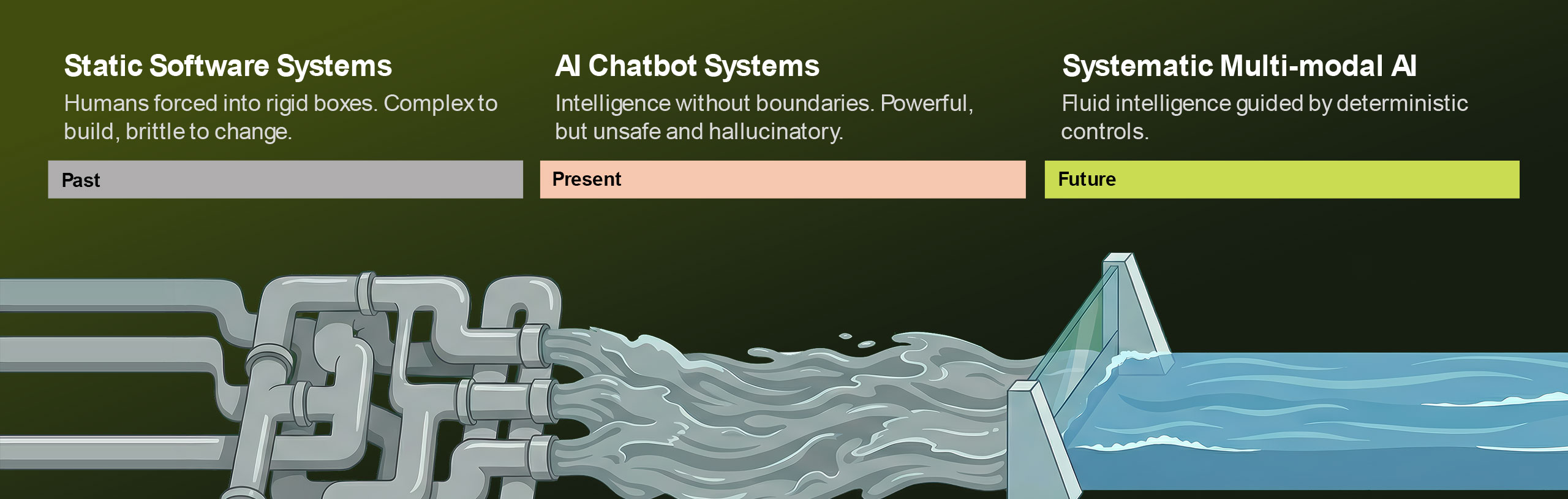 Software development has historically been **Static**. Developers wrote rigid `if/else` statements to define exactly how a user flows through a system. It was safe, but brittle.
The arrival of Generative AI introduced **Dynamic** computing. LLMs can handle infinite variations of user input. However, they are probabilistic—they can hallucinate, break rules, and leak data. They are powerful, but chaotic.
The Hybrid Approach [#the-hybrid-approach]
Iqra AI is built on a specific philosophy: **Probabilistic Intent driving Deterministic Action.**
We believe the future of software is not "Pure Code" nor "Pure AI", but a hybrid architecture that leverages the strengths of both.
The River and The Dam [#the-river-and-the-dam]
Think of user interaction as a river.
1. **The River (AI):** We let the AI flow naturally. It handles the nuances of language, dialect, and intent. We do not force the user into a rigid IVR menu.
2. **The Dam (Control Layer):** To generate value, that energy must be channeled. We place strict, deterministic gates—**Action Flows** and **FlowApps** through **Visual Script Builder**—that the AI must pass through to execute tasks.
This architecture ensures that while the *conversation* is dynamic, the *business outcome* (e.g., booking a database slot, processing a payment) is 100% reliable.
Core Pillars [#core-pillars]
Software development has historically been **Static**. Developers wrote rigid `if/else` statements to define exactly how a user flows through a system. It was safe, but brittle.
The arrival of Generative AI introduced **Dynamic** computing. LLMs can handle infinite variations of user input. However, they are probabilistic—they can hallucinate, break rules, and leak data. They are powerful, but chaotic.
The Hybrid Approach [#the-hybrid-approach]
Iqra AI is built on a specific philosophy: **Probabilistic Intent driving Deterministic Action.**
We believe the future of software is not "Pure Code" nor "Pure AI", but a hybrid architecture that leverages the strengths of both.
The River and The Dam [#the-river-and-the-dam]
Think of user interaction as a river.
1. **The River (AI):** We let the AI flow naturally. It handles the nuances of language, dialect, and intent. We do not force the user into a rigid IVR menu.
2. **The Dam (Control Layer):** To generate value, that energy must be channeled. We place strict, deterministic gates—**Action Flows** and **FlowApps** through **Visual Script Builder**—that the AI must pass through to execute tasks.
This architecture ensures that while the *conversation* is dynamic, the *business outcome* (e.g., booking a database slot, processing a payment) is 100% reliable.
Core Pillars [#core-pillars]
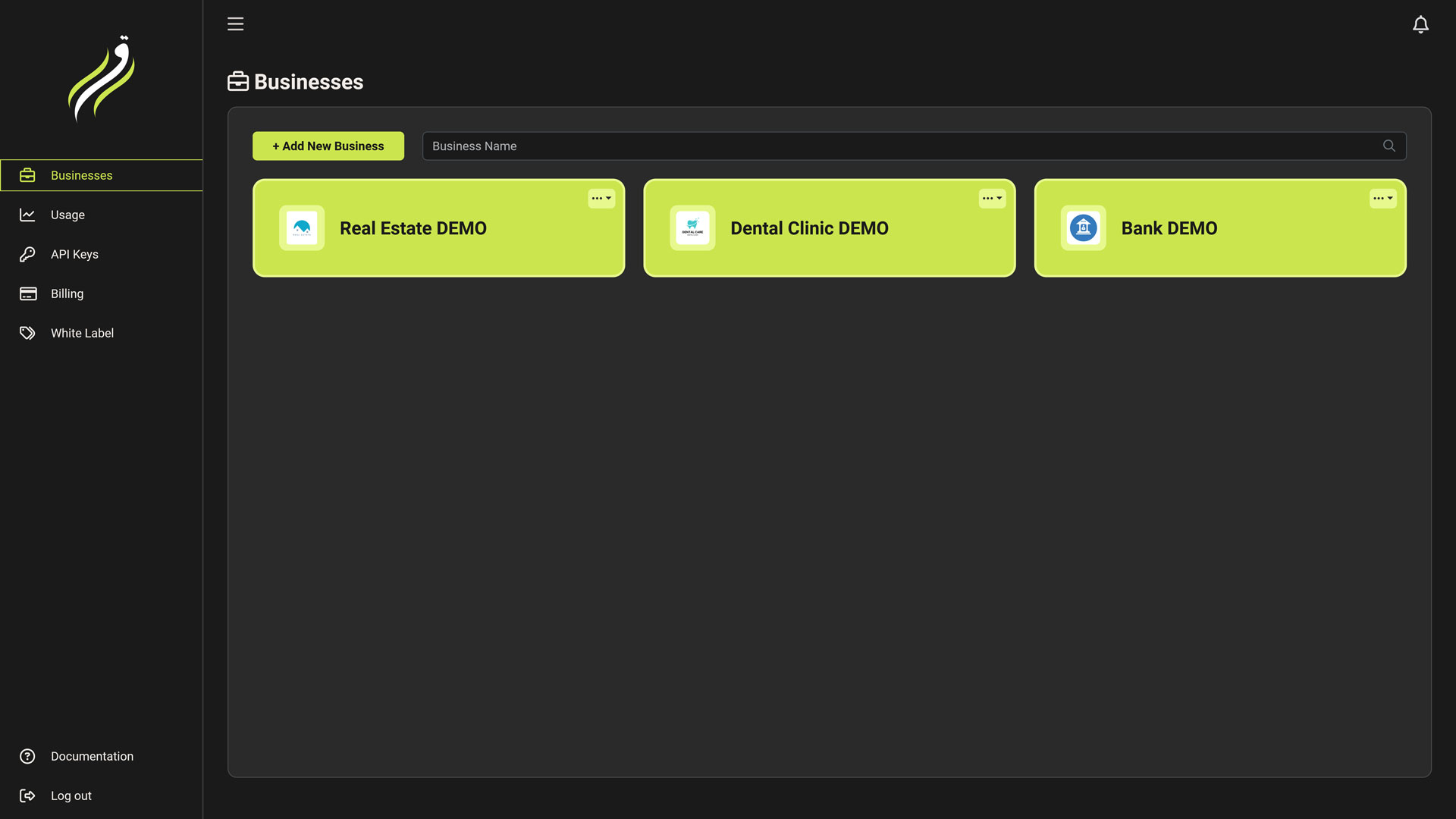 The **User Dashboard** is the top-level management layer of Iqra AI. It is designed for the **Account Owner** or **Agency Administrator**.
Unlike the **[Business Dashboard](/build)** (which is for building agents), this dashboard focuses on **Governance**:
* **Who** has access? (Tenancy & Whitelabeling)
* **How much** are we spending? (Finance)
* **How** is the system performing globally? (Analytics)
Core Modules [#core-modules]
The **User Dashboard** is the top-level management layer of Iqra AI. It is designed for the **Account Owner** or **Agency Administrator**.
Unlike the **[Business Dashboard](/build)** (which is for building agents), this dashboard focuses on **Governance**:
* **Who** has access? (Tenancy & Whitelabeling)
* **How much** are we spending? (Finance)
* **How** is the system performing globally? (Analytics)
Core Modules [#core-modules]
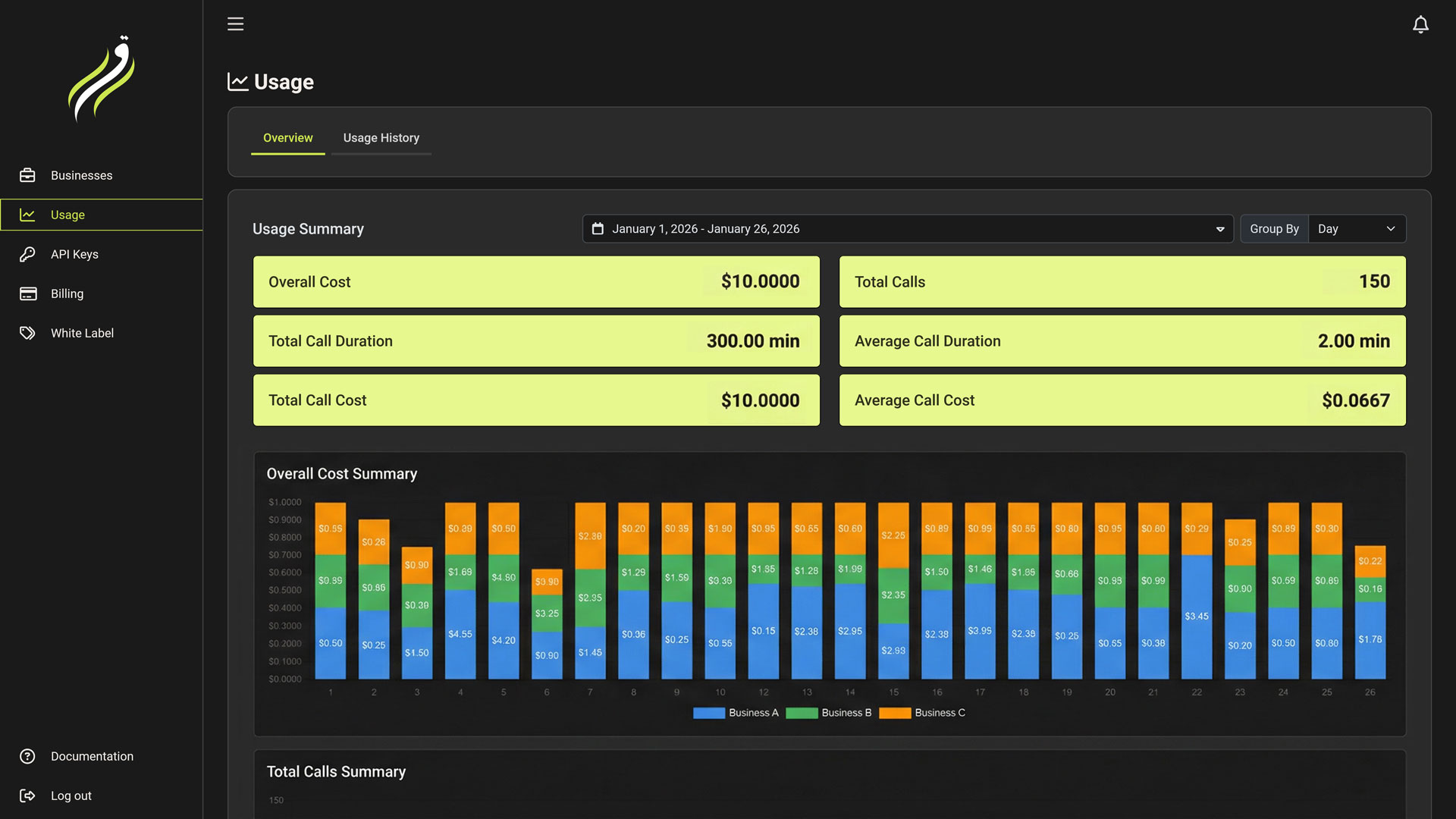 While the [Billing](/platform/billing) tab handles the money coming *in*, the **Usage Tab** tracks where the resources are going *out*.
This dashboard is your "Receipt." It provides granular transparency into every second of audio processed and every token generated.
Usage Overview [#usage-overview]
The **Overview Tab** provides high-level metrics for business owners.
* **Cost Analysis:** View your total spend over time (Daily/Monthly).
* **Volume Metrics:** Track total Calls, Minutes, and Request counts.
* **Grouping:** Break down costs by:
* **Day/Month:** Spot usage spikes.
* **Business:** Identify which Workspace/Client is consuming the most resources.
While the [Billing](/platform/billing) tab handles the money coming *in*, the **Usage Tab** tracks where the resources are going *out*.
This dashboard is your "Receipt." It provides granular transparency into every second of audio processed and every token generated.
Usage Overview [#usage-overview]
The **Overview Tab** provides high-level metrics for business owners.
* **Cost Analysis:** View your total spend over time (Daily/Monthly).
* **Volume Metrics:** Track total Calls, Minutes, and Request counts.
* **Grouping:** Break down costs by:
* **Day/Month:** Spot usage spikes.
* **Business:** Identify which Workspace/Client is consuming the most resources.
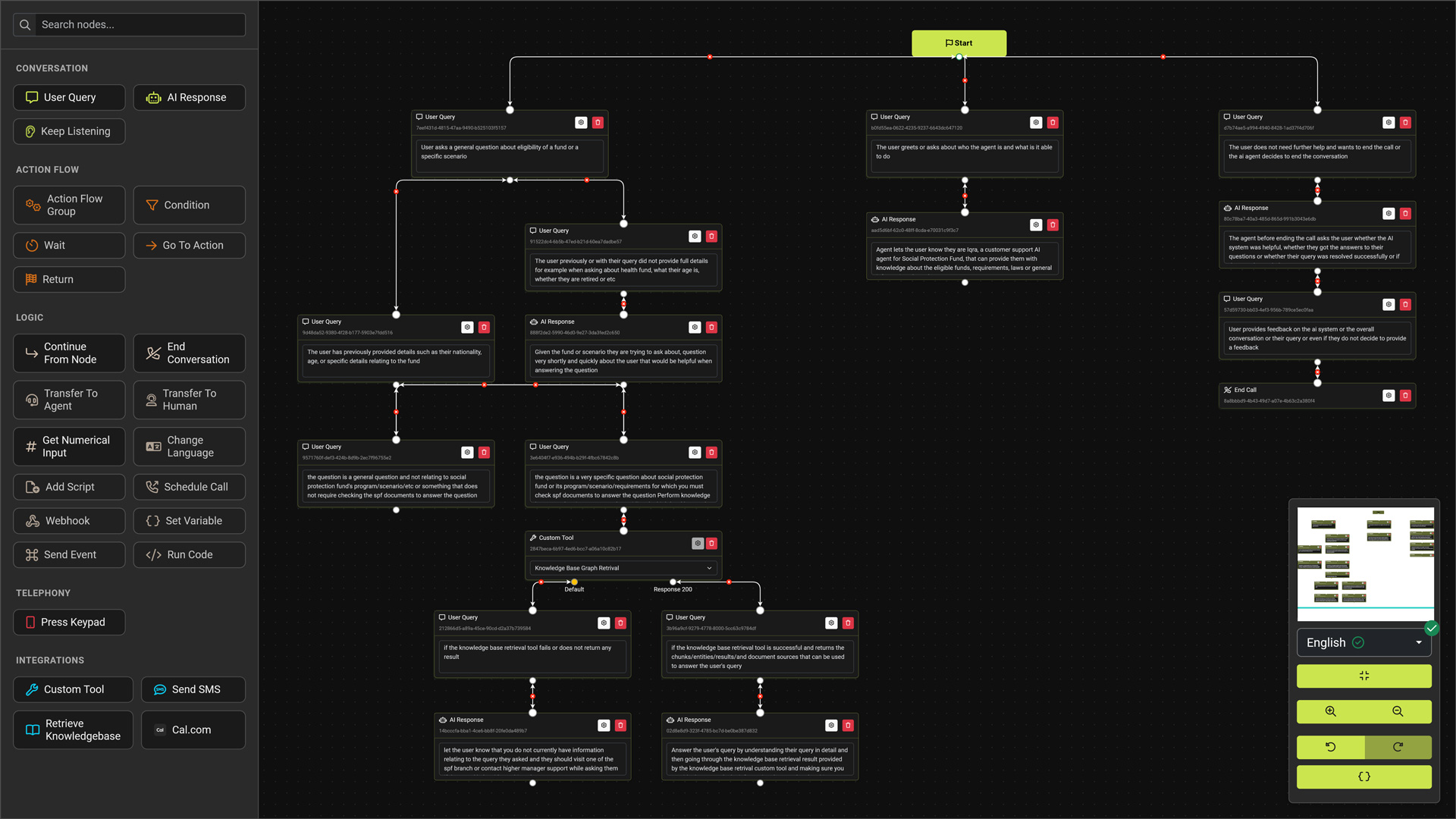 The **Script Builder** is more than a flowchart tool; it is a visual programming environment (IDE).
While the **Agent** defines the *personality*, the **Script** defines the *execution*. It acts as a state machine that orchestrates the conversation, manages variables, executes logic, and securely handles data.
The Interface [#the-interface]
The builder is organized to give you maximum canvas space while keeping powerful tools accessible.
1. The Sidebar Palette (Left) [#1-the-sidebar-palette-left]
This contains your building blocks. Nodes are grouped by function:
* **Conversation:** User Query, AI Response, SMS.
* **Action Flow:** Logic groups, Conditions, Waits.
* **Logic:** Go To Node, Continue From Node, Set Variable.
* **Telephony:** End Call, Transfer, Keypad Input.
* **Integrations:** **FlowApps** (Cal.com, HubSpot) and Custom Tools.
2. The Floating Controls (Bottom Right) [#2-the-floating-controls-bottom-right]
A dock containing essential view and state tools:
* ** Minimap:** Toggle the eagle-eye view of your graph.
* **
The **Script Builder** is more than a flowchart tool; it is a visual programming environment (IDE).
While the **Agent** defines the *personality*, the **Script** defines the *execution*. It acts as a state machine that orchestrates the conversation, manages variables, executes logic, and securely handles data.
The Interface [#the-interface]
The builder is organized to give you maximum canvas space while keeping powerful tools accessible.
1. The Sidebar Palette (Left) [#1-the-sidebar-palette-left]
This contains your building blocks. Nodes are grouped by function:
* **Conversation:** User Query, AI Response, SMS.
* **Action Flow:** Logic groups, Conditions, Waits.
* **Logic:** Go To Node, Continue From Node, Set Variable.
* **Telephony:** End Call, Transfer, Keypad Input.
* **Integrations:** **FlowApps** (Cal.com, HubSpot) and Custom Tools.
2. The Floating Controls (Bottom Right) [#2-the-floating-controls-bottom-right]
A dock containing essential view and state tools:
* ** Minimap:** Toggle the eagle-eye view of your graph.
* **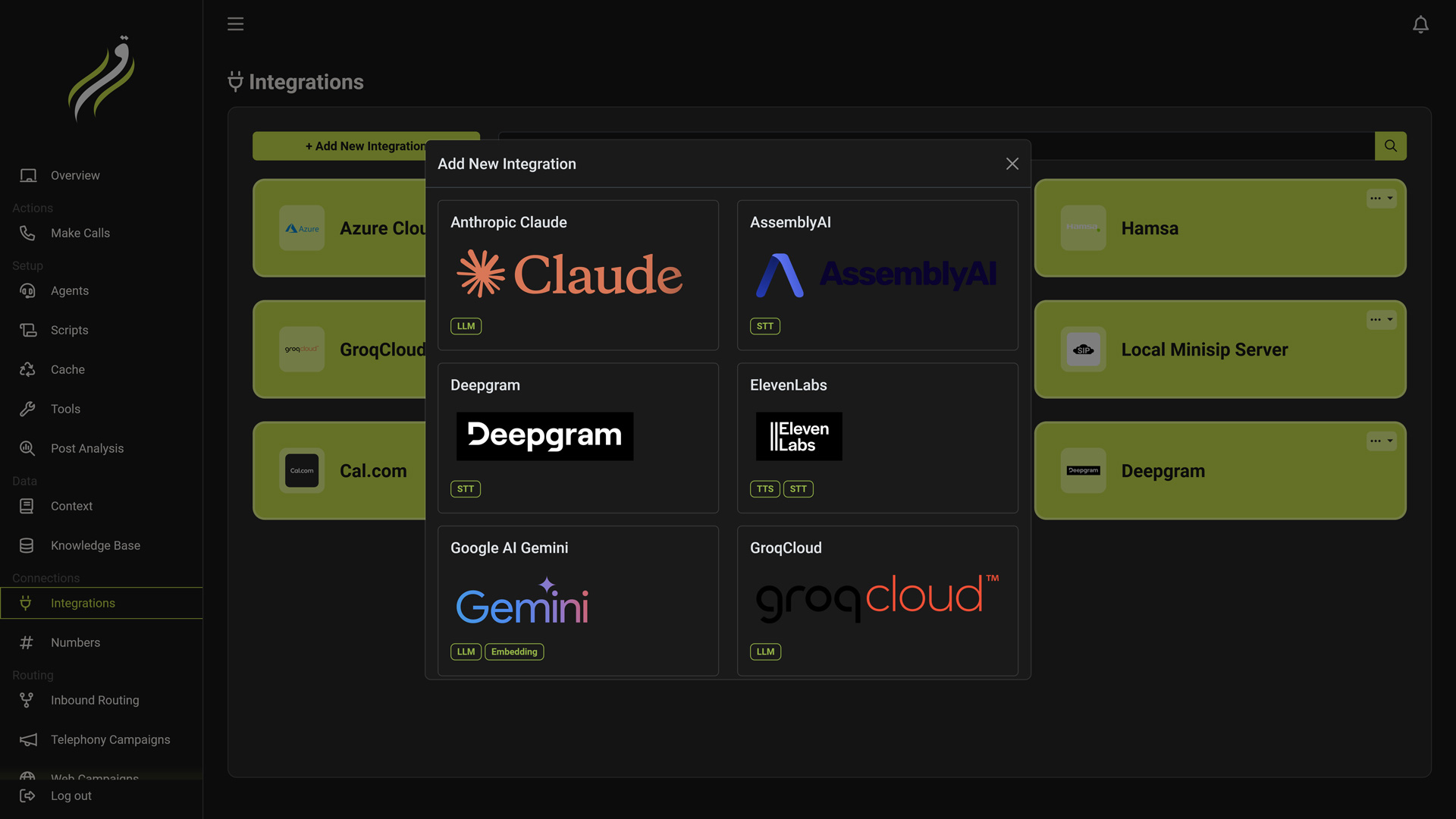 Before you can build an Agent or connect a Phone Number, you must provide the infrastructure. The **Integrations Tab** acts as your workspace's **Key Vault**.
You store your credentials here once, and reuse them across multiple agents, scripts, and campaigns.
Integration Categories [#integration-categories]
Iqra AI is vendor-agnostic. We support a wide range of providers across the entire stack.
Before you can build an Agent or connect a Phone Number, you must provide the infrastructure. The **Integrations Tab** acts as your workspace's **Key Vault**.
You store your credentials here once, and reuse them across multiple agents, scripts, and campaigns.
Integration Categories [#integration-categories]
Iqra AI is vendor-agnostic. We support a wide range of providers across the entire stack.
 Understanding the Metrics [#understanding-the-metrics]
* **System Version:** The version of the running **Frontend** binary.
* **Database Schema:** The version of the **MongoDB** structure.
* *Critical:* If these versions mismatch, the system will trigger a [Migration Lock](/developers/self-hosting/lifecycle).
* **Migration Status:** Indicates if the background processor is currently modifying the database structure.
***
Navigation Map [#navigation-map]
The sidebar allows you to control every layer of the stack.
1. Core Operations [#1-core-operations]
Understanding the Metrics [#understanding-the-metrics]
* **System Version:** The version of the running **Frontend** binary.
* **Database Schema:** The version of the **MongoDB** structure.
* *Critical:* If these versions mismatch, the system will trigger a [Migration Lock](/developers/self-hosting/lifecycle).
* **Migration Status:** Indicates if the background processor is currently modifying the database structure.
***
Navigation Map [#navigation-map]
The sidebar allows you to control every layer of the stack.
1. Core Operations [#1-core-operations]